


Smartsheet
Spreadsheet-style work management platform for projects, portfolios and processes at scale.
Paid SubscriptionFrom $9/user/mo30-day trial
- Web app
- iOS (iPhone & iPad)
- Android
- macOS


Spreadsheet-database hybrid for flexible workflows

Spreadsheet-database hybrid for flexible workflows Airtable looks like a spreadsheet and behaves like a database.
Airtable hits the sweet spot when Excel is too rigid and a full database is overkill.
Airtable looks like a spreadsheet and behaves like a database. It takes the grid everyone already knows how to use and adds field types, linked records, views, automations and an app-building layer on top, so teams can run real workflows – content calendars, product pipelines, CRMs, inventory – without writing code.
The spreadsheet core is genuinely good: fast grid editing, rich field types (attachments, checkboxes, linked records, rollups, formulas), and instant switching between grid, calendar, Kanban, Gantt, timeline and form views of the same data. That last part is the real upgrade over traditional spreadsheets: the data model lives underneath, and each team gets the view that fits its work.
Automations and integrations turn it from a smart table into a lightweight operations system. Native automation runs handle notifications, record updates and syncs, and the platform connects with the tools teams already use, including Slack and Google Workspace, plus
Airtable looks like a spreadsheet and behaves like a database. It takes the grid everyone already knows how to use and adds field types, linked records, views, automations and an app-building layer on top, so teams can run real workflows – content calendars, product pipelines, CRMs, inventory – without writing code.
The spreadsheet core is genuinely good: fast grid editing, rich field types (attachments, checkboxes, linked records, rollups, formulas), and instant switching between grid, calendar, Kanban, Gantt, timeline and form views of the same data. That last part is the real upgrade over traditional spreadsheets: the data model lives underneath, and each team gets the view that fits its work.
Automations and integrations turn it from a smart table into a lightweight operations system. Native automation runs handle notifications, record updates and syncs, and the platform connects with the tools teams already use, including Slack and Google Workspace, plus a well-documented web API for anything custom. Recent plans bundle monthly AI credits for summarizing, categorizing and drafting directly on top of base data.
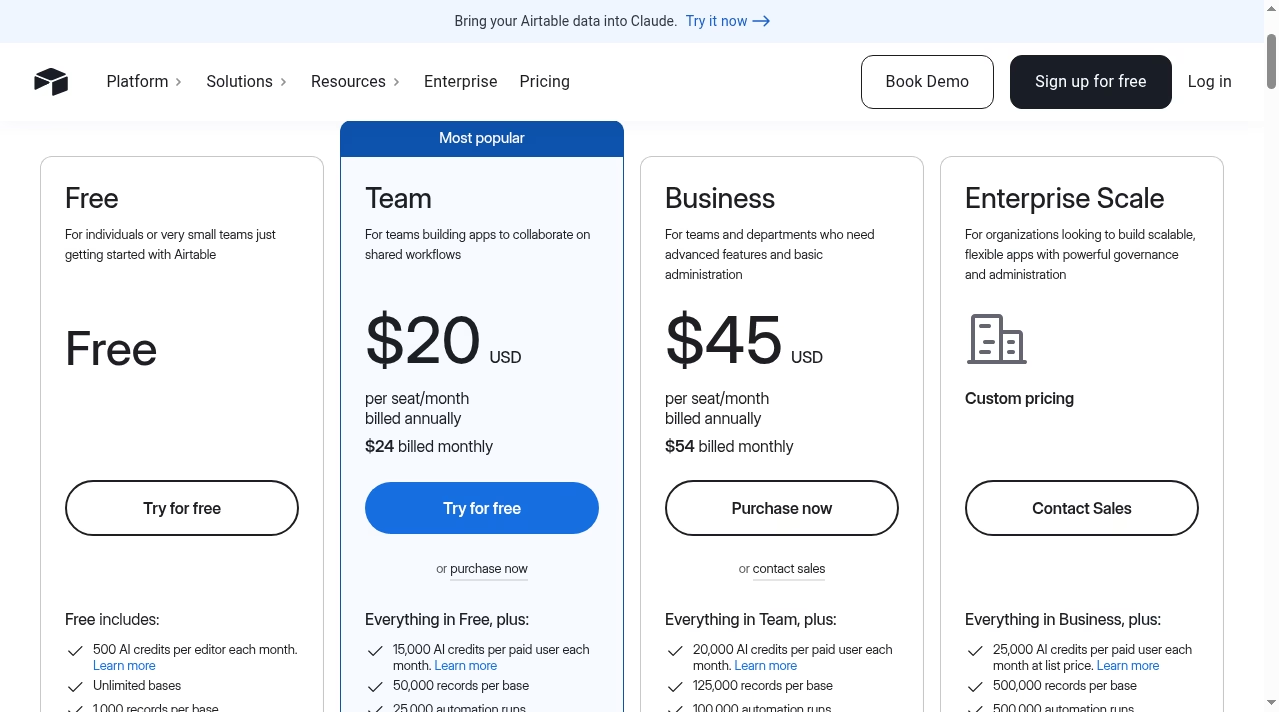
Pricing has four tiers. The Free plan covers individuals and very small teams with unlimited bases, 1,000 records per base and up to 5 editors. Team costs $20 per seat per month billed annually ($24 monthly) and lifts records to 50,000 per base with 25,000 automation runs. Business is $45 per seat per month annually ($54 monthly) with advanced admin features, and Enterprise Scale is custom-priced. Paid tiers can be tried free before purchase.
Watch-outs: per-seat pricing grows quickly for larger teams, record and automation limits bite earlier than expected on busy bases, and teams that need true spreadsheet depth – massive formulas, pivot tables, financial modeling – will still want Excel or Google Sheets alongside it.
For teams whose spreadsheets keep turning into improvised databases, Airtable is the most direct upgrade path: familiar enough to adopt in a day, structured enough to replace a tangle of disconnected sheets.
We researched Airtable in October 2026 using its official website, published pricing page, product documentation, support center and public API documentation, and compared its stated capabilities and pricing against other spreadsheet and database tools in this category. Ratings reflect editorial judgment based on that research. We did not run a paid deployment for this listing.
| Pricing | Free+Paid |
|---|---|
| Starting price | From $20/seat/mo |
| Free plan | Yes |
| Free trial | No |
| Pricing page | View pricing |
| Platforms | Web app, iOS (iPhone & iPad), Android, macOS, Windows |
| API | Yes |
| Company | Airtable |
| Apps Insight Score | 65/100 |
Editorial points are assigned by AppsInsight editors and cannot be purchased or influenced.
| Feature | Airtable | Notion | Smartsheet | Google Sheets |
|---|---|---|---|---|
| Rating | 4.5 / 5 | 4.7 / 5 | 4.6 / 5 | 4.5 / 5 |
| Pricing | Free+Paid | Free+Paid | Paid Subscription | Free+Paid |
| Starting price | From $20/seat/mo | From $10/mo | From $9/user/mo | From $7 |
| Free plan | Included | Included | Included | Included |
| Free trial | No | No | Yes (30 days) | Yes (14 days) |
| Platforms | Web app, iOS (iPhone & iPad), Android, macOS, Windows | Web app, iOS (iPhone & iPad), Android, macOS, Windows | Web app, iOS (iPhone & iPad), Android, macOS, Windows | Web app, iOS (iPhone & iPad), Android |
| Best for | Operations, content teams, light CRM | Teams, startups, knowledge workers | Teams whose shared spreadsheets have become fragile project trackers Project and PMO teams needing Gantt, dashboards and automations Enterprises that need SSO, governance and portfolio tooling Spreadsheet-comfortable teams that want structure without retraining | Teams of any size that collaborate on spreadsheets daily Individuals and small businesses that need a free, capable spreadsheet Organizations already on Google Workspace Analysts who want AI help building and filling spreadsheets Mixed environments that exchange Excel files with partners |
Airtable vs Notion Airtable vs Smartsheet Airtable vs Google Sheets
Spreadsheet-style work management platform for projects, portfolios and processes at scale.

Collaborative, AI-powered spreadsheets - free with a Google account
Free web spreadsheets or full desktop power with Microsoft 365 and Copilot AI

Free collaborative spreadsheet with an AI data analyst, part of Zoho Workplace.

AI-first spreadsheet with live data integrations and a plain-language AI Analyst.

Open-source relational spreadsheet-database with Python formulas, granular permissions and self-hosting
Apple's free spreadsheet app with polished templates and real-time collaboration

Free all-in-one office suite for documents, spreadsheets, presentations and PDF

Open-source office suite with spreadsheet, document and presentation editors, free desktop apps and a cloud collaboration…
Open-source relational spreadsheet-database with Python formulas, granular permissions and self-hosting
No reviews yet. Be the first to review this app.
Already have an account? Log in to track your reviews.