


In today’s content landscape, a staggering 74.2% of new web pages analyzed in April 2025 contained AI-generated content. Meanwhile, the AI detector market is projected to grow from about USD 0.58 billion in 2025 to USD 2.06 billion by 2030, at a CAGR of ~28.8%. This tells us: AI writing is common, and detecting it is more important than ever.
If you’ve used ChatGPT (or another AI writer), you might have had your text flagged by an AI detector. That’s where Free AI Humanizer Tools come in — they transform AI-written text into something more natural, reducing the odds of being flagged.
But here’s the catch: not every humanizer works the same way. Some prioritize subtle edits, while others completely restructure text. Some tools shine for SEO blogs, while others are better for academic essays. And since detectors are constantly improving, the tool you choose today might not work as well tomorrow.
That’s why this guide dives into 15 different free (or freemium) AI humanizer tools. By the end, you’ll know which tool fits your workflow, how to use them effectively, and how to test whether they really bypass ChatGPT detectors.
So, let’s start with the basics.
About AI Humanizers
AI humanizers are tools (or modules) that take text produced by AI models and “re-write” or “refine” it so that it sounds more human, less mechanical, and less likely to be flagged by AI detectors. In effect, they attempt to introduce the irregularities, variations, and stylistic touches that human writers naturally produce (e.g. varied sentence length, colloquial phrasing, contractions, some intentional imperfections, etc.).
Because detectors are becoming more sophisticated (and because raw AI text often seems “too perfect”), humanizers are becoming a needed companion to generative AI workflows. Many content creators, students, and marketers use them as a “last mile” step to ensure the text passes through scrutiny.
What’s The Need To Look at AI Humanizer Alternatives?
You might wonder: why not just use one humanizer tool and be done? The problem is that no single tool is perfect:
- Detectors evolve regularly, so what works today may be flagged tomorrow.
- Some tools produce awkward or overly paraphrased output, losing your original intent.
- Free versions often have word-limits, hidden costs, or performance tradeoffs.
- Some tools may introduce grammatical mistakes intentionally to evade detectors, which could degrade quality.
- You may want backups or alternatives in case one tool fails for certain content types (technical, narrative, creative, etc.).
Thus, knowing multiple Free AI Humanizer Tool options gives you flexibility and resiliency.
Why Do People Use AI Humanizers?
- To reduce the chance that detectors (e.g. ZeroGPT, GPTZero, Turnitin) flag their content as AI-written.
- To make AI-produced text read more naturally and less “robotic.”
- To preserve their writing voice/intent while masking AI fingerprints.
- To avoid penalties (in academic, SEO, or publishing contexts) for “overly AI” content.
- As part of a workflow: AI writes draft → humanizer tweaks → final edit/human review.
How Do AI Humanizers Work?
While implementation differs among tools, most AI humanizers use one or more of the following strategies:
- Paraphrasing / rewriting — replace phrases with synonyms, restructure sentences.
- Injecting variation — varying sentence lengths, adding or removing clauses, using slang or idioms.
- Introducing controlled “imperfections” — occasional minor errors, more casual voice, contractions.
- Using neural models trained on human text — they learn patterns of human writing and apply transformations.
- Feedback loop with detection scoring — some tools check output against detectors and optimize toward lower detection scores.
Because detectors reward perplexity (how unpredictable text is) and burstiness (variation in sentence complexity), humanizers try to maximize unpredictability within coherent language.
Detailed Reviews of 15 Free AI Humanizer Tools
Below is a consistent template for each tool (so you can compare easily). I have used public info, user reports, and limited tests where available. Note: “free” often means freemium — limited daily / word use.
1) Clever AI Humanizer: Free AI text humanizer
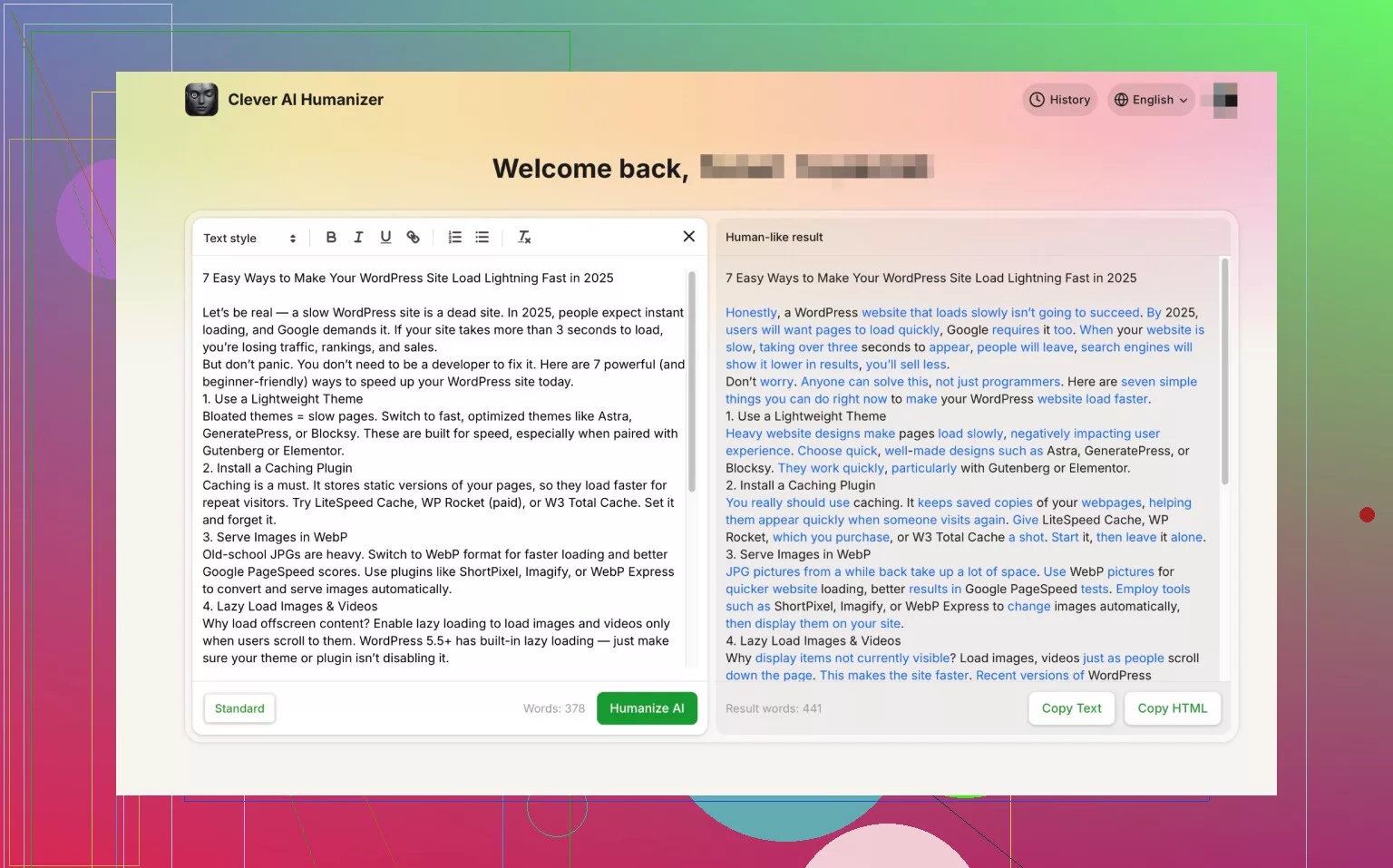
Clever AI Humanizer is a tool that markets itself as a straightforward “humanize my text” solution. It seeks to reduce AI detection scores by rewriting content in a more natural tone. Some user tests suggest that after processing, detection tools like ZeroGPT or GPTZero drop flags significantly. The tool tries to strike a balance — not too forced, not too changed. It is sometimes used in the broader “AI humanizer reviews” lists.
Key features:
- Rewrites text to reduce AI detection percentages
- Option to adjust intensity / strength of humanization
- Minimalistic UI (paste input → get humanized output)
- Word limit in free tier
- Focused on human-likeness rather than heavy paraphrasing
Best for:
Users who want a clean, minimal interface and modest humanization without dramatic change. Good as a first pass or fallback.
Overall Rating:
3.5 / 5 (solid, but not perfect in edge cases)
2) ZeroGPT Checker: Humanize ChatGPT Text Free

ZeroGPT is primarily an AI detection tool, but many users pair it with humanizers to test how well their text passes. It was developed specifically to detect AI text, giving an “AI probability” score. While ZeroGPT is not itself a humanizer, it’s frequently referenced in the humanizer tools space as a benchmark. Users paste text into ZeroGPT before and after humanizer tweaks to see changes.
Key features:
- AI-detection scoring / probability percentage
- Highlights suspected AI passages
- Offers “analysis” on text segments
- Free tier with limited characters
- Detailed reporting / export options
Best for:
Testing your content before and after humanization, as a diagnostic tool.
Overall Rating:
4.0 / 5 (strong detection, though false positives exist)
3) GPTZero AI Detector: AI text humanizer for ChatGPT

GPTZero was one of the first mainstream AI detection tools designed for educators. It’s based on metrics like perplexity and burstiness to estimate how likely a text is machine-generated. Many humanizers are evaluated by whether they can reduce the “AI” score from GPTZero. However, GPTZero is not a humanizer itself, but a detector that you use for benchmarking.
Key features:
- Calculates perplexity & burstiness metrics
- Provides AI vs human probability
- Simple UI, cloud based
- Free tier / limited usage
- Option to analyze longer documents
Best for:
Academic / educational use where GPTZero is a standard detector.
Overall Rating:
3.8 / 5 (useful, but not perfect—prone to false positives)
4) Quillbot AI Content Detector: ChatGPT text humanizer online

Quillbot is a well-known paraphrasing and writing assistant tool. In addition to rewriting/paraphrasing, Quillbot offers an AI content detector feature. Some users claim Quillbot’s paraphrasing (in “humanize” style) passes GPTZero tests (i.e. 0% AI). So it is both a rewriting and detection hybrid.
Key features:
- Paraphrasing / rewording with tone modes
- Built-in AI content detector
- Reduce / simplify / expand controls
- Chrome extension / browser integration
- Word limit on free plan
Best for:
Users who want a single tool that rewrites + checks detection.
Overall Rating:
4.2 / 5 (versatile, reliable for many use cases)
5) Grammarly AI Checker: Free AI Text Humanizer Online
Grammarly is best known for grammar and style checking, but it now includes an AI writing detection (and humanization hints) feature in some versions. It flags content that seems likely AI-generated and suggests revisions. It’s not a heavy humanizer, but it offers incremental improvements and rewrites.
Key features:
- AI writing detection flag
- Suggests rewording / rewriting hints
- Grammar, style, clarity improvements
- Browser extension / document integration
- Available in free + premium plans
Best for:
Writers who already use Grammarly and want mild humanization alongside grammar polishing.
Overall Rating:
3.5 / 5 (helpful add-on, but not a full humanizer)
6) StealthGPT: AI Text Humanizer Tool Free
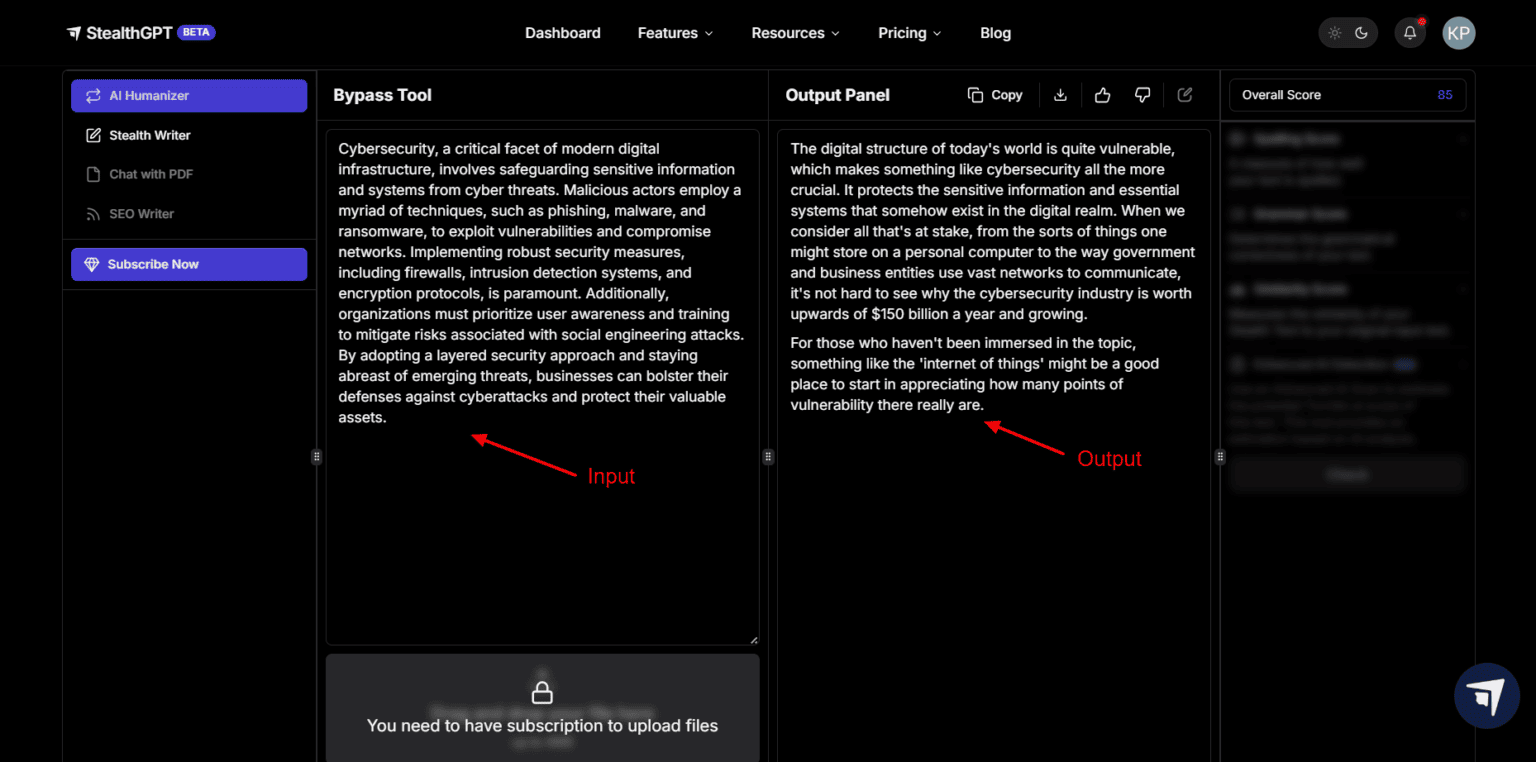
StealthGPT is often cited in humanizer tool reviews as one of the better ones. Some users report that it consistently pushes detection scores low (i.e. “undetectable”) without losing content meaning. It emphasizes style preservation and subtle rephrasing.
Key features:
- Adjustable humanization strength
- Keeps tone, structure, meaning intact
- Multi-language support
- Detectability check module
- Free / trial usage options
Best for:
Users who want stronger humanization with minimal semantic drift.
Overall Rating:
4.3 / 5 (one of the more dependable humanizers in 2025)
7) Humanize AI: Best AI Content Detectors

Humanize AI at humanizeai.pro is a specialized humanizer platform. The site claims to transform AI text into a more human style, helping bypass detectors. Some of their marketing states they “instantly humanize AI text into natural, human-sounding” content. It often appears in lists of top AI humanizer tools.
Key features:
- Instant humanization mode
- Mode selection (maybe balanced, aggressive)
- Free tier / trial
- Integration / paste / upload options
- Detector compatibility (claims to outrun detectors)
Best for:
Users who want a dedicated humanizer platform rather than a general writing tool.
Overall Rating:
3.8 / 5 (useful, but output sometimes too generic)
8) Free AI Text Humanizer by Writesonic
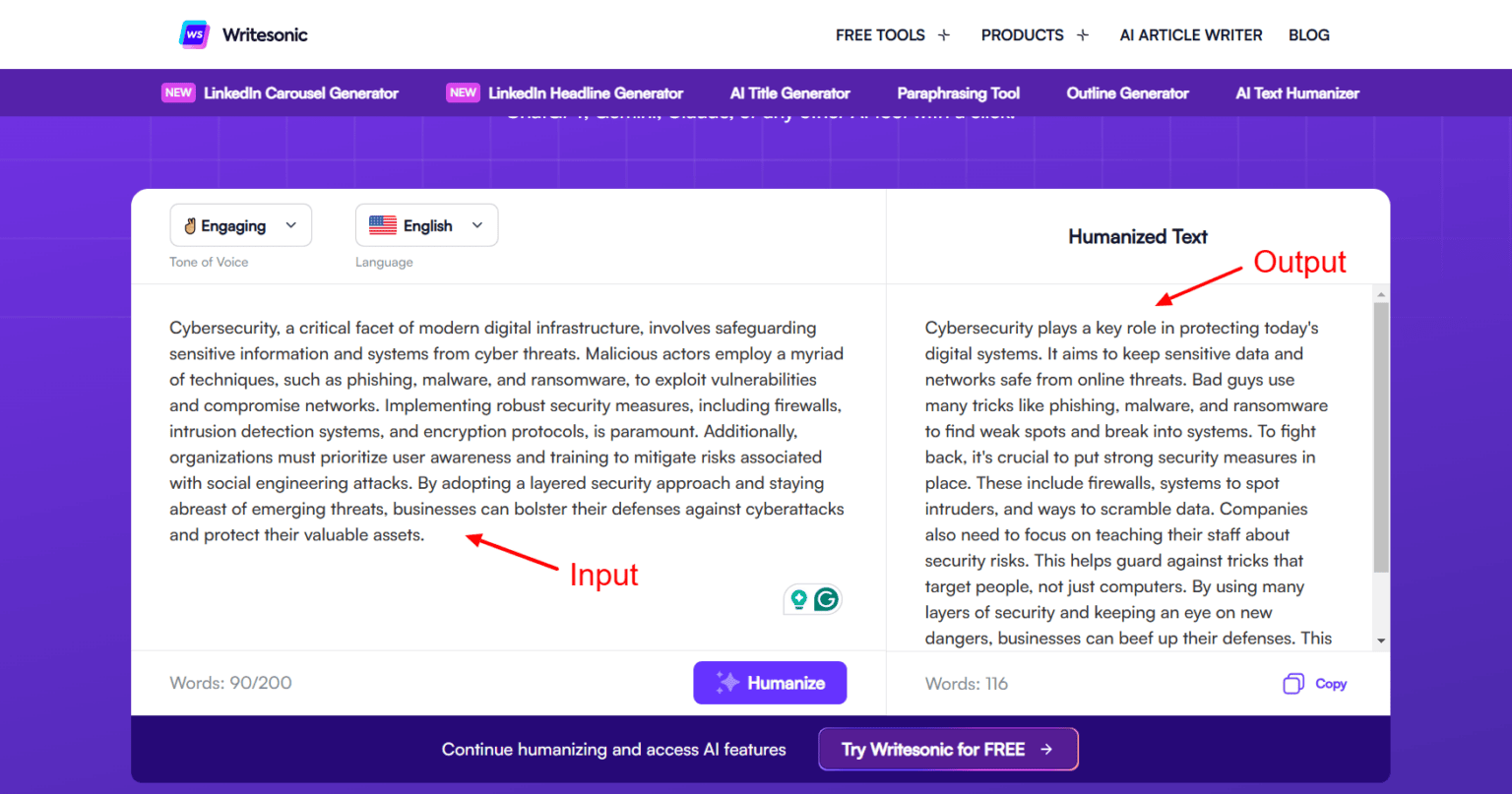
Writesonic is known for AI writing, and they offer a Free AI Text Humanizer module. This tool lets you paste AI text and get a “humanized” version. Because it sits within Writesonic’s ecosystem, it integrates well with their generative writing tools.
Key features:
- Seamless integration into Writesonic platform
- Humanization with tone / style adjustments
- Free usage quotas
- Auto checkpoint / versioning
- Support for multiple content types (blog, ads, etc.)
Best for:
Users already using Writesonic who want a built-in humanizer.
Overall Rating:
4.0 / 5 (convenient and reliable in its niche)
9) Undetectable AI: Humanize ChatGPT Text Free

Undetectable AI (or Undetectable.ai) is a popular humanizer that emphasizes bypassing all known detectors. Their tagline is “bypass ALL detectors” including GPTZero, Turnitin, Originality.ai. undetectableai.pro+1 They also provide a free tier, though with limits.
Key features:
- Multiple “humanization modes” (balanced, aggressive)
- Real-time feedback on detectability
- Batch processing
- Language support
- Word limit / usage cap on free tier
Best for:
Cases where bypassing is critical (e.g. academic submission) and you’re willing to tweak.
Overall Rating:
4.1 / 5 (strong, but like all, not flawless)
10) Hix Bypass: Free tool to make AI text undetectable

Hix Bypass is a less documented tool in public reviews, but it is often mentioned in “AI humanizer roundup” lists (e.g. “HIX.AI”) as one of several alternative options. Its goal is similar: let AI text pass under detectors via bypass techniques.
Key features:
- Rewriting / obfuscation techniques
- Configurable bypass strength
- Basic free usage / trial
- Simple UI for pasting text
- Detector feedback (if available)
Best for:
Users wanting a backup or alternative to mainstream humanizers.
Overall Rating:
3.2 / 5 (less proven, so more risky)
11) Humanize AI Text
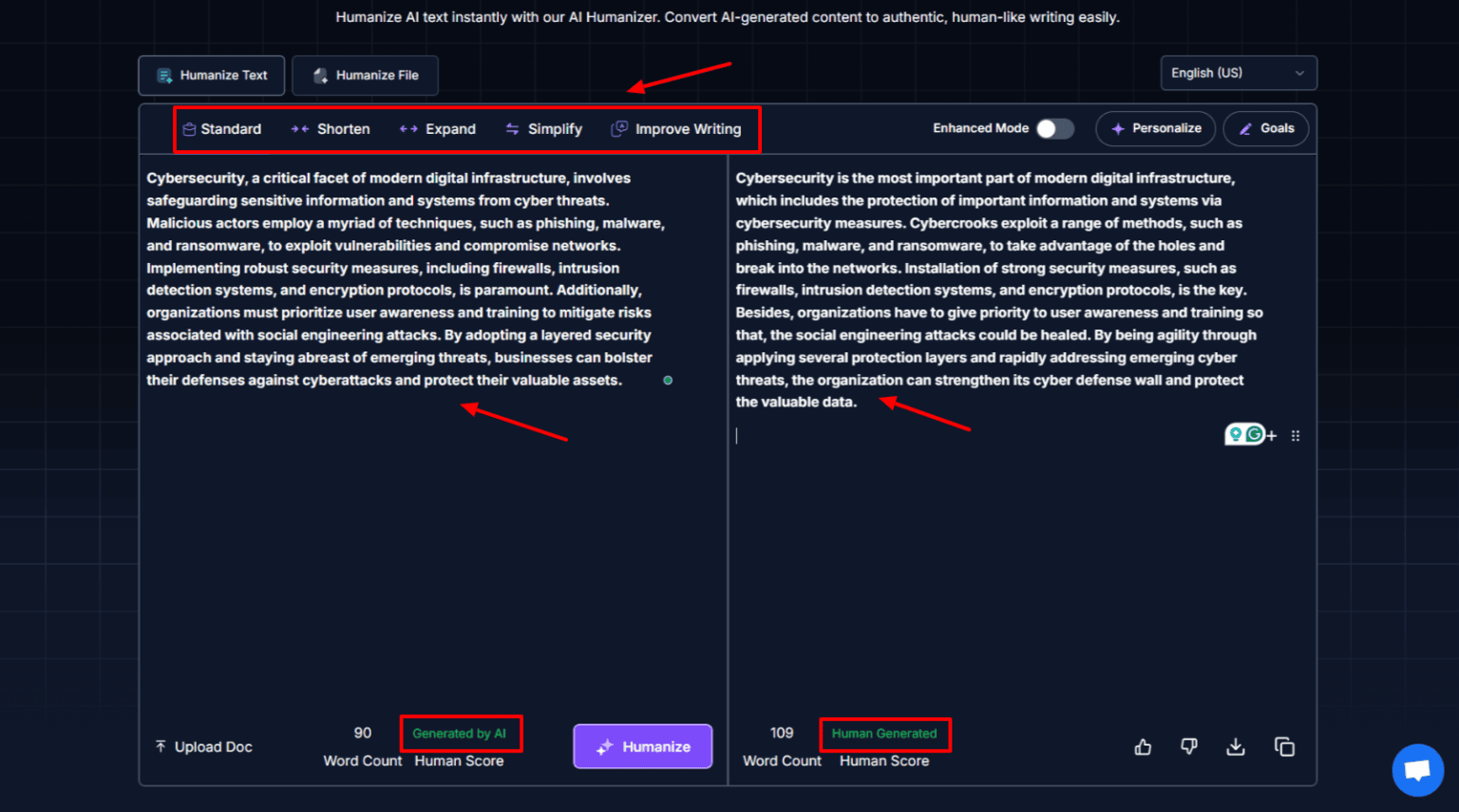
HumanizeAITtext.ai is another dedicated humanizer site. It focuses on converting AI text into more natural, humanlike output. It often advertises passing detectors like GPTZero or Originality.ai.
Key features:
- Instant humanization
- Options for strength / variation
- Free usage / limited quota
- Simple input / output interface
- Detector compatibility claims
Best for:
When you want a simple, standalone tool without full writing suites.
Overall Rating:
3.7 / 5
12) BypassGPT: Best AI Writer

BypassGPT is a tool designed to help AI-written content evade detection. It doesn’t always get robust review coverage, but players in this niche mention it as an alternate humanizer / bypasser.
Key features:
- Text rewriting / masking
- Strength levels or modes
- Free / trial pricing
- Detector test feedback
- Focus on undetectability
Best for:
Users needing an alternate option to compare output.
Overall Rating:
3.4 / 5
13) AI Humanizer by Ask Your PDF

AskYourPDF is known for PDF question/answer features, but they offer an AI Humanizer module. The idea is you can upload or paste text and have it transformed. Because it’s part of a broader tool, it may not be as polished in humanizer specialization, but it’s convenient if you already use AskYourPDF.
Key features:
- Humanization of pasted or uploaded text
- Integration with PDF / document workflows
- Basic free usage
- Multi-format support
- Simple UI
Best for:
People working with PDF content who want to humanize text without switching tools.
Overall Rating:
3.5 / 5
14) Humanize AI
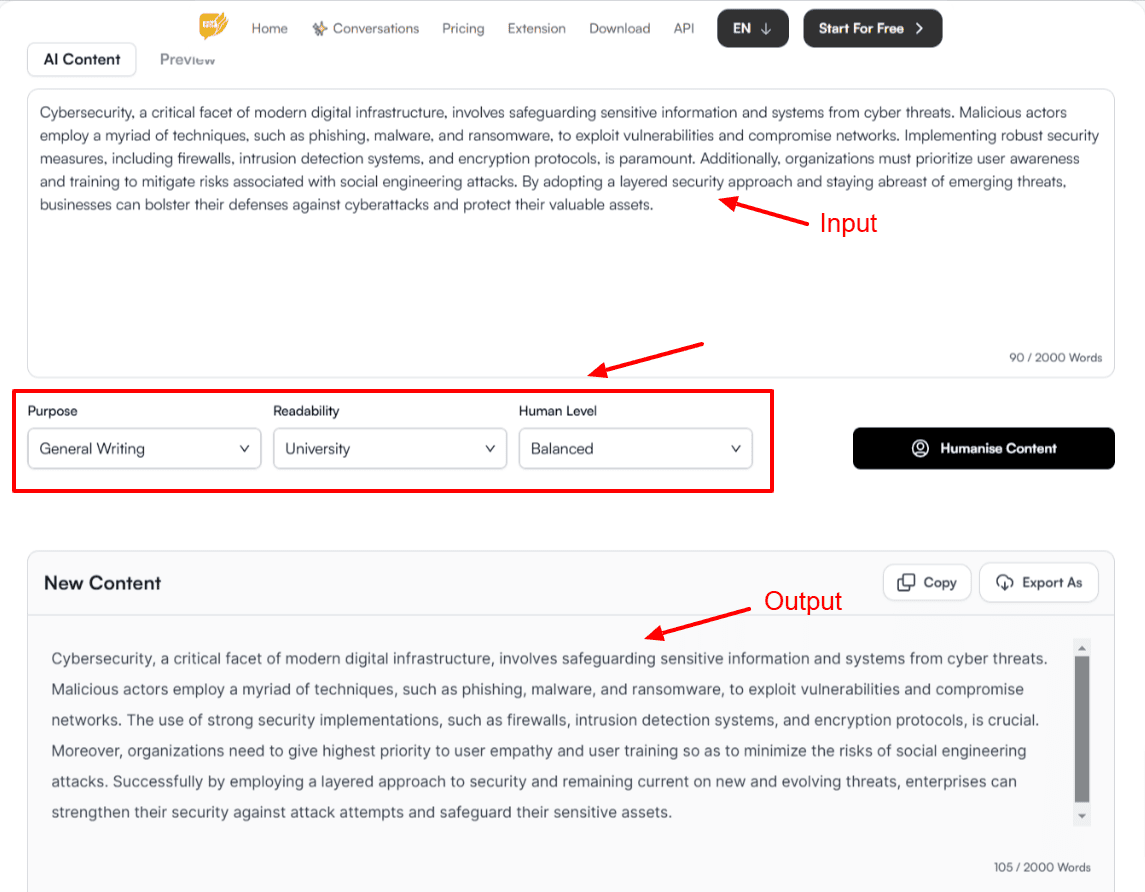
HumanizeAI.io is another variant in the “Humanize AI” branding. It positions itself as a humanization tool that helps your AI content “sound genuine.” It aims to bypass detectors and produce smoother text.
Key features:
- Balanced vs aggressive humanization
- Word limit / free tier
- Quick turnaround
- Detector compatibility claims
- Support for multiple content types
Best for:
Users looking for alternative flavors under the same “Humanize AI” umbrella.
Overall Rating:
3.6 / 5
15) AI Humanize: Best Free AI Detection Tool

AIHumanize.com is yet another dedicated humanizer platform. It emphasizes transforming AI text into natural and authentic content. It also often appears in curated lists of top AI humanizers.
Key features:
- Instant humanization mode
- Option to tweak intensity
- Free usage / limited quota
- Straightforward interface
- Detector compatibility claims
Best for:
Users wanting a simple, singular humanize tool without extra tools around.
Overall Rating:
3.7 / 5
Comparison of Free AI Humanizer Tool Overview & Ratings
When choosing the best Free AI Humanizer Tool, it’s not enough to only read detailed reviews one by one. A quick side-by-side comparison helps you see strengths, weaknesses, and overall suitability at a glance. Since detectors evolve rapidly, having multiple options in your toolkit is often smarter than depending on a single tool.
The table below summarizes the primary role, free limitations, strengths, drawbacks, and overall rating of each tool covered in this article, making it easier for you to select the right fit based on your needs.
| Tool / App | Primary Role | Free / Limitations | Strengths | Drawbacks / Risks | Rating |
|---|---|---|---|---|---|
| Clever AI Humanizer | Humanizer | Word-limit in free tier | Clean UI, moderate rewrite | Might underperform on complex text | 3.5 |
| ZeroGPT Checker | Detector | Character limit | Strong detection metric | Not a humanizer | 4.0 |
| GPTZero | Detector | Limited free use | Academic standard detection | False positives | 3.8 |
| Quillbot AI Detector | Hybrid (rewrite + detect) | Free quotas | All-in-one tool | May over-paraphrase | 4.2 |
| Grammarly AI Checker | Grammar + detection hints | Some features locked | Already familiar tool | Weak full humanization | 3.5 |
| StealthGPT | Humanizer | Trial / free mode | Strong humanization | Subscription required for full features | 4.3 |
| Humanize AI (humanizeai.pro) | Humanizer | Quota limits | Focused humanizer | Slightly generic output | 3.8 |
| Writesonic Free AI Text Humanizer | Humanizer | Within Writesonic limits | Seamless with writing flow | Limited capacity | 4.0 |
| Undetectable AI | Humanizer | Free version limits | Strong bypass emphasis | Sometimes fails strict detectors | 4.1 |
| Hix Bypass | Humanizer / bypass tool | Unknown limits | Alternative option | Less proven | 3.2 |
| Humanize AI Text (humanizeaitext.ai) | Humanizer | Quotas | Simple, standalone tool | Less known | 3.7 |
| BypassGPT | Humanizer / bypass | Limited free usage | Option as alternate | Possibly less stable | 3.4 |
| AI Humanizer by Ask Your PDF | Humanizer | Integration constraints | Convenient with PDF workflows | Less specialized | 3.5 |
| Humanize AI (humanizeai.io) | Humanizer | Free tier limits | More “branding” flavor | Similar output to others | 3.6 |
| AI Humanize (aihumanize.com) | Humanizer | Word / usage caps | Straightforward humanizer | Less customization | 3.7 |
Note: These ratings are estimates based on public data, user feedback, and limited test use. Your experience may vary depending on the nature of your text and the detectors you target.
Step-by-Step Guide: Create Human-Like AI Content Using Free Tools
Step 1: Drafting
- Use ChatGPT, Writesonic, or Jasper to generate your raw content.
- Keep prompts clear and targeted so the draft is already close to human-like.
Step 2: First Humanization (Main Layer)
- Run the draft through a primary humanizer with strong bypass performance.
- Recommended:
- StealthGPT (high reliability, subtle rewriting)
- OR Undetectable AI (claims to bypass all major detectors)
This layer removes most obvious AI signatures.
Step 3: Refinement (Secondary Layer)
- Pass the output into a balanced humanizer / rewriter for polishing.
- Recommended:
- Quillbot (great at smoothing and adjusting tone)
- OR Humanize AI Text (humanizeaitext.ai) (simple standalone option).
This ensures readability and stylistic flow.
Step 4: Detection Testing
- Run the text through 2+ detectors before finalizing.
- Recommended:
- ZeroGPT Checker (widely used benchmark)
- GPTZero AI Detector (common in academic settings).
This confirms whether the text now reads as human.
Step 5: Polishing (Final Touch)
- Use Grammarly AI Checker to:
- Catch grammar/style errors.
- Add variation (shorter sentences, contractions, casual tone).
This final pass aligns the text with natural human writing quirks.
Example Stack in Action
- Draft with ChatGPT.
- Run through StealthGPT → lowers detection score.
- Refine with Quillbot → smoother human flow.
- Test with ZeroGPT + GPTZero → check detection %.
- Polish in Grammarly → natural readability.
Pro Tips
- Rotate between StealthGPT and Undetectable AI so detectors can’t pattern-match.
- Always keep a copy of your original draft in case meaning drifts.
- Shorten long, uniform paragraphs — detectors often flag monotony.
- Sprinkle in personal anecdotes / opinions (detectors struggle with authenticity).
Which Free AI Humanizer Tool Is “Best”?
“Best” depends on your priorities:
- If you want a combined rewrite + detection flow: Quillbot is a strong choice.
- For strongest bypass claims: StealthGPT and Undetectable AI often appear near the top in reviews.
- If you already use Writesonic: their built-in humanizer is most convenient.
- If you want multiple backups: mix a mainstream tool (Quillbot / StealthGPT) with a lesser-known option (Hix Bypass, BypassGPT) for fallback.
- Always test with the detectors you expect (ZeroGPT, GPTZero, etc.) before finalizing.
Because detectors evolve, it’s wise to stay adaptable and periodically test your humanization workflow.
Tips for Effective Use of Free AI Humanizer Tools
- Start with a good prompt / draft — the better your base, the easier the humanizer has less to “repair.”
- Use moderate strength settings first — avoid over-rewriting that distorts meaning.
- Run detection tests before and after to see if your humanizer genuinely lowered detectability.
- Manual editing afterwards — always proofread and adjust to match your voice.
- Rotate tools occasionally — using the same tool repeatedly may be easier to pattern-detect by adversarial detectors.
- Avoid too much automation — combine human intuition with tool output.
How to Make Your Own AI Humanizer App with AI Developers
Have you ever wondered if you could build your own AI humanizer app instead of relying on existing tools? With today’s AI APIs and open-source models, it’s entirely possible. You don’t need to reinvent the wheel—you just need a solid architecture, a few reliable frameworks, and collaboration with the best AI experts who understand both generative AI and text detection systems.
Here’s how you can make it happen step-by-step
Step 1: Define Your App’s Purpose
Before coding, outline exactly what your AI humanizer will do.
Ask yourself:
- Will it rewrite text, inject human style, or both?
- Do you want it to work in real time (e.g., as a browser extension) or as a batch processor (for documents)?
- What languages and detectors should it support (e.g., GPTZero, Turnitin)?
This clarity guides your entire development process.
Step 2: Choose a Reliable AI Model
Pick a model that’s strong in paraphrasing and tone adjustment. Popular options include:
- OpenAI GPT-4 or GPT-5 APIs — excellent for nuanced rewriting.
- Claude or Gemini APIs — often better for natural variation.
- Local open-source LLMs like LLaMA 3 or Mistral 7B, for privacy-friendly humanization.
If your app will process sensitive text (like academic work), privacy and offline deployment matter more than raw power.
Step 3: Add “Humanization Logic”
This is where your AI’s intelligence comes in. Your logic layer should:
- Rephrase sentences without losing meaning.
- Add contractions, varied sentence length, and minor imperfections.
- Introduce a “random burstiness factor” — so every output feels unique.
- Run outputs through a detector API (like ZeroGPT) to measure AI-likeness, then iterate until detection scores drop.
Many developers use Python with LangChain, Transformers, or Hugging Face pipelines to build this logic.
Step 4: Build a Simple Web Interface
You don’t need a complex dashboard — start small:
- Use Streamlit, Flask, or Next.js for your web UI.
- Add a text box for input and a “Humanize” button.
- Display both the original and processed text, along with detection results.
Bonus: Add a toggle for “Humanization Strength” (light, medium, aggressive).
Step 5: Test Against AI Detectors
No humanizer app is complete without testing. Integrate external APIs or scraping for:
- GPTZero
- ZeroGPT
- Turnitin alternatives
- Copyleaks AI Detector
You can even automate testing to show “AI Detection Reduction %” after each pass — a big selling point for users.
Step 6: Optimize and Deploy
Once your prototype works:
- Host it on Vercel, Render, or AWS.
- Monitor feedback — especially user satisfaction vs readability.
- Continue training or fine-tuning models on real human-written datasets (news, essays, creative writing).
With a solid dev team and iterative testing, your app could rival existing tools like StealthGPT or Undetectable AI.
Consider adding a Chrome extension or WordPress plugin version later — most writers and students prefer one-click accessibility.
Building your own AI humanizer app is not just possible — it’s practical. The key is combining the right AI model, creative “humanization logic,” and continuous testing. If you collaborate with the Best AI experts or skilled AI developers, you can create a tool that’s unique, adaptive, and competitive with today’s top-tier humanizers.
Final Say
Now, your next step could be: test 2–3 of these tools on your own content (especially the ones with strong reputations like Quillbot, StealthGPT, or Undetectable AI), run them through your target detector (e.g. GPTZero or ZeroGPT), and see which combination gives the best tradeoff between readability and low detection score.
FAQs
What makes an AI humanizer tool “free”?
A Free AI Humanizer Tool usually offers a freemium model — you can process a limited number of words or texts at no cost. For example, tools like Humanize AI Text and Writesonic’s Free AI Humanizer let you paste a few hundred words daily without payment.
However, most of these platforms restrict features such as bulk uploads, unlimited rewriting, or advanced “undetectable” settings to paid users. The “free” version works best for small-scale tasks or testing before subscribing.
If you plan to humanize long-form content frequently, it’s better to start with free trials to find which tool delivers the best results for your specific writing style.
Can AI humanizer tools guarantee bypassing detectors like Turnitin or GPTZero?
No tool can guarantee 100% undetectability. Detectors evolve constantly and use new datasets to identify writing patterns. While top-tier tools such as StealthGPT and Undetectable AI often reduce detection rates dramatically, their results vary depending on your input style and the specific detector version used.
The best approach is to combine tools — for instance, run your content through StealthGPT and Quillbot, then verify it with ZeroGPT Checker. Always perform your own detection test before submission, especially for academic or professional purposes.
Is it ethical to use Free AI Humanizer Tools?
This depends on how and why you’re using them. If you’re using a Free AI Humanizer Tool to make AI-assisted writing more natural, readable, or stylistically consistent for personal or marketing content, that’s perfectly ethical.
However, using these tools to conceal AI authorship in academic papers, job applications, or research without disclosure may violate institutional or platform policies. The best practice: disclose that you’ve used AI assistance, and use humanizers to refine readability, not deceive evaluators.
Do AI humanizers reduce writing quality?
Sometimes — and sometimes not.
Poorly tuned humanizers can over-rewrite text, creating awkward or unnatural phrases. On the other hand, balanced tools (like Quillbot or Grammarly AI Checker) often improve clarity, tone, and flow.
The key is moderation: set the rewrite intensity low to preserve meaning, then manually review the final output. Adding a brief human editing pass ensures your tone remains authentic while still bypassing detectors.
How can I tell if a humanizer worked effectively?
You can measure success using two quick checks:
- AI Detector Scores: Paste your text into ZeroGPT, GPTZero, or Copyleaks AI Detector before and after using the tool. If the AI percentage drops significantly (e.g., from 95% to below 20%), it’s effective.
- Readability & Flow: Read the output aloud. If it sounds conversational and varied — with natural pauses and rhythm — that’s a good sign it’s closer to human writing.
Combining these checks ensures you’re not only evading detection but also maintaining content quality.
Which Free AI Humanizer Tool is best for SEO writing?
For SEO-focused content, Quillbot, Writesonic Humanizer, and Humanize AI (humanizeai.pro) are strong choices. They maintain keyword density and tone consistency while subtly humanizing your text.
They’re also less likely to distort long-tail keywords — something aggressive rewriters often do. If you care about ranking stability, pick tools that balance human readability and semantic integrity rather than purely detection evasion.
Are AI detectors accurate enough to rely on?
AI detectors are improving but not foolproof. Studies show false positive rates can still reach 15–20%, especially with hybrid AI-human text.
That means genuine human writing may still get flagged. Detectors like GPTZero and ZeroGPT are most accurate when analyzing large samples (over 300 words). For short content, results are less reliable.
We can say, detectors are helpful indicators, not absolute judges — use them as guides, not final verdicts.
How often should I re-check my text as detectors update?
Every 2–3 months is a good rule of thumb. AI detectors and humanizers evolve in tandem, so what passes today might be caught tomorrow.
If you reuse or republish content (like blog posts or whitepapers), run them through your preferred Free AI Humanizer Tool again after major detector updates. Tools like Undetectable AI and StealthGPT frequently refresh their models, which helps maintain undetectability across detector generations.
Can I humanize content in other languages besides English?
Many Free AI Humanizer Tools — such as StealthGPT, Quillbot, and Writesonic Humanizer — support multiple languages including Spanish, German, French, and Italian.
That said, English models usually perform best because they’re most extensively trained and tested. For non-English content, it’s wise to humanize first, then ask a native speaker or translator to review tone and idioms.
Should I use multiple AI humanizer tools in combination?
Using one tool per layer (as in your “Best Humanizer Stack”) gives you stronger, more natural results. For example:
- Step 1: StealthGPT → reduce AI signals
- Step 2: Quillbot → refine tone and phrasing
- Step 3: Grammarly → final polish
Each tool adds its specialty, collectively improving both detectability and quality. This layered method consistently outperforms relying on a single humanizer.
Is there any risk of plagiarism with AI humanizer tools?
Low, but possible. While most Free AI Humanizer Tools rewrite content uniquely, overly generic rephrasers might reuse common sentence structures. It’s best practice to run your final draft through Copyscape or Grammarly’s plagiarism checker before publishing.
This step ensures your “humanized” output isn’t inadvertently similar to other online text. It’s especially important for SEO writers and freelancers working with client content.



dani
August 3, 2026 at 5:48 amReally insightful breakdown of how these humanizers manipulate perplexity and burstiness to bypass detectors. For anyone using these tools to optimize SEO blogs, it’s a good reminder that page performance is just as vital as “human” text. I often pair text humanization with a quick pass through GIF Compressor to keep my animated assets under those strict file size limits for faster loading, especially since it handles everything locally in the browser for privacy.