

Podcast Player Apps make it easy for you to discover, follow, and enjoy your favorite shows on the go. In 2025, the global podcast audience reached about 584.1 million listeners, and the market was valued at around 32–33 billion dollars, with forecasts pushing it beyond 190–217 billion dollars by early 2030s as listening keeps growing worldwide.
This means you and I now have more shows, more episodes, and more platforms fighting for our attention. So choosing the right Podcast Player Apps in 2026 really matters if you want a smooth, organized listening experience.
Today we will walk through the best Podcast Player Apps for 2026, see what each one does well, and help you pick the one that fits your daily routine. We will also touch on how these apps fit into modern AI tools, including AI flyer creators and other content workflows, so the whole tech stack makes sense together.
What Makes a Great Podcast Player App in 2026
When you pick Podcast Player Apps today, you are not just choosing a simple audio player, you are choosing a daily companion. You and I both want an app that feels fast, simple, and reliable every single morning commute or evening walk. Strong playback controls, smart discovery, and easy library management now matter more than ever because episode counts and show catalogs keep exploding.
A great podcast app in 2026 usually offers powerful audio tools like trim silence, volume boost, and variable speed, so you can listen your way without wasting time. It should also support offline downloads, cross‑platform sync, and clean queue management, so you can start on your phone and continue on your tablet or desktop without friction.
Modern Podcast Player Apps are also adding smart recommendations, AI‑powered highlights, and better analytics so you quickly find episodes that match your interests. All of this works best when the interface stays simple, the app respects your privacy, and pricing is clear, whether it’s free, freemium, or subscription‑based.
We have listed! Best AI Flyer Generator Tools to Simplify Your Design Process
1) Pocket Casts
Pocket Casts is one of the most polished Podcast Player Apps you can use in 2026, especially if you like a clean, minimal layout that still hides a lot of power under the hood. You and I can easily search for almost any show, subscribe in a tap, and then manage episodes through smart filters, queues, and playlists. The app runs on Android, iOS, web, and desktop, so you can start listening on your phone and finish on your laptop without losing your place. It also supports cloud sync, so your subscriptions, play history, and filters stay updated across devices.
Pocket Casts focuses on giving you strong playback tools like trim silence, volume boost, and variable speed, so you can move through long episodes quickly while still understanding everything. At the same time, its discovery section helps you find trending shows, curated lists, and category picks when you want something fresh. You can use light or dark themes, customize skip buttons, and even create “up next” queues that auto‑update based on rules you set. For most everyday listeners, Pocket Casts feels like that perfect balance of simple on the surface and powerful when you dig deeper.
Features:
- Advanced playback controls (trim silence, volume boost, variable speed).
- Cross‑platform sync across mobile, web, and desktop apps.
- Smart filters and playlists to auto‑organize new episodes.
- Curated discovery section with charts and staff picks.
- Customizable themes, skip buttons, and “up next” queue.
Best For:
Pocket Casts is best for listeners who want Podcast Player Apps that feel premium, stay in sync across devices, and offer deep organization without being hard to use.
2) Overcast
Overcast is a popular iOS‑only podcast player app that focuses on smart audio features and a clean, no‑nonsense design. If you use an iPhone or iPad, you will probably like how fast and simple it feels while still giving you advanced tools when you need them. The app is built by a small indie team, so it tends to ship thoughtful updates rather than bloated extras. You and I can quickly subscribe to shows, build custom playlists, and tweak playback settings per podcast, which is great if you listen to both chatty and highly produced shows.

Overcast is best known for features like Smart Speed and Voice Boost, which help you save time and hear voices clearly without constant volume juggling. You can speed up episodes, skip long silences, and normalize loudness across different shows. The app also supports recommendations based on what you already follow, plus support for private feeds, so you can add premium or members‑only podcasts easily. With light, dark, and true black themes, Overcast looks good on modern iPhone screens and stays easy on your eyes during late‑night listening.
Features:
- Smart Speed to shorten silences and save listening time.
- Voice Boost to normalize and clarify spoken audio.
- Custom playlists with fine‑grained filter and sort options.
- Support for private and premium podcast feeds.
- Clean iOS‑native design with multiple themes.
Best For:
Overcast is best for Apple users who want Podcast Player Apps with top‑tier audio controls and simple, ad‑light design, without diving into complex settings screens.
Looking for? Best Social Media Automation Tools to Use in 2025-2026
3) AntennaPod
AntennaPod is one of the most flexible open‑source Podcast Player Apps for Android, and it’s perfect if you like control without subscription fees. You and I can add almost any public podcast via search or RSS link, and the app keeps everything in neat lists and queues. Because it’s open‑source, the community helps improve features, fix bugs, and keep the app privacy‑friendly. You don’t need to create an account or hand over extra data, which feels refreshing compared to some big platforms.
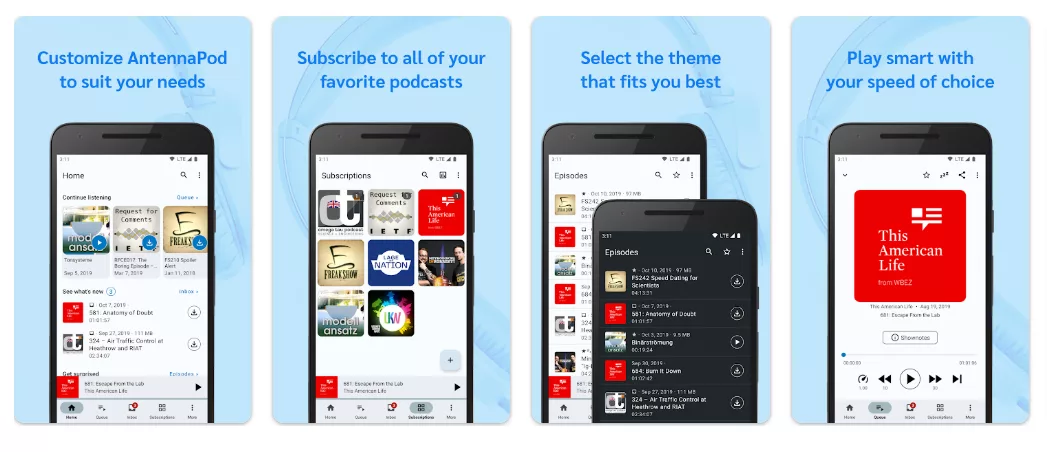
The app focuses on giving you solid basics: automatic downloads, offline listening, variable playback speeds, and powerful queue management. You can set per‑podcast defaults, like playback speed and skip intro length, so each show behaves the way you want. Its interface is simple, but once you get used to it, you can move through episodes and folders very quickly. For many Android users, AntennaPod proves that Podcast Player Apps don’t have to be packed with ads or dark patterns to be powerful.
Features:
- Open‑source, free, and privacy‑friendly Android podcast app.
- Add shows via search or custom RSS feeds.
- Automatic downloads and offline listening controls.
- Per‑podcast settings for speed, skip, and download rules.
- Flexible queue and folder management.
Best For:
AntennaPod is best for Android users who want Podcast Player Apps that are free, open, and privacy‑focused, with lots of control over how episodes download and play.
4) Podcast Addict
Podcast Addict is one of the most feature‑packed Podcast Player Apps on Android, built for power users who love to fine‑tune everything. When you open it, you can manage podcasts, audiobooks, radio streams, YouTube channels, and even RSS news feeds in one place. This makes it feel more like a full media control center than just a simple player. You and I can set detailed rules for downloads, cleanup, notifications, and playback so the app works almost on autopilot once it’s configured.

Because it has so many options, Podcast Addict can look a bit busy at first, but that also means you get tools others simply don’t offer. You can create complex playlists, filter episodes by status, and trigger actions like “download only on Wi‑Fi and while charging.” The app supports multiple backup and sync options, plus powerful search and discovery to help you find new shows quickly. For heavy listeners who treat their Podcast Player Apps like a serious part of their day, Podcast Addict can easily become the main hub.
Features:
- Supports podcasts, audiobooks, radio streams, and RSS feeds in one app.
- Advanced rules for downloads, cleanup, and network usage.
- Custom playlists and powerful episode filters.
- Multiple backup and sync options for your subscriptions.
- Rich discovery tools and charts to find new shows.
Best For:
Podcast Addict is best for Android listeners who want Podcast Player Apps with deep customization, automation rules, and the ability to manage many different audio sources together.
5) Spotify
Spotify is one of the biggest audio platforms in the world, and in 2026 it remains a go‑to choice among Podcast Player Apps because it mixes music, podcasts, and audiobooks in one place. If you already use it for songs, it feels natural to follow your favorite shows there too. You and I can search almost any major podcast, hit follow, and then see new episodes right alongside our playlists and daily mixes. Spotify also invests heavily in originals and exclusives, so some shows only live on this platform.
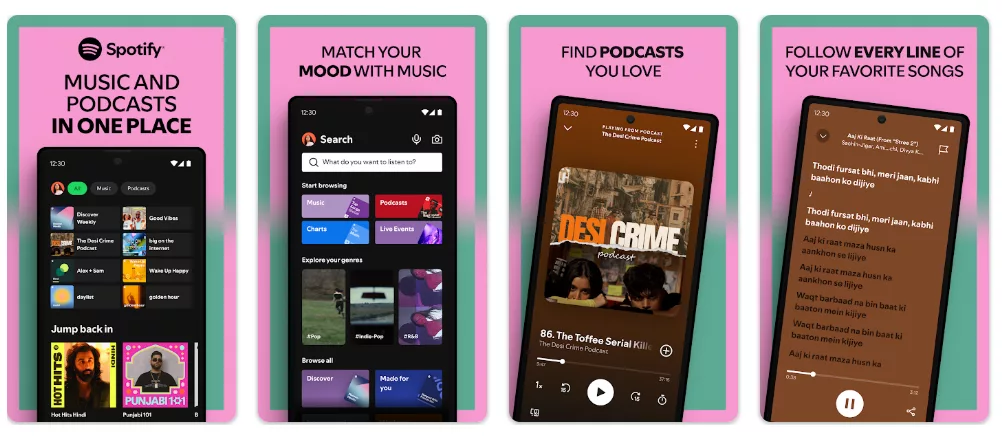
Over the last few years, Spotify has added better podcast layouts, improved show pages, and smarter recommendation carousels, so you quickly find new episodes similar to what you already enjoy. You can download episodes for offline listening, build mixed queues with songs and podcasts, and use features like “enhance” playlists for smoother transitions between content types. For people who like everything in one app, it removes the need to jump between separate Podcast Player Apps and music players.
Features:
- Huge catalog of podcasts, music, and audiobooks in a single app.
- Personalized recommendations and charts based on your listening.
- Offline downloads for episodes and playlists.
- Mixed queues that combine songs and podcast episodes.
- Exclusive and original shows only available on Spotify.
Best For:
Spotify is best for listeners who want Podcast Player Apps that combine music, podcasts, and more into one simple, familiar experience, with strong recommendations and cross‑device support.
6) Apple Podcasts
Apple Podcasts is one of the oldest and most widely used Podcast Player Apps, especially if you live in the Apple ecosystem. It comes pre‑installed on iPhone, iPad, Mac, Apple Watch, and even works with CarPlay, so you and I can listen almost anywhere with minimal setup. You simply search for a show, tap follow, and episodes start appearing in your library automatically. Over time, Apple has improved the design, making it easier to browse charts, categories, and editorial picks across many countries.
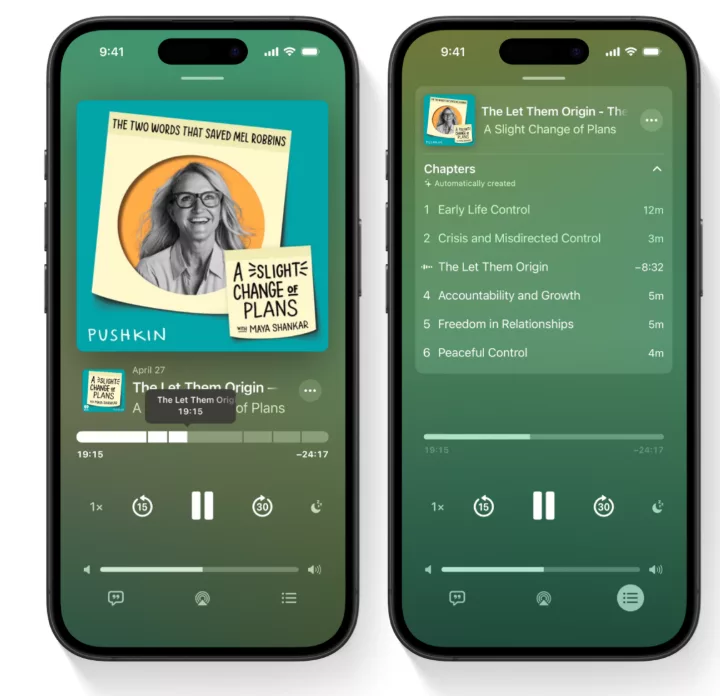
Apple Podcasts also supports paid subscriptions and channels, so creators can offer bonus episodes or ad‑free feeds directly through the app. This makes it simple for you to support your favorite shows without juggling extra logins or external platforms. Your listening progress syncs through iCloud, so you can pause on your iPhone and resume on your Mac or iPad. For many users who already rely on Apple services, Apple Podcasts feels like the default choice among Podcast Player Apps that “just works.”
Features:
- Pre‑installed on Apple devices with iCloud sync across iPhone, iPad, and Mac.
- Global charts, categories, and curated editorial collections.
- Support for paid podcast subscriptions and channels.
- CarPlay and Apple Watch support for on‑the‑go listening.
- Simple library with automatic episode updates and notifications.
Best For:
Apple Podcasts is best for people who live inside the Apple ecosystem and want Podcast Player Apps that integrate tightly with iOS, macOS, and Apple services without extra setup.
7) Castro
Castro is an iOS‑focused podcast player app that treats your shows more like an email inbox than a simple list. When new episodes arrive, they land in an “Inbox,” and you and I can quickly decide whether to queue, archive, or ignore them. This triage‑first design is great if you follow many shows but only listen to a few episodes from each. Instead of getting overwhelmed, you just clear the inbox and keep only what looks interesting today.

Castro also offers features like enhanced audio, chapter support, and automatic episode queuing so you can keep a steady flow of content without constant manual sorting. Its interface is clean, colorful, and touch‑friendly, making it fun to swipe through new episodes while you plan your day. For iPhone users who feel that most Podcast Player Apps become messy as subscriptions grow, Castro’s inbox model can feel like a big upgrade in control and calm.
Features:
- Inbox‑style episode management with swipe triage.
- Automatic queue building from shows you follow.
- Audio enhancement and chapter navigation support.
- Clean, gesture‑friendly iOS design.
- Options to archive, keep, or skip episodes quickly.
Best For:
Castro is best for iOS listeners who follow many shows and want Podcast Player Apps that help them “triage” episodes like email, keeping only the ones they really want to hear.
8) Downcast
Downcast is a long‑time favorite among Podcast Player Apps for Apple users who want more control than Apple Podcasts but still like a simple look. It runs on iPhone, iPad, Mac, and Apple Watch, so you and I can keep our listening synced across all Apple devices. You can subscribe to shows from the directory or add custom RSS feeds, which is handy for private or niche podcasts. The app lets you fine‑tune how each show downloads, deletes, and plays, so your library stays tidy without much manual work.

Downcast also makes it easy to organize large collections with playlists, filters, and smart settings that group episodes by status or priority. You can change playback speed, use skip buttons, and tweak per‑podcast options like start time offsets if a show always has a long intro. While it doesn’t chase trends as aggressively as some newer Podcast Player Apps, Downcast focuses on being reliable, customizable, and fast for serious listeners.
Features:
- Dedicated podcast app for iPhone, iPad, Mac, and Apple Watch with sync.
- Supports both directory search and custom RSS feeds.
- Smart playlists and filters to organize many subscriptions.
- Per‑podcast rules for downloads, deletion, and playback.
- Variable speed, skip controls, and start time offsets.
Best For:
Downcast is best for Apple users who want Podcast Player Apps that are reliable, highly configurable, and focused only on podcasts rather than mixing in music or other media.
9) Goodpods
Goodpods is one of the more social‑first Podcast Player App, built around the idea that you discover the best episodes through friends, creators, and communities. Instead of only showing charts and generic recommendations, it highlights what people you follow are listening to right now. You and I can see episode feeds, comment threads, and ratings that feel a bit like a podcast‑focused social network. This is great when you’re tired of scrolling endless lists and just want to know what real people are enjoying.
Inside Goodpods, you can follow friends, influencers, and even podcast hosts to see their picks and playlists. There are also group features and topic‑based lists, so you can explore shows around business, tech, comedy, or self‑help with more context. At the same time, it still works as a regular player with downloads, queues, and playback controls. For listeners who see podcasts as a shared experience, Goodpods stands out among Podcast Player Apps by putting conversation and discovery at the center.
Features:
- Social feed showing what friends and creators are listening to.
- Ratings, comments, and lists that work like a podcast social network.
- Topic‑based recommendations and community‑curated playlists.
- Standard playback features with queues and downloads.
- Options to follow podcasters and influencers directly.
Best For:
Goodpods is best for listeners who want Podcast Player Apps that feel social and community‑driven, helping them find new episodes through people they trust rather than only algorithms.
10) Fountain
Fountain is one of the most innovative Podcast Player App because it mixes listening with earning and sending small crypto rewards, often called “value‑for‑value.” You and I can listen to regular podcasts, but we can also tip creators or even earn tiny rewards for engaging with episodes and promos. This model tries to fix the old problem where shows depend only on ads or big sponsors. On Fountain, listeners and hosts have a more direct relationship, which can be exciting if you like supporting indie creators.

Beyond money features, Fountain still works as a solid everyday player with search, subscriptions, and queues. You can discover shows through charts and community picks, then send boosts or messages attached to your tips. For some people, this turns podcast listening from a passive habit into something more interactive and rewarding. If you are curious about how Web3, Bitcoin, or value‑for‑value ideas can work inside Podcast Player Apps, Fountain is a good place to experiment.
Features:
- Built‑in value‑for‑value tipping and small crypto rewards.
- Standard podcast search, subscriptions, and queue management.
- Community‑driven discovery with charts and featured shows.
- Option to send boosts and messages to podcasters.
- Focus on direct listener–creator relationships.
Best For:
Fountain is best for listeners who want Podcast Player Apps that blend podcasts with Web3‑style tipping, rewards, and direct support for creators.
How Podcast Player Apps Fit Into Your Daily Content Stack
Podcast Player Apps now sit right beside your note‑taking apps, AI writing tools, and design platforms in a single daily content stack. You and I might listen to a show on marketing in the morning, clip key ideas into a notes app at lunch, and then use AI flyer tools in the evening to promote what we’ve learned through events or campaigns. When you connect these pieces, podcasts stop being passive background noise and turn into inputs for your learning and content pipeline.
Many creators use Podcast Player Apps to research topics, then turn insights into blog posts, newsletters, or social threads the same day. With smarter recommendations and cross‑device sync, it’s easy to move from car to desk without losing your place. From there, your AI flyer generators, schedulers, and CRMs help you repurpose those ideas into visuals and campaigns. In practice, your “content stack” becomes a loop: learn via podcasts, capture notes, create assets, share, then repeat with the next episode.
Tips to Choose the Right Podcast Player App for You
When you compare Podcast Player Apps, it helps to start with your daily routine. Ask yourself where you listen most: phone, desktop, car, or smartwatch. If you jump between devices all day, strong cross‑platform sync (like in Pocket Casts or Spotify) will matter more than advanced niche features. If you only use an iPhone and love Apple services, Apple Podcasts, Overcast, Castro, or Downcast might feel more natural.
Next, think about how “hands‑on” you want to be. If you enjoy tuning rules and automation, apps like Podcast Addict, AntennaPod, or Downcast give you deep control. If you prefer a social feel, Goodpods and Fountain bring in community and creator support in new ways. And if you just want everything (music, podcasts, audiobooks) in one place, Spotify covers most needs with minimal setup. A simple rule: test two or three Podcast Player Apps for a week each, and notice which one you naturally open without thinking—that’s usually the right pick for you.
We have listed! Most Profitable Mobile App Niches to Build in 2026
Wrapping Up
In 2026, Podcast Player Apps sit at the center of how you and I learn, relax, and keep up with the world. From focused tools like Pocket Casts, Overcast, AntennaPod, Podcast Addict, Castro, Downcast, and Goodpods to big platforms like Spotify, Apple Podcasts, and newer models like Fountain, there’s now an option for every type of listener. The global podcast market continues to grow fast, so picking a player that fits your habits will only become more important over the next few years.
The good news is that most Podcast Player Apps are free or low‑cost to try, so you can experiment without risk and see which one you reach for automatically each day. Once you lock in your favorite app and pair it with AI flyer generators and other content tools, you get a smooth loop: discover ideas, capture them, create content, and share it back with your audience.