

Otter.ai

AI meeting notes with searchable transcripts and workflow handoff
Paid Subscription16.997-day trial
- Web app
- Browser extension
- iOS (iPhone & iPad)
- Android

Cross-platform task, note-taking, and planning app with calendar views and habit tracking.
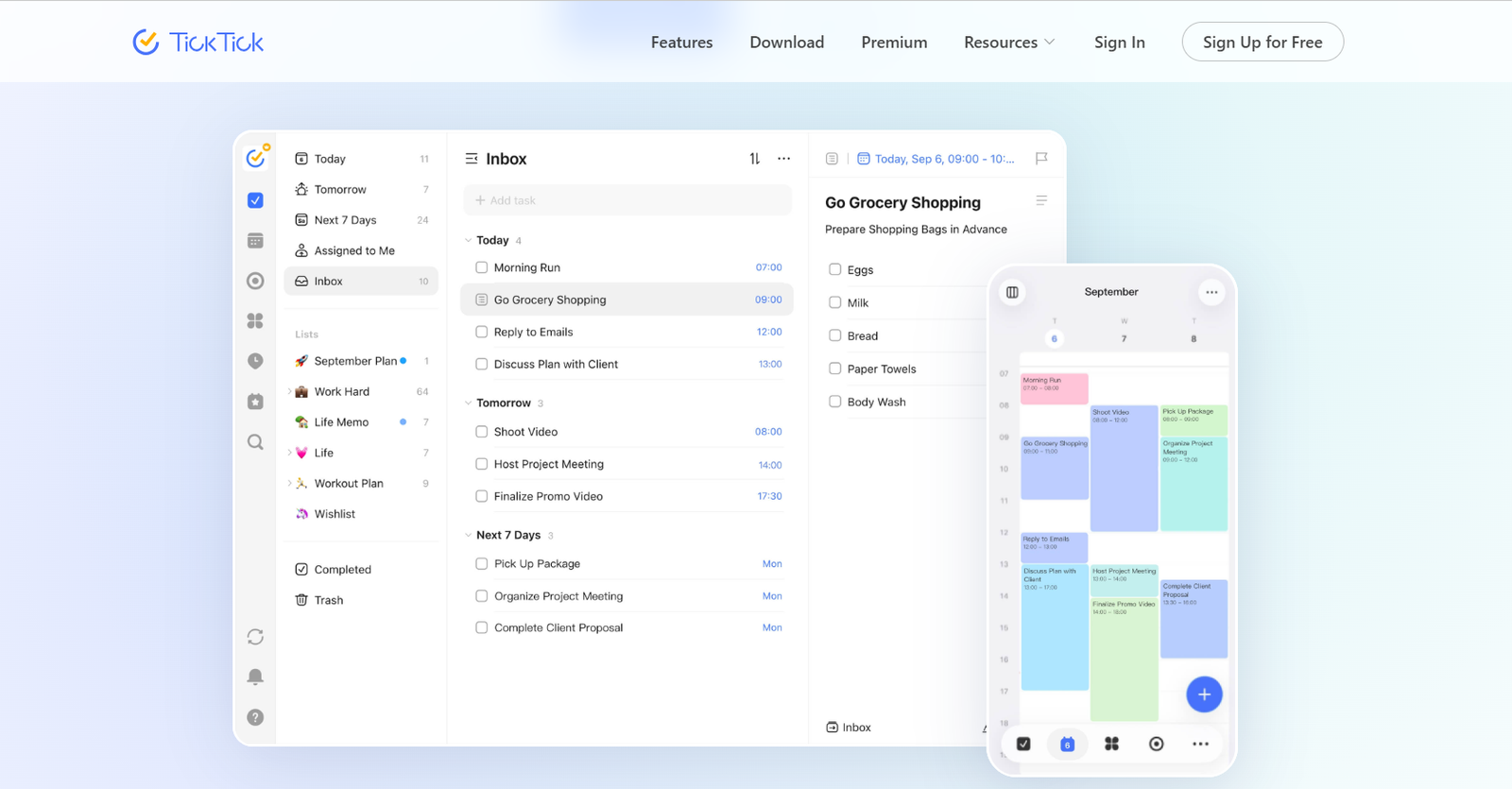
Cross-platform task, note-taking, and planning app with calendar views and habit tracking. TickTick is a task and note-taking app for people who need one place for tasks, habits, and schedules.

After evaluating dozens of productivity and task management applications, my team and I found TickTick to be one of the most well-rounded solutions for individuals and teams. It combines task management, calendar planning, habit tracking, reminders, and collaboration features in a single, intuitive platform, making it easier to stay organised without switching between multiple apps.
What impressed my team and me most is TickTick's clean interface, cross-platform support, and consistent performance across devices. Whether you're managing personal tasks, coordinating projects, or planning daily routines, the app offers the flexibility and features needed to improve productivity.
Based on our hands-on evaluation, we recommend TickTick for professionals, students, freelancers, and businesses looking for a reliable, feature-rich productivity app that delivers excellent value and a seamless user experience.
TickTick is a task and note-taking app for people who need one place for tasks, habits, and schedules. It works on web, iOS, Android, Mac, and Windows, so it fits mixed-device work without much setup. The app is aimed at individuals, students, and small teams that want to track day-to-day work and personal plans in the same system.
What stands out on the site is the mix of planning views. You get calendar layouts, Kanban, timeline, and an Eisenhower matrix, plus habits and Pomodoro in the same app. That makes it more than a basic to-do list. You can plan the week, time-block work, and check progress without jumping between tools.
Pricing starts with a free plan, and Premium is $35.99 per year. Premium unlocks more calendar functions, extra filters, task history, and other advanced controls. If you want a cross-platform planner with note-taking, reminders, and lightweight project views, TickTick
TickTick is a task and note-taking app for people who need one place for tasks, habits, and schedules. It works on web, iOS, Android, Mac, and Windows, so it fits mixed-device work without much setup. The app is aimed at individuals, students, and small teams that want to track day-to-day work and personal plans in the same system.
What stands out on the site is the mix of planning views. You get calendar layouts, Kanban, timeline, and an Eisenhower matrix, plus habits and Pomodoro in the same app. That makes it more than a basic to-do list. You can plan the week, time-block work, and check progress without jumping between tools.
Pricing starts with a free plan, and Premium is $35.99 per year. Premium unlocks more calendar functions, extra filters, task history, and other advanced controls. If you want a cross-platform planner with note-taking, reminders, and lightweight project views, TickTick is built for that job.
My team and I spent several weeks testing TickTick across desktop, Android, iOS, and web platforms to evaluate its real-world performance. We used the app to manage daily tasks, recurring reminders, project planning, habit tracking, calendar scheduling, and team collaboration.
During our evaluation, we assessed its ease of use, feature set, synchronization speed, customization options, integrations, notification reliability, and overall user experience. We also compared TickTick with other popular productivity apps to understand where it excels and where it has room for improvement.
Our recommendations are based on hands-on testing, practical use cases, and the overall value the app provides to individuals, professionals, and teams.
| Pricing | Paid Subscription |
|---|---|
| Starting price | 35.99 |
| Free plan | No |
| Free trial | No |
| Pricing page | View pricing |
| Platforms | Web app, iOS (iPhone & iPad), Android, macOS, Windows |
| API | No |
| Company | TickTick Team |
| Apps Insight Score | 38/100 |
Editorial points are assigned by AppsInsight editors and cannot be purchased or influenced.
| Feature | TickTick | Otter.ai | LUCI Desktop | Timeless Code |
|---|---|---|---|---|
| Rating | 5.0 / 5 | 5.0 / 5 | 4.2 / 5 | 4.2 / 5 |
| Pricing | Paid Subscription | Paid Subscription | Free plan | Free+Paid |
| Starting price | 35.99 | 16.99 | Free | — |
| Free plan | Included | Included | Included | Included |
| Free trial | No | Yes (7 days) | No | No |
| Platforms | Web app, iOS (iPhone & iPad), Android, macOS, Windows | Web app, Browser extension, iOS (iPhone & iPad), Android, macOS, Windows | macOS, Windows | Web app, macOS, Windows, API / SDK |
| Best for | Students, solo professionals, SMB teams, cross-platform users, people managing personal and work tasks in one app | Sales teams, customer support teams, recruiters, educators, SMB marketing teams, enterprise operations teams | Founders, investors and sales leaders who live in meetings and want AI agents briefed from real context, privacy-conscious users who refuse cloud AI note-takers, and developers who want Claude Code or Cursor to remember their workday. | Developer teams and founders who live in Claude Code and want meetings to become queryable memory - briefs before calls, action items after, and answers grounded in what was actually said. |
TickTick vs Otter.ai TickTick vs LUCI Desktop TickTick vs Timeless Code
$35.99 billed annually



AI meeting notes with searchable transcripts and workflow handoff

Local computer memory for every AI agent - it remembers your whole day, fully on your…

Your meetings are the prompt - record once, remember forever, and let Claude Code use it.


Always-on listening app that turns real conversations into a private, searchable memory your AI agents can…
Local-first Apple journal with AI replies memory and opt-in shared reflections
Always-on listening app that turns real conversations into a private, searchable memory your AI agents can…
Your meetings are the prompt - record once, remember forever, and let Claude Code use it.
No reviews yet. Be the first to review this app.
Already have an account? Log in to track your reviews.