

Best All-in-One Workspace
Notion

All-in-one workspace for notes, docs, and projects
Free planPaid from $10/mo
- Web app
- iOS (iPhone & iPad)
- Android
- macOS

Free, open-source tasks and reminders with offline storage and optional sync
Free, open-source tasks and reminders with offline storage and optional sync Clarity is a free, MIT-licensed task and reminder app from the hariprasad2512 project.
Clarity offers a focused task workflow without a subscription: Today, Inbox, natural dates, local reminders and optional sync. Its MIT source and real UI examples make the product easier to inspect. We recommend it for personal task capture, with caution around unsigned macOS installation, cloud configuration and reminder permissions. Our 3.5/5 rating is a documentation-based editorial judgment, not an installed-app test.
Clarity is a free, MIT-licensed task and reminder app from the hariprasad2512 project. This listing covers the cross-platform Flutter app linked from its official website, not other products with the same name. It keeps the main workflow small: capture a task, give it a due time, and find it in Today, Inbox or Done.
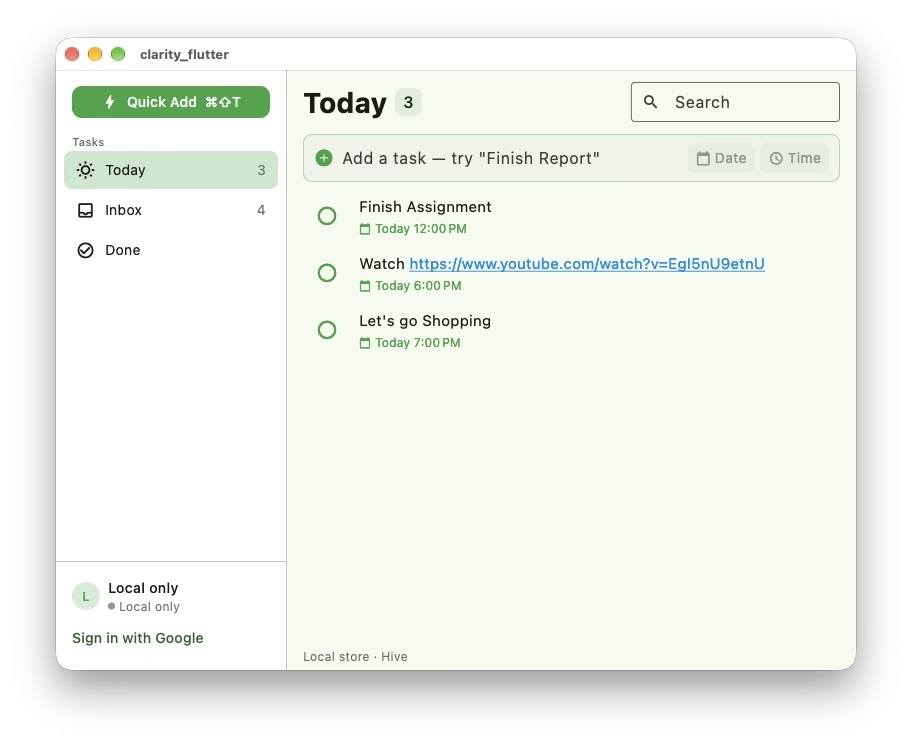
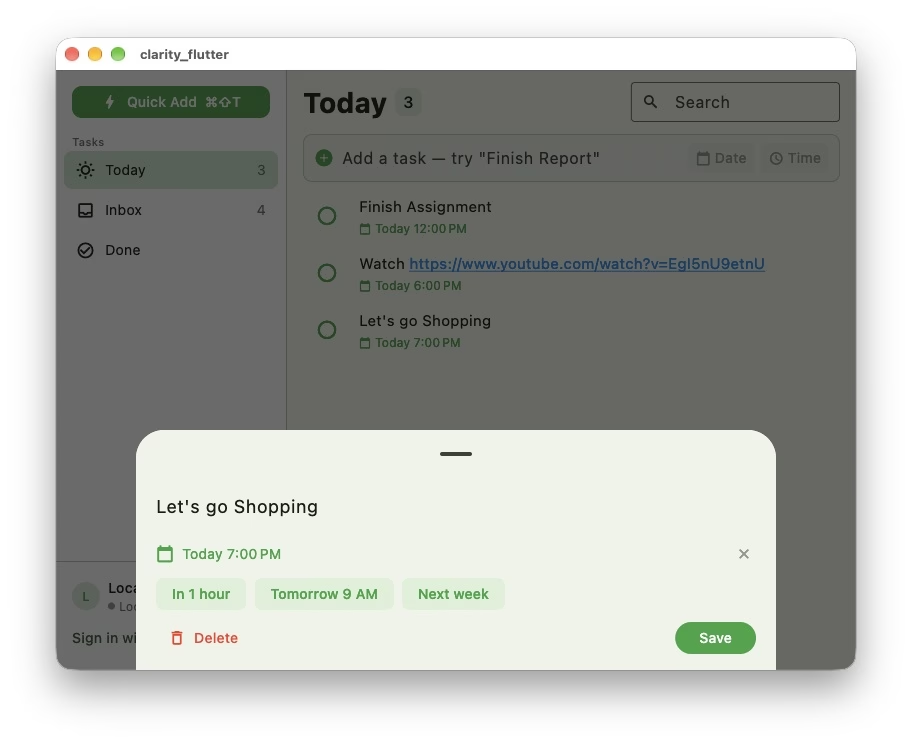
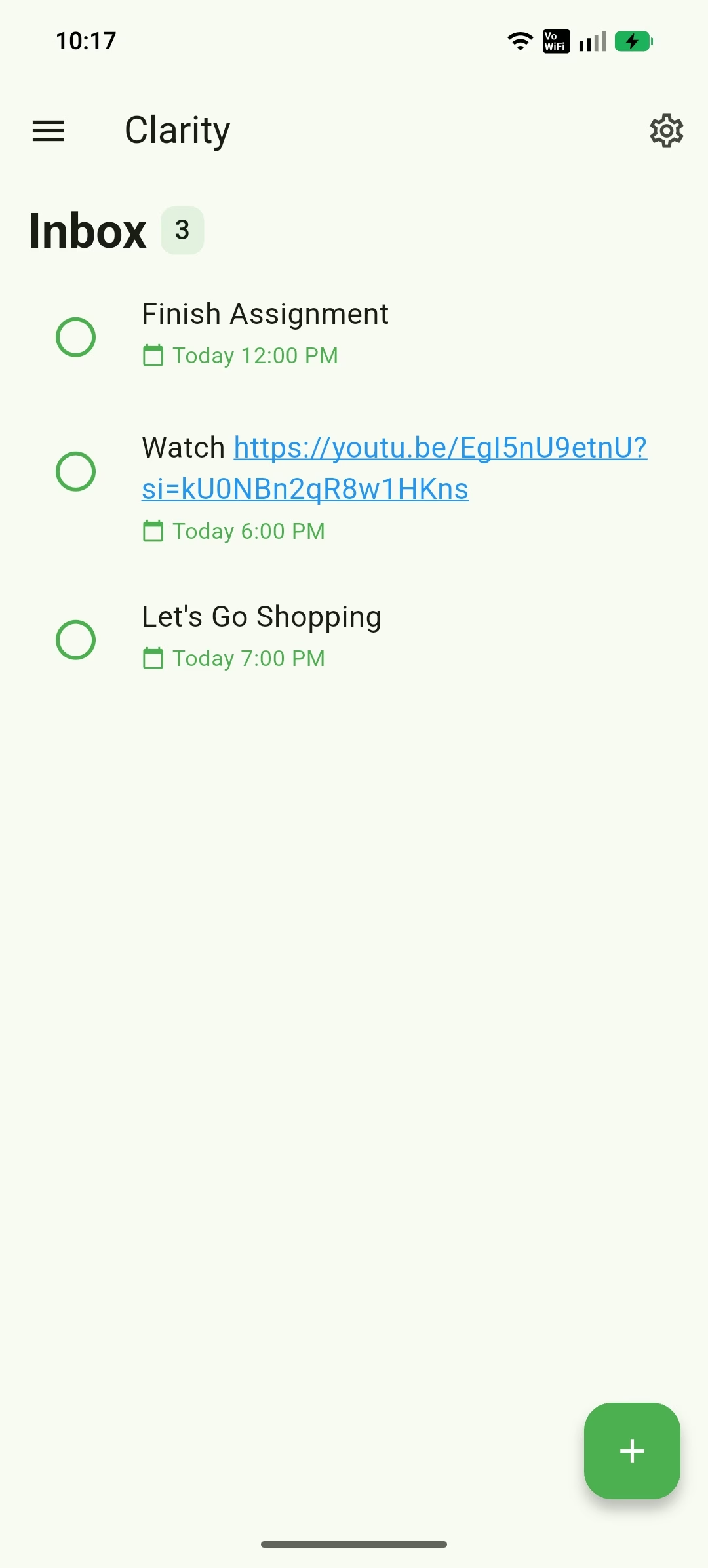
The app accepts natural-language dates such as “tomorrow at 5pm” and lets you refine the result with a calendar or quick presets. Its desktop Today view shows due times and clickable links, while a detail sheet changes titles, dates and reminder timing. Android adds home-screen widgets; desktop builds offer Quick Add, hotkeys and tray controls.
The repository describes Hive-based local storage and an offline-first workflow. Google sign-in and Supabase provide optional two-way sync with last-write-wins conflict handling. A source build without sync configuration runs locally. This is useful
Clarity is a free, MIT-licensed task and reminder app from the hariprasad2512 project. This listing covers the cross-platform Flutter app linked from its official website, not other products with the same name. It keeps the main workflow small: capture a task, give it a due time, and find it in Today, Inbox or Done.
The app accepts natural-language dates such as “tomorrow at 5pm” and lets you refine the result with a calendar or quick presets. Its desktop Today view shows due times and clickable links, while a detail sheet changes titles, dates and reminder timing. Android adds home-screen widgets; desktop builds offer Quick Add, hotkeys and tray controls.
The repository describes Hive-based local storage and an offline-first workflow. Google sign-in and Supabase provide optional two-way sync with last-write-wins conflict handling. A source build without sync configuration runs locally. This is useful for keeping a personal list without treating cloud sync as a prerequisite.
There is a wording gap worth noting: the website privacy policy says the project does not operate account or task-data servers, while the repository documents Google authentication and Supabase sync. Read the configuration and third-party policies before enabling sync. This review does not treat “local-first” as a promise that signed-in use never sends data off-device.
The official site links Windows, Android and Linux downloads and a GitHub release page. The repository gives macOS Homebrew instructions and identifies macOS and Android as its primary verified platforms. It also documents iOS and web builds, but we have not verified an iOS store release or a hosted web app.
The macOS build is unsigned and needs the developer’s documented one-time Open approval. Web builds do not schedule local reminders. Android reminder timing depends on notification, alarm and battery permissions. These details matter more than a generic “works everywhere” label.
The website and terms state that all builds are free and open source under the MIT License. No paid tier, subscription or time-limited trial is listed. Optional infrastructure used for a self-configured sync setup has its own terms and possible costs.
The privacy policy says tasks, reminders and settings stay on-device in local use, the landing page has no tracking, and optional integrations send data directly to the services you configure. The software is provided as-is, without a guarantee against data loss. Keep backups of important tasks and use the project’s GitHub issues for questions.
Clarity fits people who want a small personal task list and are comfortable with open-source installation and documentation. Real repository screenshots show an uncluttered Today list and a focused editing sheet. Free access and inspectable source are strengths; release hardening, cloud-setup clarity and platform-specific reminder behavior are the trade-offs.
It is not a substitute for a full project-management suite with verified team permissions, reporting or support SLAs. Our assessment comes from the current website, legal pages, repository documentation and official UI images. We did not install binaries, sign in, connect Gmail or Supabase, or test notification delivery and sync reliability.
Reviewed official website, MIT terms, privacy policy, current repository and real desktop/Android screenshots on October 12, 2026. No binary installation, sign-in, Gmail/Supabase connection or reminder/sync reliability test. 3.5/5 editorial rating reflects documentation and visible UI, with release and privacy wording limits.
Repository lists v1.2.1 as its latest release. Current documentation covers live sync, desktop Quick Add and Android widgets; store availability was not independently tested.
| Pricing | Free plan |
|---|---|
| Free plan | Yes |
| Free trial | No |
| Pricing page | View pricing |
| Platforms | Android, macOS, Windows, Linux |
| API | No |
| Apps Insight Score | 37/100 |
| Implementation | Medium |
| Learning curve | Beginner |
Editorial points are assigned by AppsInsight editors and cannot be purchased or influenced.
| Feature | Clarity | Notion | ClickUp | Todoist |
|---|---|---|---|---|
| Rating | 3.5 / 5 | 4.7 / 5 | 4.0 / 5 | 4.0 / 5 |
| Pricing | Free plan | Free+Paid | Free plan | Free+Paid |
| Starting price | Free | From $10/mo | Free | Free |
| Free plan | Included | Included | Included | Included |
| Free trial | No | No | No | No |
| Platforms | Android, macOS, Windows, Linux | Web app, iOS (iPhone & iPad), Android, macOS, Windows | Web app, iOS (iPhone & iPad), Android, macOS, Windows | Web app, iOS (iPhone & iPad), Android, macOS, Windows |
| Best for | Personal task lists, open-source users, offline-first reminders, macOS and Android users | Teams, startups, knowledge workers | Project teams, marketing teams, product teams, IT and PMO teams, HR operations, leadership teams, SMBs, enterprise teams, cross-functional departments | Solo creators, Freelancers, Students, SMB teams, Marketing agencies, Professional services, Operations managers, Enterprise buyers |

All-in-one workspace for notes, docs, and projects

Work management with AI tied to your project context
Task and project management with templates, natural-language capture, and team collaboration.

One AI-powered workspace where creative teams keep projects, conversations, reviews and work connected
Mobile task planning with energy check-ins and one suggested next step
Print process travelers and calibration due lists for the shop floor.
Mobile task planning with energy check-ins and one suggested next step

Live creative review rooms with shared assets, AI assistance and approvals
Print process travelers and calibration due lists for the shop floor.
One AI-powered workspace where creative teams keep projects, conversations, reviews and work connected
No reviews yet. Be the first to review this app.
Already have an account? Log in to track your reviews.