
Sign In

Claude Design by Anthropic Labs logo

Claude Design by Anthropic Labs

Design, prototype, and present with AI.
4.8 Editor rating
#2 in AI Rank
39
AppsInsight Score
Enterprise Founded 2021 1000+ employees AI
Best AI Design Platform 2026 Featured Trending Has Deal
  • Trusted by 10,000+ buyers worldwide
  • 500+ verified reviews from real users
  • Updated weekly fresh & accurate data
  • Independent editorial research 100% unbiased

What is Claude Design by Anthropic Labs?

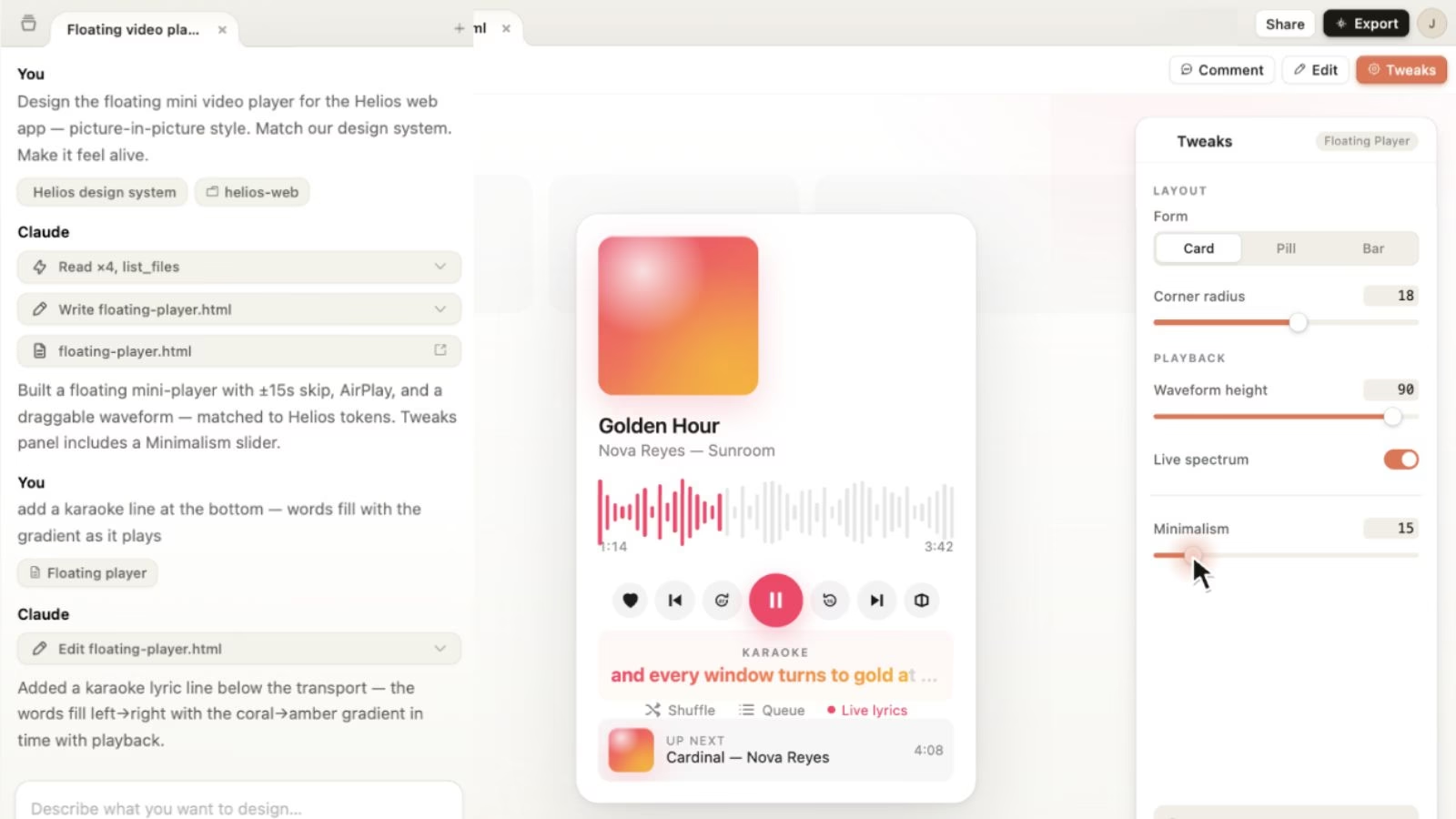
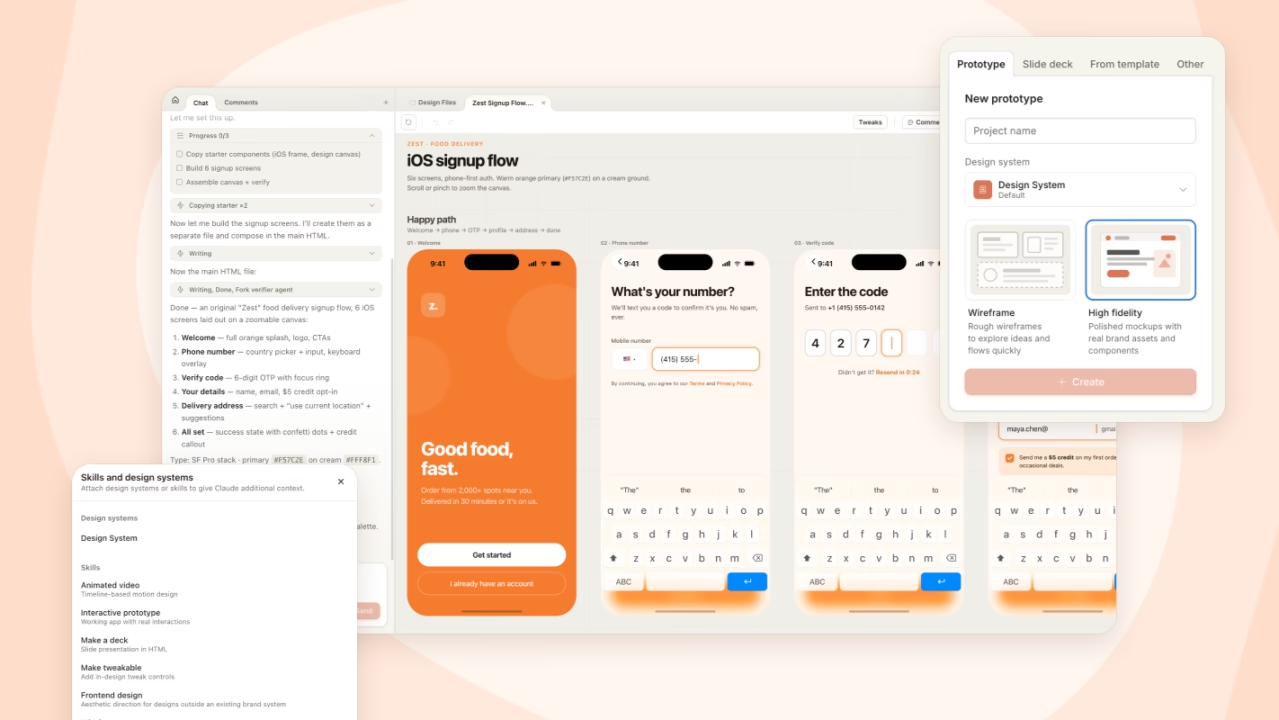
Design, prototype, and present with AI. Claude Design is an AI-powered visual creation platform from Anthropic Labs that enables users to generate prototypes, wireframes, presentations, landing pages, marketing assets, one-pagers, and interactive design concepts through natural language conversations.

Claude Design by Anthropic Labs screenshot

Our verdict


Claude Design dramatically lowers the barrier to creating professional visual work. Instead of mastering complex design software, users can describe ideas conversationally and iterate through natural language. The ability to automatically apply design systems and hand projects directly to Claude Code creates a powerful bridge between design and implementation.

Reviewed by Ashley Richmond Chief Marketing Officer at AppsInsight Last updated June 8, 2026

Full review

Claude Design is an AI-powered visual creation platform from Anthropic Labs that enables users to generate prototypes, wireframes, presentations, landing pages, marketing assets, one-pagers, and interactive design concepts through natural language conversations. Built on Claude Opus 4.7, it combines conversational AI with visual design workflows, allowing teams to move from idea to polished design without traditional design software expertise.

Who it's for

Best for

  • Product Managers
  • Startup Founders
  • Marketing Teams
  • Designers
  • UX Researchers
  • Agencies

Not ideal for

  • Professional graphic artists requiring pixel-perfect manual control
  • Advanced 3D designers
  • Motion graphics specialists
  • Offline design workflows

How we tested

Our editorial team evaluated Claude Design by reviewing Anthropic's product documentation, launch materials, feature announcements, pricing structure, supported export formats, collaboration capabilities, and design-system workflow. We assessed how the platform compares to established design tools such as Figma, Canva, Adobe Express, Uizard, and Galileo AI.

Particular attention was given to Claude Design's AI-assisted prototyping capabilities, presentation generation workflows, collaborative editing features, design-system automation, export options, and integration with the broader Claude ecosystem.

We also analyzed its suitability for designers, product managers, marketers, startup founders, and enterprise teams to determine where the platform delivers the most value and where traditional design tools may still offer advantages.

This review will be updated as Claude Design moves beyond research preview and becomes more widely available.

What's new

Claude Design launched in research preview through Anthropic Labs. Introduced AI-powered visual creation for prototypes, presentations, landing pages, and marketing assets. Added automatic design-system generation from codebases and design files. Released collaborative editing and organization-wide sharing capabilities. Enabled exports to PDF, PPTX, Canva, and standalone HTML. Added one-click handoff workflows to Claude Code for implementation. Made the product available to Pro, Max, Team, and Enterprise subscribers.

Security & compliance

Enterprise Access Controls

At a glance

Pricing Enterprise
Platforms Web
Free trial No
API Yes
Company Anthropic
Apps Insight Score 39/100
Implementation Easy
Learning curve Beginner
Compliance Enterprise Access Controls
Editor rating 96%
User reviews 0%
Value for money 0%
Ease of use 0%
Trust signals 100%

Integrations

Built for

Use case

UI/UX Design

Industry

Design

Industry

Marketing

Industry

SaaS

Industry

Software

Key features

AI Design Generation
Create complete visual designs, presentations, wireframes, landing pages, mockups, and prototypes simply by describing your idea in natural language. Claude Design transforms text prompts into editable visual outputs within minutes.
Interactive Prototyping
Build realistic clickable prototypes that can be shared with stakeholders, tested with users, and refined without writing production code.
Design System Automation
Automatically generates and applies company design systems, including colors, typography, spacing, and reusable UI components across every project.
Brand-Aware Design Creation
Ensures every design follows organizational branding guidelines, helping teams maintain consistency across presentations, marketing assets, and product interfaces.
Multi-Source Content Import
Import DOCX, PPTX, XLSX files, images, existing websites, and code repositories to instantly generate design concepts and visual experiences.
Inline Visual Editing
Modify designs directly using comments, text edits, element selection, and AI-powered controls without leaving the design workspace.
Team Collaboration Workspace
Collaborate with teammates through shared projects, group conversations, commenting, editing permissions, and organization-wide access controls.
Presentation Builder
Generate professional pitch decks, sales presentations, investor updates, and business proposals that can be exported as PPTX files.
Advanced Design Exploration
Rapidly generate multiple design directions and visual concepts, enabling teams to explore creative possibilities faster than traditional workflows.

Key benefits

  • Faster design iteration
  • Reduced design bottlenecks
  • Easier stakeholder communication
  • Better cross-team collaboration
  • Consistent brand implementation
  • Rapid prototyping without coding
  • Simplified presentation creation

Pricing

Free

0 /mo

0 billed annually

  • Access Claude chat on web
  • desktop
  • iOS and Android
  • generate content
  • analyze text and images
  • web search
  • file creation
  • code execution
  • Slack and Google Workspace connections
  • MCP integrations
  • extended thinking capabilities.

Pro

20 /mo

17 billed annually

  • Everything in Free
  • plus higher usage limits
  • Claude Code access
  • unlimited projects
  • Research mode
  • memory across conversations
  • additional Claude models
  • Claude in Excel
  • Claude in Chrome
  • Cowork collaboration features.

Max 5x

100 /mo

Custom billed annually

  • Everything in Pro
  • plus 5x higher usage limits
  • priority access during peak times
  • advanced model access
  • higher output limits
  • early feature releases
  • optimized for Claude Code workflows.

Max 20x

200 /mo

Custom billed annually

  • Everything in Pro
  • plus 20x usage limits
  • highest priority processing
  • maximum output capacity
  • premium Claude Code support
  • fastest access to experimental features.

Pros & Cons

Pros

  • Extremely easy to use
  • Strong AI-powered visual generation
  • Brand-aware design systems
  • Multiple export formats
  • Excellent for rapid prototyping
  • Integrated workflow with Claude ecosystem
  • Supports collaborative editing

Cons

  • Research preview product
  • Less mature than established design suites
  • Some outputs still require manual refinement

Screenshots & media

User reviews

No reviews yet. Be the first to review this app.

Frequently asked questions

What is Claude Design?
Claude Design is an AI-powered design platform from Anthropic that helps users create prototypes, wireframes, presentations, landing pages, marketing assets, and visual designs using natural language prompts. It combines conversational AI with advanced visual generation to simplify the design process.
How does Claude Design work?
Claude Design allows users to describe ideas in plain English and generates visual designs automatically. Users can refine outputs through chat, inline comments, direct edits, and AI-powered controls while maintaining brand consistency across projects.
Is Claude Design free?
No. Claude Design is currently available to Claude Pro, Max, Team, and Enterprise subscribers. Access is included within eligible Claude subscription plans and consumes plan usage limits.
What can you create with Claude Design?
Users can create: Interactive prototypes Product wireframes UI mockups Pitch decks Sales presentations Landing pages Social media graphics Marketing assets AI-powered design concepts
Can Claude Design create interactive prototypes?
Yes. Claude Design can generate realistic interactive prototypes that teams can share for feedback, stakeholder reviews, and user testing before development begins.
Is Claude Design better than Figma?
Claude Design focuses on AI-assisted design generation and rapid prototyping, while Figma provides extensive manual design control and collaboration tools. Claude Design is better for quickly creating concepts, while Figma remains stronger for detailed production design workflows.
Can Claude Design generate PowerPoint presentations?
Yes. Claude Design can create complete presentations from prompts and export them as PPTX files, making it useful for founders, sales teams, marketers, and business professionals.
Does Claude Design support team collaboration?
Yes. Teams can share projects, manage permissions, collaborate through comments, and work together inside organization-wide design workspaces.
Can Claude Design use my company's design system?
Yes. During onboarding, Claude Design can analyze design assets and codebases to build a reusable design system that automatically applies brand colors, typography, and components across projects.
Does Claude Design integrate with Claude Code?
Yes. Claude Design includes a handoff workflow that packages design assets and project specifications into implementation-ready bundles for Claude Code.
What file formats can Claude Design export?
Claude Design supports exporting projects to: PDF PPTX HTML Canva Internal shared links This allows teams to easily distribute, present, and further edit generated designs.
Is Claude Design good for startups?
Yes. Startups can use Claude Design to quickly create prototypes, investor pitch decks, marketing materials, landing pages, and product concepts without needing a dedicated design team.
Can marketers use Claude Design?
Yes. Marketing teams can generate campaign assets, social media graphics, landing pages, promotional visuals, and branded content while maintaining consistency with company design guidelines.
What are the main alternatives to Claude Design?
Popular alternatives include: Figma Canva Adobe Express Uizard Galileo AI Framer Lovable Each offers different strengths for prototyping, design generation, collaboration, and visual content creation.
Is Claude Design worth it?
Claude Design is particularly valuable for teams that want to accelerate design workflows, create visual concepts quickly, and connect design directly to development through the broader Claude ecosystem.