

Sign In

Timeful logo

Timeful

A local visual editor for Vue and Tailwind that turns design edits into code, without AI tokens or export steps.
4.0 Editor rating
#1 in Code Editors Rank
38
AppsInsight Score Needs Improvement
Paid Subscription 7-day trial Code Editors
Also listed in UI/UX Design
  • Trusted by 10,000+ buyers worldwide
  • 500+ verified reviews from real users
  • Updated weekly fresh & accurate data
  • Independent editorial research 100% unbiased

What is Timeful?

A local visual editor for Vue and Tailwind that turns design edits into code, without AI tokens or export steps. Timeful: when the design file is already the code The usual design-to-development handoff produces two versions of the same interface: a layout in the design tool and an implementation someone builds later.
Timeful screenshot

Our verdict

The code is the design format, rather than an export target. That makes the local-first, Git-native workflow worth a look for Vue teams that keep rebuilding the same layouts after design handoff.

Reviewed by Ashley Richmond Chief Marketing Officer at AppsInsight Last updated October 1, 2026

Full review

Timeful: when the design file is already the code

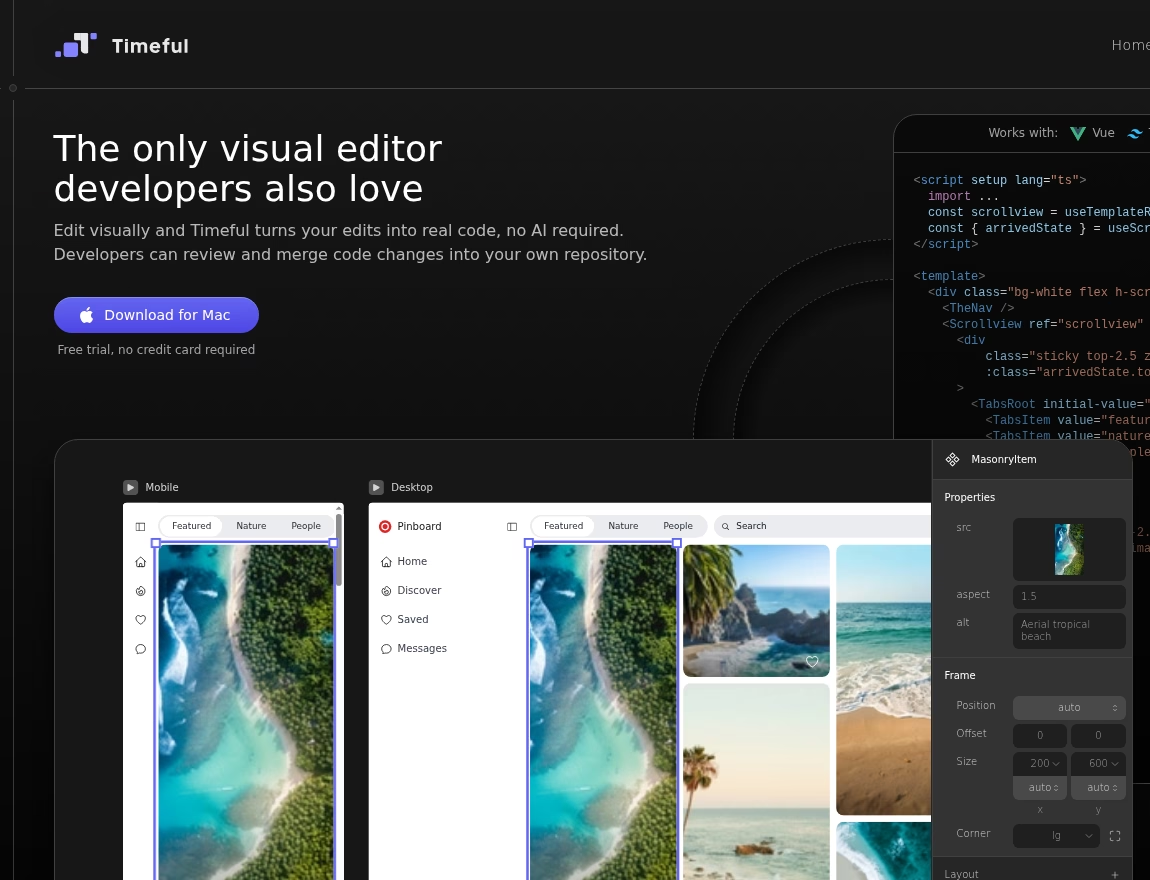
The usual design-to-development handoff produces two versions of the same interface: a layout in the design tool and an implementation someone builds later. Timeful tries to remove that split. Its canvas opens real Vue files, and a visual edit writes straight back to the code. A developer can change that same code in an IDE, and the design follows.

No tokens between an edit and a file

Despite the AI label in some launch directories, Timeful is not an AI app generator. The vendor says it uses deterministic algorithms, with unlimited edits rather than a token allowance. It also says changes are kept small, existing formatting is preserved, and only the Vue template is modified. Script logic stays untouched. Those are product claims reviewed from the official site, not measurements from a hands-on trial.

Local files, ordinary Git

The project lives

Timeful: when the design file is already the code

The usual design-to-development handoff produces two versions of the same interface: a layout in the design tool and an implementation someone builds later. Timeful tries to remove that split. Its canvas opens real Vue files, and a visual edit writes straight back to the code. A developer can change that same code in an IDE, and the design follows.

No tokens between an edit and a file

Despite the AI label in some launch directories, Timeful is not an AI app generator. The vendor says it uses deterministic algorithms, with unlimited edits rather than a token allowance. It also says changes are kept small, existing formatting is preserved, and only the Vue template is modified. Script logic stays untouched. Those are product claims reviewed from the official site, not measurements from a hands-on trial.

Local files, ordinary Git

The project lives on your device. Designers and developers can push, pull and review the same Git repository, and cancelling does not take the code away. That is the useful distinction: production code is the working format, not a special export you request after the design is finished.

There is still room for AI in this workflow, but it is separate. An agent with access to the local folder can edit the standard Vue and Tailwind files; Timeful updates the design when those files change. You keep your choice of agent and your own code tools.

The stack restrictions matter

This is a focused editor, not a universal website builder. The documented stack is Vue 3 composition API Single-File-Components and Tailwind CSS 3. Vite setups and plugins work, as does Nuxt. React does not. Custom Tailwind configurations and Tailwind plugins do not work either. The difference between Vite plugins and Tailwind plugins is worth checking before bringing an existing project over.

There is no direct Figma import. A Figma-like interface may feel familiar, but an existing design still needs rebuilding or an external conversion to Vue. Complex behavior stays with developers in their code editor.

Pay for the canvas, not the whole team

Standard costs $19 per month per editor, and Enterprise $29, plus local taxes. Both publish unlimited files, projects and edits. Only people using the visual canvas need licences; developers reviewing or editing the files in their own IDE do not need paid seats. A seven-day trial requires no card. After it ends, visual editing pauses but your files remain in place.

Ashley Richmond’s editorial view

The appeal is less about generating a website quickly and more about keeping design work close to implementation. For a Vue and default-Tailwind team, the local code and Git model is a thoughtful alternative to repeated handoffs. For React teams or heavily customized Tailwind projects, the compatibility gap is decisive. My provisional desk-research score is 4.0/5.

Desk-research disclosure: Official product and pricing pages reviewed September 30, 2026. The app was not installed or used; no account was created and no purchase was made.

Who it's for

Best for

  • Designers and developers sharing a Vue 3 and Tailwind CSS 3 codebase
  • who want visual layout edits without a separate design-to-code handoff.

Not ideal for

  • React teams
  • projects using custom Tailwind configurations or plugins
  • teams expecting direct Figma imports
  • and people who want an AI app generator.

How we tested

Ashley Richmond desk research September 30, 2026. Official product page https://www.timeful.io/ and pricing https://www.timeful.io/pricing reviewed; app not installed or used, no account created, no purchase. Compatibility documented: Vue 3 composition API Single-File-Components and Tailwind CSS 3; Vite plugins and Nuxt supported, React and custom Tailwind configurations/plugins not supported. Local-first, minimal-diff and production-ready descriptions are vendor claims, not independently measured. Pricing: Standard $19/month/editor, Enterprise $29/month/editor plus local taxes; seven-day trial without a card; no free plan published. Company Timeful B.V. from footer; founded year, headquarters, founders, team size, support address and social accounts left blank as unverified. Provisional desk-research scores, not hands-on ratings. Mapping: primary code-editors (local visual IDE writing Vue files), secondary ui-ux-design; mac platform (official Download for Mac); industry saas-tech; use cases design-creative, development, collaboration. No named integration chips checked: plain Git is not a documented GitHub-specific integration. Media: official-site header logo, hero and two canvas views (property inspector and responsive breakpoint demonstration), captured October 1, 2026. Product and pricing text reviewed September 30, with macOS download button confirmed October 1.

At a glance

PricingPaid Subscription
Free planNo
Free trialYes (7 days)
Pricing pageView pricing
PlatformsmacOS
APINo
CompanyTimeful B.V.
Apps Insight Score38/100
ImplementationMedium
Learning curveIntermediate

Why this app scored 38/100

Editorial Review 21/30
  • Product quality 8/10 8/10
  • Ease of use 3/5 3/5
  • Feature depth 3/5 3/5
  • Innovation 4/5 4/5
  • Value for money 2/3 2/3
  • Recommendation confidence 1/2 1/2
Trust & Verification 4/25
  • AppsInsight badge installed Badge not installed 0/15
  • HTTPS website HTTPS 1/1
  • Business support email Missing 0/1
  • Privacy policy published Provided 2/2
  • Terms of service published Provided 1/1
  • Security certifications None listed 0/2
  • Knowledge base / help center Missing 0/2
  • Social profiles linked 0 profiles linked 0/1
Community 0/20
  • Verified reviews & rating 0 reviews (5 needed) 0/15
  • Recent reviews No reviews yet 0/5
Product Profile 10/20
  • Detailed description 485 words 3/3
  • Screenshots 2 screenshots 1/3
  • Demo video No demo video 0/2
  • FAQ 6 items 1/2
  • Feature list 8 items 1/2
  • Pricing published Plan tiers published 3/3
  • Pros & cons Pros & cons listed 1/1
  • Integrations 0 integrations 0/2
  • API available No 0/1
  • Company details 1 of 3 details filled 0/1
Freshness 3/5
  • Listing recently updated Updated 0 days ago 3/3
  • Recent changelog entry No changelog entries 0/2

Editorial points are assigned by AppsInsight editors and cannot be purchased or influenced.

Built for

Key features

Two-way visual code editing
Design changes write directly to Vue files. Changes made to the code update the canvas, with no export step between the two.
Local-first projects
Projects live in a folder on your device and in your own version control. The vendor says source code is not stored on its servers.
Git collaboration
Designers and developers work on the same codebase, using existing commit, push and pull workflows instead of a separate handoff format.
Deterministic edits, no AI credits
The editor uses predictable algorithms rather than an AI model. Published plans allow unlimited edits, files and projects without token metering.
Layout and style controls
Visual controls cover colors, spacing, typography and layout, including freeform resizing and auto-layout frames.
Responsive states side by side
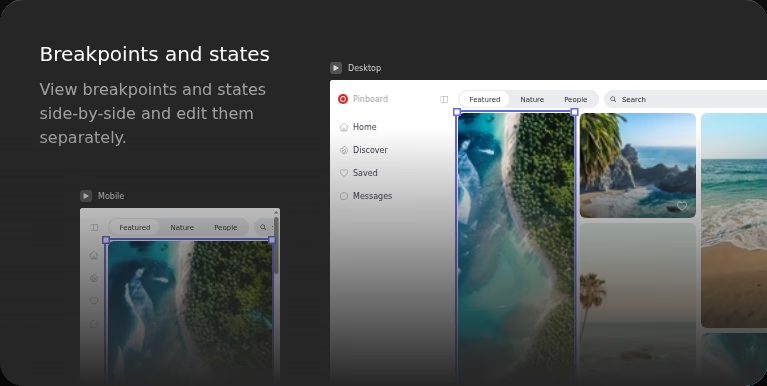
Breakpoints and states can be viewed side by side and edited separately on the canvas.
Vue, Tailwind, Vite and Nuxt
Supports Vue 3 composition API Single-File-Components and Tailwind CSS 3. The FAQ says Vite setups/plugins and Nuxt work; custom Tailwind configurations/plugins do not.
Works alongside coding agents
Any agent with access to the local project folder can edit the standard Vue and Tailwind files. Timeful follows those code changes; it is not itself an AI generator.

Key benefits

  • Keep layout and implementation in the same files rather than rebuilding a static design in code.
  • Retain the code and designs after cancelling; there is no proprietary export format to recover.
  • Pay for people using the visual canvas, not developers who only review or edit code in their own IDE.
  • Avoid per-edit token charges while leaving your normal Git and coding-agent workflows in place.

Pricing

Paid Subscription7-day trial

Standard

19 /mo

  • For individuals and small teams. $19/month per editor plus local taxes. Unlimited files
  • projects and edits; collaboration via Git; no token charges. Developers using their own tools need no editor licence.

Enterprise

29 /mo

  • For medium to large organizations. $29/month per editor plus local taxes. Includes Standard features; the vendor invites organizations to discuss their needs
  • but does not publish specific extra entitlements.

View official pricing

Pros & Cons

Pros

  • Standard Vue and Tailwind files remain the source of truth, with local storage and ordinary Git workflows.
  • The vendor documents concrete compatibility limits, including unsupported React and custom Tailwind setups.
  • Predictable per-editor pricing with unlimited edits, files and projects, and a seven-day card-free trial.
  • Developers using their own tools do not need paid viewer or developer seats.

Cons

  • Narrow stack support: Vue 3 composition API and Tailwind CSS 3 only; React is not supported.
  • Custom Tailwind configurations and Tailwind plugins are not supported, even though Vite plugins are.
  • No direct Figma import and no built-in AI generation; existing design layers need rebuilding or an external conversion workflow.
  • Logic stays in the code editor, and every person using the visual canvas needs a paid editor seat after the trial.

Screenshots & media

User reviews

No reviews yet. Be the first to review this app.

Write a review

Already have an account? Log in to track your reviews.

Frequently asked questions

Is Timeful an AI app builder?
No. The editor uses deterministic algorithms to turn visual edits into code. You can separately point an AI agent at the local project folder, but that agent and its costs are outside Timeful.
Which frameworks does Timeful support?
Vue 3 with the composition API in Single-File-Components and Tailwind CSS 3. The official FAQ says Vite setups/plugins and Nuxt work. React and custom Tailwind configurations/plugins are not supported.
How much does it cost?
Standard is $19/month per editor and Enterprise $29/month per editor, plus local taxes. Only people editing on the visual canvas need a licence; developers using their own IDE do not need paid seats. There is a seven-day trial without a credit card, not a published permanent free plan.
Where does my source code live?
In a local project folder and your own version control. The vendor says it does not store source code on its servers. Git commits, pushes and pulls use your existing workflow.
Can I import Figma designs?
Not directly. Timeful works on Vue files, not static design layers. The vendor suggests exporting Vue code using an external Figma plugin or rebuilding components with the Figma file as a reference.
What happens when the trial ends or I cancel?
After seven days, visual editing pauses until you subscribe, but your local files remain untouched. Cancellation keeps access through the current billing cycle; code you already created remains yours.