
Enterprise AI agents are changing how businesses work, decide, and grow in 2026. We see companies moving away from basic tools to smarter systems that can handle real work on their own. These agents can talk to customers, manage tasks, study data, and even suggest better decisions without constant human help. This shift is not small, it is changing how teams operate every single day.
Think of it like this: instead of hiring more people for every new task, businesses are building intelligent systems that can learn and improve over time. From handling support queries to managing operations, these agents are becoming a core part of modern companies.
We also notice a strong trend where businesses are not just experimenting anymore, they are fully investing in Enterprise AI Agents because they bring speed, accuracy, and scale. Teams can now focus on bigger goals while AI takes care of repetitive and time-consuming work.
In this guide, we will walk together through everything you need to know—from basic ideas to advanced building steps, so you can confidently create AI agents that actually work in real business situations.
What Are Enterprise AI Agents?

Enterprise AI Agents are smart software systems that can perform tasks, make decisions, and improve over time with very little human input.
In simple words, these are not just chatbots or tools that follow fixed rules. They can understand what is happening, choose what to do next, and complete tasks from start to finish. That is what makes them powerful for real business use.
How Enterprise AI Agents Are Different from Basic AI Tools
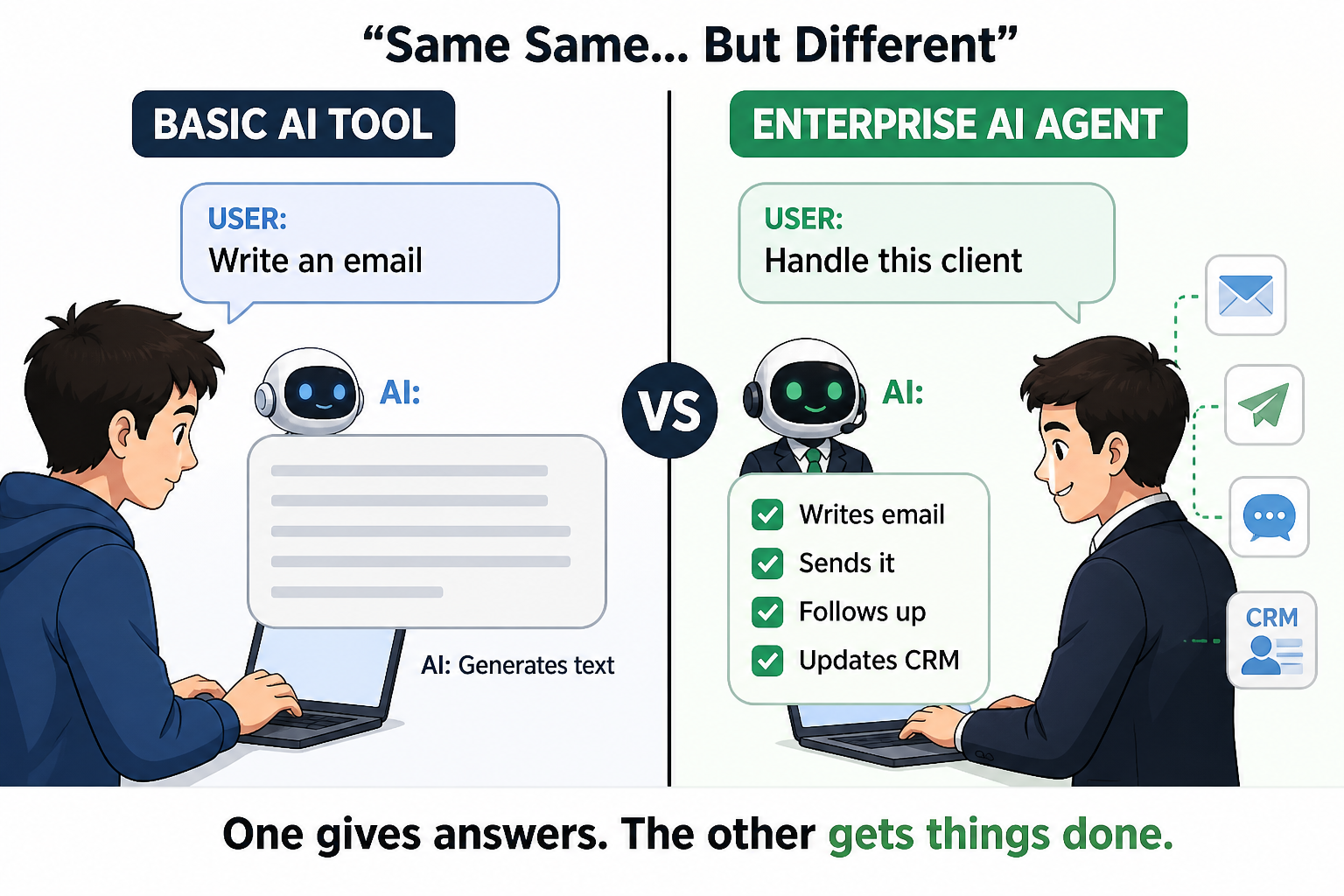
Basic AI tools usually do one thing. For example, a chatbot may only answer questions, or a tool may only generate text. But enterprise-level agents go much further.
They can:
- Understand complex instructions
- Work across multiple systems
- Take actions like sending emails, updating data, or triggering workflows
- Learn from past results and improve
This means they are not just helping—they are actually doing work.
Simple Example to Understand
Let’s say a customer sends a message asking about an order. A basic AI tool will reply with a pre-written answer. But an AI agent will:
- Check the order status
- Look into delivery updates
- Respond with real-time information
- Offer help if something is wrong
All of this happens automatically, without human effort.
Where Businesses Are Using Them
Companies are already using these agents in many areas:
- Customer support
- Sales follow-ups
- Data analysis
- Internal operations
- HR processes
This is why you often hear about Enterprise AI Agents Transforming Operations across industries. They reduce manual work and help teams move faster.
Many businesses are now experimenting with systems that combine multiple capabilities. These are often called Smart AI Agents, where each agent handles a specific task but works together as one system. This creates a powerful setup that can manage complex workflows easily.
The real value of these agents is simple:
- They save time
- They reduce human error
- They scale easily as your business grows
Instead of adding more people for every new task, companies are building systems that can handle thousands of actions at once. That’s why Enterprise AI Agents are becoming a core part of how modern businesses operate.
Why Businesses Are Investing in AI Agents
Businesses are putting serious focus on AI agents because they solve real problems that slow down growth.
We see teams struggling with repetitive work, delayed decisions, and rising costs. AI agents step in and handle these challenges in a simple and scalable way. They don’t get tired, they don’t miss steps, and they can work all the time.
1) They Save Time Across Teams
One of the biggest reasons companies invest in AI agents is time. Think about daily tasks like replying to emails, updating systems, checking reports, or handling customer queries. These tasks take hours every day. AI agents can do them in seconds. This gives teams more time to focus on strategy, creativity, and growth.
2) They Reduce Operational Costs
Hiring and training people for every task is expensive. AI agents reduce this need by handling large volumes of work without increasing headcount.
If you are thinking about the cost to build an AI app, it may look high at the start, but over time, businesses save much more by reducing manual work and errors.
3) They Improve Customer Experience
Customers expect quick and accurate responses. AI agents help businesses deliver this without delays.
They can:
- Reply instantly
- Provide accurate information
- Handle multiple users at once
- Work 24/7
This leads to better customer satisfaction and stronger relationships.
4) They Help in Better Decision-Making
AI agents can study large amounts of data quickly. They can find patterns, detect issues, and suggest actions. Instead of guessing, businesses can make decisions based on real insights. This reduces risk and improves results.
5) They Scale Without Limits
When a business grows, work increases. Normally, this means hiring more people. But AI agents scale easily. Whether there are 100 users or 100,000 users, the system can handle the load without slowing down.
6) Strong Support from AI Solution Providers
Today, many Top AI solutions Companies are helping businesses build and deploy AI agents faster. They provide tools, platforms, and ready-to-use solutions that reduce development time.
At the same time, some of the best Agentic AI Companies are creating advanced systems that can act independently and handle complex workflows. This is pushing innovation even further.
Types of AI Agents Used in Enterprises
Not all AI agents do the same work. Different types are built for different business needs. We usually divide them based on what they do and how they help teams. Once you understand these types, it becomes much easier to decide what kind of agent your business actually needs.
1. Task Automation Agents
These are the most common and easiest to start with.
They handle repetitive work like:
- Data entry
- Email responses
- Report generation
- Updating systems
Instead of spending hours on these tasks, teams can let the agent handle everything in the background. Many businesses start here because the results are quick and clear.
2. Customer Support Agents
These agents interact directly with customers. They can:
- Answer questions
- Resolve basic issues
- Track orders
- Guide users
Unlike simple chatbots, these agents understand context and provide better responses. Some of the Best AI Agents That Can Actually Do Tasks for You fall into this category because they don’t just reply—they take action.
This improves customer experience without increasing support teams.
3. Data Analysis Agents
Data is everywhere, but understanding it takes time.
These agents:
- Study large datasets
- Find patterns
- Create reports
- Suggest insights
Instead of waiting for manual reports, businesses get real-time updates and smarter decisions.
4. Decision-Making Agents
These agents go one step further. They don’t just analyze—they suggest or even take decisions based on rules and data.
For example:
- Approving transactions
- Detecting fraud
- Optimizing pricing
- Managing inventory
They help businesses move faster with less risk.
5. Multi-Agent Systems
This is where things get more powerful. Instead of one agent doing everything, multiple agents work together. Each agent handles a specific task, but they communicate with each other.
For example:
- One agent handles customer queries
- Another checks inventory
- Another processes orders
Together, they create a complete workflow. This is where we see real innovation from Leading Enterprise Agentic AI Development Companies, as they build systems where agents collaborate like a real team.
6. Workflow Automation Agents
These agents manage complete business processes from start to end. They can:
- Trigger actions based on events
- Move data across systems
- Track progress automatically
For example, when a new lead comes in:
- The agent assigns it
- Sends a follow-up email
- Updates CRM
- Notifies the sales team
Everything happens without manual steps.
7. Autonomous AI Agents
These are the most advanced ones. They can:
- Set goals
- Plan steps
- Execute tasks
- Learn from results
They act almost like a digital employee.
This is the future of Enterprise AI Agents, where systems don’t just assist—they operate independently. You don’t need all types at once.
Start by asking:
- What task takes the most time?
- Where do errors often happen?
- Which process slows down growth?
Pick one area and build an agent for it. Then slowly expand.
Want to know? Cost to build an AI agent
Key Components of an Enterprise AI Agent
To build something powerful, we need to understand what sits behind it. An enterprise AI agent is not just one tool. It is a combination of different parts working together smoothly. When all these parts are strong, the agent performs well and gives real results.
Let’s break it down in a very simple way.
1. Data Layer (The Foundation)
Everything starts with data. AI agents learn and act based on the data they receive. If the data is clean and well-organized, the agent works better. If the data is messy, results will also be weak.
This layer includes:
- Customer data
- Business data
- Historical records
- Real-time inputs
Good data means better decisions. This is the base of all Enterprise AI Agents.
2. AI Models (The Brain)
This is where the intelligence comes from. AI models help the agent:
- Understand inputs
- Make decisions
- Generate responses
- Learn over time
These models can be trained for specific tasks like language understanding, prediction, or automation. Choosing the right model is very important because it directly affects performance.
3. APIs and Integrations (The Connectors)
AI agents don’t work alone. They need to connect with other tools and systems. APIs help the agent:
- Fetch data from systems
- Send updates
- Trigger actions
- Work across platforms
For example, an agent may connect with:
- CRM systems
- Payment tools
- Email platforms
- Databases
Without integrations, the agent cannot take real action.
4. Decision Engine (The Logic Layer)
This is where the agent decides what to do next. The decision engine:
- Follows rules
- Uses AI predictions
- Chooses actions based on goals
It helps the agent move from “understanding” to “doing”.
For example: If a customer is unhappy → offer support → escalate if needed.
5. User Interface (The Interaction Layer)
This is how users interact with the agent. It can be:
- Chat interfaces
- Dashboards
- Voice systems
- Mobile apps
A simple and clean interface makes it easy for teams and customers to use the agent without confusion.
6. Memory and Learning System
A smart agent remembers and improves. This component allows the agent to:
- Store past interactions
- Learn from results
- Improve future actions
Over time, the agent becomes more accurate and helpful.
7. Security and Compliance
This is critical, especially for enterprise use. AI agents often handle sensitive data, so security must be strong. This includes:
- Data protection
- Access control
- Compliance with regulations
- Secure APIs
Without this, businesses can face serious risks.
8. Monitoring and Feedback System
Once the agent is live, the work is not over. We need to track:
- Performance
- Errors
- User feedback
- Outcomes
This helps in improving the system continuously. Think of it like a team:
- Data gives input
- AI model understands
- Decision engine plans
- Integrations take action
- Interface shows results
When all parts work together, the agent becomes powerful and reliable. Building a strong AI agent means building each of these components carefully. If one part is weak, the whole system can struggle.
Looking for? How to Choose the Right Agentic AI Solution for Your Business
Step-by-Step Process to Build an AI Agent (Detailed Guide)
Building an AI agent becomes much easier when we follow a clear path. We don’t rush. We plan, build, test, and improve step by step. This is how real businesses create systems that actually work.
Let’s go deeper into each step so you understand exactly what to do.
1. Define the Business Goal Clearly
This is the most important step. If the goal is not clear, everything else will feel confusing.
We need to ask:
- What exact problem are we solving?
- Who will use this agent?
- What result do we expect?
For example, instead of saying “we want automation,” say:
“We want to reduce customer support response time by 50%.”
This makes the goal measurable and clear. Also, keep the first goal small. Don’t try to automate the whole business at once. Start with one problem and solve it well.
2. Choose the Right Use Case
Not every task needs AI. We choose a use case where AI can actually make a difference. A good use case usually has:
- Repetitive tasks
- High volume of work
- Clear patterns or rules
- Available data
Examples of strong use cases:
- Customer support handling
- Lead qualification
- Invoice processing
- Report generation
If the task is too random or has no pattern, AI may struggle.
3. Collect and Prepare Data
Data is the fuel of AI. Without good data, the agent cannot perform well. This step includes:
- Collecting data from different sources (CRM, emails, databases)
- Cleaning the data (removing duplicates, fixing errors)
- Structuring it properly (organized format)
We also need to make sure:
- Data is relevant to the task
- Data is updated regularly
- Sensitive data is handled securely
Many projects fail here because data is ignored or rushed.
4. Select the Right AI Model
Now we choose how the agent will think. Different tasks need different types of models:
- For conversations → language models
- For predictions → machine learning models
- For automation → rule-based + AI combination
We don’t always need the most advanced model. We need the most suitable one.
Also, consider:
- Accuracy
- Speed
- Cost
- Scalability
A balanced choice is always better than an overly complex one.
5. Design the Workflow
Before building, we map out how everything will work. This is like drawing a flow of actions.
For example:
- User sends a request
- Agent understands it
- Agent checks data
- Agent decides action
- Agent responds or triggers a task
This step helps avoid confusion during development. We can use simple flowcharts or diagrams to plan this clearly.
6. Build the AI Agent
Now we start turning the plan into reality. This step includes:
- Setting up the AI model
- Writing logic for decision-making
- Connecting APIs and tools
- Building the interface (chat, dashboard, etc.)
At this stage, the agent may not be perfect, and that’s okay. Focus on getting a working version first.
7. Test the Agent Carefully
Testing is where we find problems before users do. We test different scenarios:
- Normal cases (expected inputs)
- Edge cases (unexpected inputs)
- Error handling
- Performance under load
We also check:
- Is the response accurate?
- Is the action correct?
- Is the system stable?
Fix issues step by step. Don’t ignore small errors—they grow later.
8. Deploy the Agent
Now the agent is ready to go live. We can deploy it on:
- Company website
- Mobile apps
- Internal dashboards
- Cloud platforms
Start with a small group of users if possible. This helps in getting real feedback without big risks.
9. Monitor Performance
After deployment, we don’t stop. We observe. Track key things like:
- How accurate is the agent?
- How fast does it respond?
- Are users satisfied?
- Are tasks completed correctly?
We also monitor errors and failures. This gives us a clear picture of what needs improvement.
10. Improve and Scale
This is where the real growth happens. We:
- Update the data regularly
- Improve model performance
- Add new features
- Expand to more use cases
Over time, a small agent can grow into a full system that handles multiple business operations. This is how companies build strong Enterprise AI Agents that support real work at scale.
Start small → Build fast → Learn quickly → Improve continuously
When we follow this process properly, we avoid confusion, reduce risk, and build systems that actually deliver results—not just ideas.
Tech Stack You Need to Build an Enterprise AI Agent in 2026
To build a strong AI agent, we need the right tools. The tech stack is simply the set of technologies we use to build, run, and manage the system.
We don’t need everything at once. We choose tools based on our goal, budget, and scale. Let’s break it down in a simple way.
1. Programming Languages (The Base)
These are used to build the logic of the agent. The most common ones are:
- Python → best for AI and machine learning
- JavaScript → useful for web-based agents
- Java or Go → used in large enterprise systems
Python is the most popular because it has strong AI libraries and is easy to work with.
2. AI Frameworks and Libraries (The Brain Tools)
These help us build and train AI models faster. Popular options include:
- TensorFlow → for machine learning models
- PyTorch → flexible and widely used
- LangChain → useful for building AI agents and workflows
- Hugging Face → for ready-to-use models
These tools reduce development time and make building easier.
3. Large Language Models (LLMs)
These power the intelligence of many AI agents, especially for text and conversations. Examples include:
- Open-source models
- API-based models (cloud providers)
We choose based on:
- Accuracy
- Cost
- Speed
- Data privacy
For enterprise use, many companies prefer secure and customizable options.
4. Cloud Platforms (The Infrastructure)
AI agents need computing power and storage. Cloud platforms provide this easily.
Common choices:
- AWS
- Google Cloud
- Microsoft Azure
They help with:
- Hosting models
- Scaling systems
- Managing data
Cloud makes it easier to grow without heavy hardware investment.
5. Databases (The Memory Storage)
AI agents need to store and retrieve data quickly. Types of databases:
- SQL databases → structured data
- NoSQL databases → flexible data
- Vector databases → for AI search and embeddings
Vector databases are especially important for modern AI agents because they help in understanding context.
6. APIs and Integration Tools
These connect the AI agent with other systems. For example:
- CRM tools
- Payment systems
- Email services
- Internal software
Without integrations, the agent cannot take real action.
7. Frontend and Interface Tools
This is how users interact with the agent. We can use:
- Web apps
- Mobile apps
- Chat interfaces
- Dashboards
The goal is to keep it simple and easy to use.
8. DevOps and Deployment Tools
These help us launch and manage the system. Tools include:
- Docker → for packaging applications
- Kubernetes → for scaling systems
- CI/CD pipelines → for updates
They make deployment smooth and reliable.
9. Security Tools
Security is very important in enterprise systems. We need:
- Authentication systems
- Data encryption
- Access control
- Monitoring tools
This ensures data is safe and compliant.
10. Monitoring and Analytics Tools
Once the agent is live, we need to track performance. These tools help us:
- Monitor errors
- Track usage
- Measure success
- Improve performance
Without monitoring, we won’t know what is working. We don’t choose tools just because they are popular.
We choose based on:
- Project size
- Budget
- Team skills
- Business needs
Start simple. As the system grows, upgrade the stack.
- Language builds the logic
- Framework builds intelligence
- Cloud runs the system
- Database stores memory
- APIs connect everything
The right tech stack makes development faster, smoother, and more scalable. It is not about using more tools—it is about using the right ones.
How Much Does it Cost to Build an AI Agent
When we talk about building AI agents, the first thing that comes to mind is budget. Let’s keep it simple, there is no single fixed price. The cost depends on what you want the agent to do, how smart it needs to be, and how big your system is.
But we can still understand it clearly with real numbers and breakdowns.
1. Approximate Cost Based on Project Size
To give you a practical idea, here are common cost ranges we see in real projects:
- Basic AI Agent (₹4,00,000 – ₹16,00,000)
Handles simple tasks like chat support, basic automation, or data entry. - Mid-Level AI Agent (₹16,00,000 – ₹65,00,000)
Includes integrations, better decision-making, and multi-step workflows. - Advanced Enterprise AI System (₹65,00,000 – ₹2,50,00,000+)
Full-scale systems with multiple agents, automation across departments, and high-level intelligence.
This gives a clear picture of the cost to build an AI app depending on your business needs.
2. What Drives the Cost Up or Down
Now let’s understand why the cost changes so much.
Complexity of the System: A simple chatbot is quick to build. But a system that can analyze data, make decisions, and automate workflows takes more time and effort.
Features You Want: Each feature adds to the cost. For example:
- Real-time data processing
- Multi-system integration
- Custom dashboards
- Automation flows
More features = more development hours.
Data Preparation Effort: If your data is already clean and organized, you save money.
If not, cleaning and structuring data can take a lot of time.
AI Model Selection:
- Ready-to-use models → lower cost
- Custom-trained models → higher cost but more control
Integrations with Other Tools: Connecting your agent with CRM, payment systems, or internal tools increases complexity and cost.
3. Full Cost Breakdown (Where Money Is Spent)
To understand better, let’s look at how the budget is usually divided:
Planning & Strategy (₹1,00,000 – ₹5,00,000)
- Defining goals
- Selecting use case
- Designing workflows
Development (₹5,00,000 – ₹80,00,000+)
- Building AI models
- Writing logic
- Creating integrations
Testing & Optimization (₹2,00,000 – ₹10,00,000)
- Fixing errors
- Improving accuracy
- Performance testing
Deployment (₹1,00,000 – ₹8,00,000)
- Cloud setup
- System launch
- Initial scaling
Maintenance & Updates (₹50,000 – ₹5,00,000/month)
- Monitoring
- Improvements
- Feature updates
Many businesses ignore maintenance, but it is important for long-term success.
Smart Ways to Control Cost
We always suggest a simple approach:
- Start with one problem, not everything
- Build a small working version first
- Use existing tools and models where possible
- Improve step by step
This reduces risk and keeps your investment safe. You can either build in-house or hire experts.
Many companies choose to work with experienced teams like AI solutions Companies because:
- They build faster
- They avoid common mistakes
- They already have tested systems
This is especially useful when you want to scale quickly. The cost may look high at first, but the value is long-term.
You save time, reduce manual work, and improve efficiency across your business. That’s why more companies are investing in Enterprise AI Agents as a core part of their growth strategy.
Top Use Cases Across Industries
AI agents are not limited to one industry. We see them being used everywhere because every business has tasks that can be automated, improved, or scaled. Let’s look at how different industries are using them in real situations.
1. Healthcare
In healthcare, time and accuracy are very important. AI agents help reduce manual work and support faster decisions.
They are used for:
- Managing patient records
- Scheduling appointments
- Assisting doctors with reports
- Answering basic patient queries
For example, an agent can collect patient symptoms, organize data, and help doctors focus on treatment instead of paperwork. This improves efficiency and reduces workload for staff.
2. Finance
Finance requires speed, accuracy, and strong decision-making. AI agents help in:
- Fraud detection
- Transaction monitoring
- Risk analysis
- Customer support
For example, an agent can track unusual transactions in real time and flag them instantly. This reduces risk and improves security. Many banks and fintech companies rely heavily on these systems today.
3. Retail and E-commerce
Retail businesses deal with large volumes of customers and orders. AI agents help with:
- Product recommendations
- Order tracking
- Customer support
- Inventory management
For example, when a customer visits a website, an agent can suggest products based on past behavior. This increases sales and improves user experience.
4. Logistics and Supply Chain
This industry involves many moving parts. AI agents help manage everything smoothly. They are used for:
- Route optimization
- Shipment tracking
- Demand forecasting
- Warehouse management
For example, an agent can suggest the fastest delivery route based on traffic and weather conditions. This reduces delays and improves efficiency.
5. SaaS and Tech Companies
Software companies use AI agents to improve both internal and customer-facing processes. They help with:
- Customer onboarding
- Technical support
- Bug tracking
- Usage analytics
For example, an agent can guide a new user step by step inside a product, reducing the need for manual support.
Challenges You May Face when Building AI Agents
Building AI agents is powerful, but it is not always smooth. We need to understand the challenges early so we can handle them the right way.
Let’s go through the most common problems businesses face and how we can deal with them.
1. Data Quality Issues
AI agents depend on data. If the data is not good, the results will also not be good. Common problems:
- Missing data
- Incorrect data
- Unstructured data
For example, if customer data is messy, the agent may give wrong answers or take wrong actions.
How to handle it:
- Clean data before using it
- Keep data updated
- Use proper data structure
Good data is the base of strong Enterprise AI Agents.
2. Integration with Existing Systems
Most businesses already use many tools like CRM, ERP, and internal software. The challenge is connecting the AI agent with all these systems.
Problems include:
- Different formats
- API limitations
- System compatibility issues
How to handle it:
- Use standard APIs
- Plan integrations early
- Test connections step by step
3. High Initial Investment
The starting cost can feel high, especially for small or mid-sized businesses. This includes:
- Development cost
- Infrastructure cost
- Skilled team cost
How to handle it:
- Start with a small project
- Build a minimum version first
- Scale after results
This reduces risk and keeps investment under control.
4. Lack of Skilled Talent
Building AI systems requires experienced developers, data experts, and engineers. Many businesses struggle to find the right team.
How to handle it:
- Train your existing team
- Hire experienced professionals
- Work with expert companies
This is why many businesses partner with the best Agentic AI Companies to get faster and better results.
5. Security and Privacy Concerns
AI agents often handle sensitive business and customer data. Risks include:
- Data leaks
- Unauthorized access
- Compliance issues
How to handle it:
- Use strong security systems
- Encrypt data
- Follow regulations
Security should never be ignored.
6. Over-Expectations from AI
Sometimes businesses expect AI to solve everything instantly. But AI is not magic. It needs:
- Proper setup
- Training
- Continuous improvement
How to handle it:
- Set realistic goals
- Start small
- Improve gradually
7. Maintenance and Continuous Improvement
Building the agent is just the beginning. Over time, the system needs:
- Updates
- Monitoring
- Performance improvements
If ignored, the agent may become outdated or less effective.
How to handle it:
- Track performance regularly
- Update models and data
- Keep improving features
Every challenge has a solution if we plan properly.
- Data → Clean it
- Systems → Connect them
- Cost → Start small
- Skills → Get the right support
- Security → Protect everything
Challenges are part of the process. When we understand them early, we can avoid mistakes and build stronger systems.
Best Practices for Building Scalable AI Agents
When we build AI agents, the goal is not just to make them work—it is to make them grow with the business. A small system should be able to handle bigger workloads over time without breaking.
Let’s go through the best practices that help us build strong and scalable systems.
1. Start Small, Then Scale Step by Step
One common mistake is trying to build everything at once. Instead:
- Start with one clear use case
- Build a simple working version
- Test results
- Expand gradually
This approach reduces risk and helps you learn faster.
2. Focus on Real Business Problems
Don’t build AI just because it sounds good. Always ask:
- What problem are we solving?
- How will this help the business?
When the focus is clear, the results are better.
3. Keep the System Simple
Complex systems are harder to manage and scale. We should:
- Avoid unnecessary features
- Keep workflows clean
- Build modular systems
Simple systems are easier to improve and expand.
4. Use Modular Architecture
Instead of building one large system, break it into smaller parts.
For example:
- One module for data
- One for decision-making
- One for integrations
This makes it easier to:
- Update parts without breaking everything
- Add new features
- Scale specific components
5. Plan for Scalability from Day One
Even if you start small, think about future growth. Make sure your system can handle:
- More users
- More data
- More tasks
Using cloud platforms and flexible architecture helps a lot here.
6. Continuous Learning and Improvement
AI agents should not stay the same. We need to:
- Update data regularly
- Improve models
- Learn from past performance
This is how the system becomes smarter over time.
7. Monitor Everything
Tracking performance is very important. We should monitor:
- Accuracy
- Speed
- Errors
- User feedback
This helps us fix issues quickly and improve the system.
8. Combine Human + AI Effort
AI should not replace humans completely—it should support them. Best results come when:
- AI handles repetitive tasks
- Humans handle complex decisions
This balance improves efficiency and quality.
9. Ensure Strong Security
As the system grows, risks also increase. We must:
- Protect data
- Control access
- Follow compliance rules
Security should always be part of the system, not an afterthought.
10. Work with the Right Experts
Building scalable systems requires experience. Many businesses collaborate with Leading Enterprise Agentic AI Development Companies to:
- Build faster
- Avoid mistakes
- Use proven methods
This can save both time and cost in the long run. Simple Way to Remember:
Start small → Keep it simple → Improve continuously → Scale smartly
How to Choose the Right Development Partner
Choosing the right partner is a very important step. A good partner can save time, reduce cost, and help you build a system that actually works. A wrong choice can lead to delays, poor results, and wasted money.
Let’s understand how to choose the right team in a simple way.
1. Look for Real Experience
Not every company that talks about AI has real experience.
We should check:
- Have they built AI agents before?
- Do they have real case studies?
- Have they worked with businesses like yours?
Experience matters because AI projects are not simple. A team that has done it before will avoid common mistakes.
2. Understand Their Approach
A good company will not jump into development immediately.
They will:
- Ask about your business goals
- Suggest the right use case
- Plan the workflow before building
If a company starts coding without understanding your problem, that is a warning sign.
3. Check Their Technical Skills
We need a team that understands:
- AI models
- Data handling
- System integrations
- Cloud infrastructure
Strong technical skills ensure the system is reliable and scalable.
4. Focus on Communication
Clear communication is very important.
The team should:
- Explain things in simple words
- Share progress regularly
- Be open to feedback
If communication is unclear, the project can easily go off track.
5. Ask About Scalability
We are not building just for today. We are building for the future.
Ask:
- Can the system handle growth?
- Can new features be added later?
- Is the architecture flexible?
This ensures your system does not need to be rebuilt later.
6. Check Post-Launch Support
The work does not end after launch.
A good partner will provide:
- Maintenance
- Updates
- Performance monitoring
Without support, the system can become outdated quickly.
7. Compare Cost vs Value
Don’t just choose the cheapest option. Instead, think:
- What value are they providing?
- Are they solving your problem properly?
Sometimes a slightly higher cost gives much better long-term results.
8. Watch for Red Flags
Be careful if a company:
- Promises instant results
- Does not explain their process
- Avoids sharing past work
- Ignores your business needs
These are signs of inexperience.
9. Consider Industry Leaders
Many businesses prefer working with proven teams like Leading Enterprise Agentic AI Development Companies because they bring:
- Experience
- Structured process
- Reliable delivery
This reduces risk and improves the success rate.
Right partner = Experience + Clear process + Strong support
Sum up
Enterprise AI agents are becoming a core part of how modern businesses work and grow.
We explored how to understand AI agents, how to build them step by step, and how to scale them the right way. The key idea is simple, start with a clear goal, use the right tools, and improve continuously as you grow. When done correctly, these systems save time, reduce cost, and make operations much smoother.
As you move forward, the next natural step is to explore how to design real-world workflows and automate them using AI. This will help you turn ideas into working systems that deliver real business value.
The sooner we start, the faster we learn, and that is what creates long-term advantage.