
Imagine trying to design eye-catching flyers day after day. It feels slow. It feels stressful. And sometimes, it costs more than it should. Now imagine finishing the same work in just minutes with a smart tool that understands your ideas. That is exactly how AI Flyer Generator Tools are changing design in 2026.
Today, AI is no longer just a trend. It is part of daily business life. In fact, studies show that more than 75% of businesses now use AI in some form to improve productivity and marketing efficiency. AI-powered design tools are a big reason for this shift. They help you create clean, professional flyers without design skills or long learning curves.
These AI tools do more than just place text and images. They suggest layouts. They pick colors. They adjust fonts. They even help match designs to your brand and audience. Because of this, small businesses, marketers, creators, and even beginners feel more confident with their designs.
As you read further, you will clearly understand how AI flyer tools work, why people are switching to them, and which options fit different business needs best. The goal is simple. We want to help you design faster, smarter, and with less effort.
About AI Flyer Generator Tools
AI Flyer Generator Tools are smart design apps that help you create flyers using artificial intelligence. They remove the hard parts of design and make the process simple for everyone. You do not need to be a designer. You do not need special skills. You just need an idea.

These tools work by asking a few basic questions. You tell them your purpose, business type, colors, or text. Then the AI does the heavy work. It builds layouts, selects fonts, adjusts spacing, and places images in the right spots. As a result, your flyer looks clean and professional in minutes.
What makes these tools special is how they learn from design trends. They follow modern styles. They understand balance and clarity. Because of this, your flyers feel updated and visually appealing. You stay competitive without spending hours on design work.
Another big benefit is speed. Traditional design can take hours or even days. With AI tools, you finish faster and move on to other important tasks. This helps businesses focus more on growth, sales, and customers.
Most importantly, AI Flyer Generator Tools give confidence. You feel comfortable creating marketing materials on your own. And that makes a big difference for small teams and busy creators.
What’s The Need for AI Flyer Generator Alternatives Apps?
Not every flyer tool works the same way. Some feel complex. Some feel limited. And some simply do not match what your business really needs. That is why many people look for an AI flyer generator alternative apps.
Traditional design tools often require time, practice, and patience. You may spend hours adjusting text, fixing alignment, or choosing colors. For busy business owners, this becomes frustrating. They want results, not long design sessions. AI-based alternatives solve this problem by doing the work faster and smarter.
Another reason people search for alternatives is flexibility. One tool may be great for marketing but weak for branding. Another may work well for social media but not for print flyers. By exploring different AI tools, you find options that fit your goals better.
Cost is also a major factor. Hiring designers or paying for complex software can be expensive. AI flyer alternatives offer affordable plans and even free options. This makes professional design accessible to small businesses and startups.
Most importantly, alternative apps give choice. You stay in control. You pick the tool that matches your style, budget, and workflow. That freedom is why AI flyer generator alternatives are in high demand today.
Looking for? AI Presentation Maker
How AI Flyer Generator Tools Work
AI Flyer Generator Tools work in a very simple and smart way. They are designed to help you get results quickly without confusion. You do not need to learn design rules. The tool guides you step by step.
First, you enter basic details. This usually includes your flyer’s purpose, business type, text content, and sometimes your brand colors. Some tools even ask about your target audience. This helps the AI understand what kind of design you need.
Next, the AI processes your input. It uses pre-trained design models and templates. It studies layout balance, font pairing, spacing, and color contrast. Then it creates multiple flyer options for you. Each design follows modern design standards.
After that, you can customize the flyer. You can change text, images, colors, or layouts with simple clicks. The AI often suggests improvements in real time. This saves effort and reduces mistakes.
Finally, you export your flyer. Most tools support print-ready files and digital formats for social media or ads. Because of this smooth flow, AI Flyer Generator Tools feel easy, fast, and stress-free.
Key Benefits of Using AI Flyer Generator Tools in 2026
AI Flyer Generator Tools are popular for a reason. They make flyer design faster, easier, and more affordable. Below are the key benefits explained clearly.
Saves Time and Effort
These tools work fast. You enter your content, and the AI creates designs in minutes. This helps you avoid long design hours and focus on important work.
Reduces Design Costs
You no longer need to hire designers for every flyer. Many AI tools offer budget-friendly plans. Some even provide free options for small projects.
Easy for Beginners
You do not need design skills. The interface is simple. The AI guides you at every step. Because of this, anyone can create professional-looking flyers.
Keeps Brand Consistency
AI tools help maintain the same fonts, colors, and styles across all designs. This keeps your brand looking clean and professional everywhere.
Improves Creative Output
The AI suggests layouts and ideas you may not think of. This helps you explore new styles and improve design quality with less effort.
1. Microsoft Designer – Best for Productivity & Microsoft Users
Microsoft Designer is built for people who want quick and clean designs without extra effort. It feels familiar, especially if you already use Microsoft tools like Word or PowerPoint. The tool uses AI to turn simple text ideas into polished flyer designs within minutes.

You start by describing what you want. The AI then suggests layouts, images, and styles that match your message. It keeps everything simple and organized. Because it connects well with Microsoft’s ecosystem, you can easily reuse content from other apps. This saves time and reduces repeated work.
Microsoft Designer focuses on clarity and balance. It helps you create flyers that look professional but not overdone. The tool is great for daily business needs like promotions, events, or announcements. You stay productive without feeling overwhelmed by design choices.
Overall, it works best when you want speed, consistency, and smooth workflow. You design, edit, and export without friction.
Features
- AI-powered flyer and graphic creation
- Simple text-to-design workflow
- Built-in image suggestions
- Easy customization tools
- Smooth integration with Microsoft apps
Best For
- Office users
- Small businesses
- Professionals who value productivity
2. LightX Editor – Best for Photography & Creative Businesses
LightX Editor is a powerful AI-based design tool made for people who care deeply about visuals. It is especially useful for photographers and creative businesses that want strong, eye-catching flyers. The tool focuses a lot on image quality, colors, and creative freedom.

With LightX Editor, you can turn photos into professional flyers without complex steps. The AI helps enhance images, remove backgrounds, and adjust lighting automatically. This makes your flyers look polished and modern. At the same time, you stay in control of the final look.
The interface feels smooth and beginner-friendly. You can experiment with styles, overlays, and text without feeling lost. Because of this, creative users enjoy the process instead of feeling limited by templates.
LightX Editor is a great choice when visuals matter most. If your business depends on strong images and creative appeal, this tool fits naturally into your workflow.
Features
- AI photo enhancement tools
- Background removal and replacement
- Creative text and overlay options
- Custom filters and effects
- Easy flyer export formats
Best For
- Photographers
- Creative agencies
- Visual-focused brands
3. Phot.AI – Best for E-Commerce & Online Sellers
Phot.AI is designed for sellers who want clean, high-converting flyers without extra effort. It works very well for e-commerce brands, online shops, and product-based businesses. The main focus here is product visuals and conversion-friendly design.
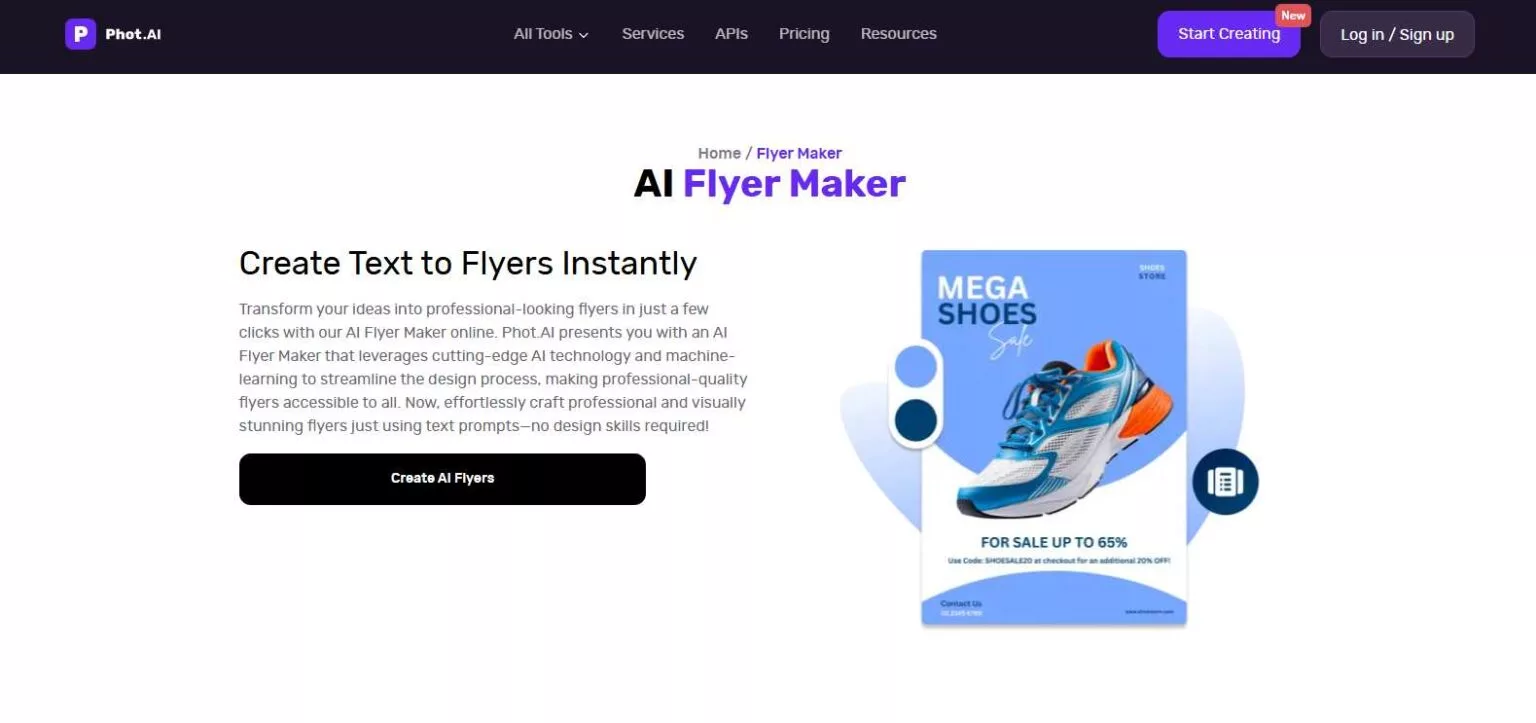
You upload product images, add short text, and the AI handles the rest. It removes backgrounds, improves lighting, and places products into ready-made flyer layouts. This saves a lot of time, especially when you create flyers for sales, discounts, or new launches.
Phot.AI keeps things simple. You do not get lost in tools or menus. The AI suggests designs that look professional and sales-focused. Because of this, your flyers feel clean and trustworthy to customers.
If you sell online and want flyers that highlight products clearly, this tool fits perfectly into your workflow.
Features
- AI background removal
- Product-focused flyer templates
- Image enhancement tools
- Fast bulk design options
- Simple text customization
Best For
- E-commerce sellers
- Online stores
- Product-based businesses
4. Writecream – Best for Businesses & Marketers
Writecream is known for AI content, but it also works well for flyer creation. It is ideal for marketers and businesses that care about strong messaging along with design. The tool helps you combine words and visuals smoothly.

You start by entering your offer or promotion. The AI writes catchy text and places it into flyer layouts. This makes your flyers feel persuasive and clear. It works well for ads, events, and marketing campaigns.
Writecream saves time by handling both content and design. You do not need to switch between tools. Everything stays in one place. This is helpful for fast-moving marketing teams.
If your flyers depend heavily on messaging and conversions, Writecream is a smart option.
Features
- AI-generated flyer text
- Ready-to-use flyer layouts
- Marketing-focused design suggestions
- Fast editing options
- Multi-format export support
Best For
- Marketers
- Small businesses
- Promotional campaigns
5. YesChat.AI – Best for Customer Service Businesses
YesChat.AI focuses on communication and clarity. It works well for customer service businesses that want simple, informative flyers. The tool helps create flyers that explain services, offers, or support information clearly.

The AI helps structure content in a friendly and easy-to-read way. It suggests layouts that focus on trust and readability. This is useful for service-based businesses like salons, clinics, or support centers.
YesChat.AI keeps designs clean and straightforward. You do not see unnecessary elements. Because of this, your message stays clear and professional.
If your goal is communication more than heavy visuals, this tool fits well.
Features
- AI-assisted flyer content
- Clean and simple layouts
- Fast text editing
- Service-focused templates
- Easy sharing options
Best For
- Customer service businesses
- Service providers
- Support-focused brands
6. Edraw.AI – Best for Corporate & Professional Services
Edraw.AI is a strong choice for businesses that value structure and professionalism. It works well for corporate teams, consultants, and service firms that need clean and formal flyer designs. The tool focuses on clarity, layout balance, and business-friendly visuals.

You start by selecting a flyer type. Then the AI helps arrange text, icons, and visuals in a logical way. It avoids flashy elements and keeps designs professional. This makes your flyers suitable for meetings, events, and corporate promotions.
Edraw.AI is also helpful when you need consistency across multiple designs. The layouts feel organized and easy to read. Because of this, your flyers look trustworthy and polished.
If your business needs clear communication with a professional tone, Edraw.AI fits perfectly.
Features
- Professional flyer templates
- AI-based layout suggestions
- Clean icon and visual support
- Easy text alignment tools
- Export for print and digital use
Best For
- Corporate teams
- Consultants
- Professional service firms
7. ChatBotKit – Best for Digital Marketing & SaaS Businesses
ChatBotKit is mainly known for automation, but it also helps create simple and effective flyers. It works best for SaaS and digital marketing businesses that want quick promotional designs with clear messaging.

The tool focuses on value-driven content. The AI helps highlight features, benefits, and calls to action. This makes flyers feel focused and goal-oriented. You can create designs for product launches, updates, or promotions easily.
ChatBotKit keeps things simple. You do not waste time on design details. Instead, you focus on your message and conversion goals.
If you want flyers that support marketing funnels, this tool works well.
Features
- AI-assisted content layout
- SaaS-focused flyer formats
- Clear call-to-action designs
- Fast editing tools
- Simple export options
Best For
- SaaS companies
- Digital marketers
- Product-focused teams
8. AppyPie Design – Best for Branding & Advertising Agencies
AppyPie Design is made for brands that need flexibility and creative control. It works well for agencies that handle multiple clients and styles. The AI helps speed up design while still allowing customization.

You can create flyers from scratch or use AI-generated templates. The tool supports branding elements like logos, colors, and fonts. This helps agencies maintain brand identity across designs.
AppyPie Design balances automation and creativity. You move fast without losing control. This makes it ideal for agency work.
Features
- AI-powered flyer templates
- Brand customization options
- Drag-and-drop editor
- Multi-format downloads
- Team collaboration support
Best For
- Branding agencies
- Advertising teams
- Creative professionals
9. Design.com – Best for Freelancers & Independent Creators
Design.com is simple, flexible, and beginner-friendly. It works best for freelancers and solo creators who want fast designs without complexity. The AI helps generate clean and modern flyers quickly.

You answer a few questions, and the AI creates multiple design options. You can tweak colors, text, and layouts easily. This makes the process smooth and stress-free.
Design.com focuses on independence. You create professional flyers without relying on designers or agencies.
Features
- AI-generated flyer designs
- Easy customization tools
- Modern design templates
- Fast export options
- Simple user interface
Best For
- Freelancers
- Solo entrepreneurs
- Independent creators
10. Piktochart – Best for Data-Driven & Educational Businesses
Piktochart is ideal for businesses that work with data and information. It helps turn numbers and ideas into easy-to-understand visuals. This makes it perfect for education and data-focused flyers.

The AI helps structure content clearly. Charts, icons, and visuals work together smoothly. Your flyers feel informative and clean, not crowded.
Piktochart is great when clarity matters more than decoration. It helps your audience understand the message quickly.
Features
- Data-focused flyer templates
- Visual charts and icons
- AI layout suggestions
- Easy content editing
- Presentation-ready exports
Best For
- Educational institutions
- Data-driven businesses
- Training and research teams
How to Choose the Right AI Flyer Generator Tools for Your Business
Choosing the right tool can feel confusing at first. There are many options. Each one serves a different purpose. But when you focus on your needs, the choice becomes easier.
Understand Your Business Goal
Start by asking what you need the flyer for. Is it for sales, events, branding, or education? Some AI Flyer Generator Tools focus on visuals, while others focus on text or data. Pick the one that matches your goal.
Check Ease of Use
You should feel comfortable using the tool. If it feels complex, it will slow you down. Look for simple layouts, clear menus, and easy editing options.
Match Your Industry
Not every tool fits every industry. E-commerce sellers need product-focused designs. Educators need clear visuals. Marketers need strong calls to action. Choose a tool built for your field.
Consider Your Budget
Many tools offer free plans or affordable pricing. Start small. Upgrade only when you need more features. This helps control costs.
Look at Export Options
Make sure the tool supports print and digital formats. This gives you flexibility across platforms.
Common Mistakes to Avoid When Using AI Flyer Generator Tools
AI tools make design easy, but small mistakes can still affect results. Knowing what to avoid helps you create better flyers.
Relying Too Much on Templates
Templates are helpful, but using them without changes can make your flyer look generic. Always adjust text, colors, and images to match your brand.
Ignoring Brand Identity
Some users forget brand colors, fonts, and tone. This creates inconsistency. Always align the flyer with your brand style so people recognize you easily.
Adding Too Much Content
More text does not mean better results. Flyers should be clear and focused. Keep messages short and easy to read.
Skipping Customization
AI gives a great starting point, not the final product. Spend a few minutes editing to improve quality and clarity.
Not Testing Different Designs
Many tools offer multiple design options. Do not settle for the first one. Compare and choose the best version.
We have listed! Chrome Extensions Every Developer Must Use
Sum up
AI Flyer Generator Tools have changed how people design flyers in 2026. They save time. They reduce costs. And they make design accessible to everyone. From beginners to professionals, these tools help create clean and effective flyers without stress.
In this guide, you learned why AI flyer tools matter, how they work, and which tools fit different business needs best. You also learned how to choose the right tool and avoid common mistakes.
As a next step, you may want to explore how to create high-converting flyers using AI prompts and design tips. That will help you get even better results from the tools you choose.
We have listed! Best Free AI Humanizer Tools for ChatGPT Detectors
FAQs
What are AI Flyer Generator Tools?
AI Flyer Generator Tools are smart design tools that use artificial intelligence to create flyers automatically. They help users design professional flyers by suggesting layouts, colors, text styles, and images with very little manual effort.
Do I need design skills to use AI flyer tools?
No, you do not need design skills. These tools are made for beginners and non-designers. You simply add your content, and the AI handles the design part for you.
Are AI flyer generators suitable for small businesses?
Yes, they are perfect for small businesses. They save time, reduce design costs, and help create professional flyers without hiring a designer. This makes them very budget-friendly.
Can I use AI-generated flyers for both print and digital use?
Most AI flyer tools support both print and digital formats. You can use the same flyer for social media, ads, emails, or physical printing.
Are AI Flyer Generator Tools better than traditional design software?
For speed and ease, yes. Traditional tools offer more control but require skills and time. AI tools are faster, simpler, and ideal for everyday business needs.