



What is Nivoli Edge?
WordPress edge shields, owner-confirmed locks and managed page caching Nivoli Edge review: the useful distinction is where the control lives By Ashley Richmond.
Our verdict
An independent edge boundary for WordPress shields and owner-confirmed changes, paired with public-page caching and useful operational visibility. Worth a measured staging trial alongside backups and endpoint security, not a takeover-proof guarantee. Desk-research score3.7/5; no efficacy test.
Full review
Nivoli Edge review: the useful distinction is where the control lives
By Ashley Richmond. Reviewed October 1, 2026.
Nivoli Edge has a sensible answer to a familiar WordPress problem: a plugin inside an already compromised site is not an independent authority over that site. Its managed service puts WordPress-specific refusals and owner-confirmed changes at Cloudflare’s edge, before a request reaches PHP. The same layer serves cached public pages, reports what it refused and keeps previously cached pages available during an origin failure. A free GPL plugin supplies the admin interface and local hardening and optimization tools.
My recommendation is conditional. This is worth evaluating for a public-facing WordPress site whose owner wants edge protection and cache visibility without abandoning an existing security plugin or render optimizer. It is not a malware cleanup service, an excuse to stop patching, or proof that a compromised server is contained. The docs make those
Nivoli Edge review: the useful distinction is where the control lives
By Ashley Richmond. Reviewed October 1, 2026.
Nivoli Edge has a sensible answer to a familiar WordPress problem: a plugin inside an already compromised site is not an independent authority over that site. Its managed service puts WordPress-specific refusals and owner-confirmed changes at Cloudflare’s edge, before a request reaches PHP. The same layer serves cached public pages, reports what it refused and keeps previously cached pages available during an origin failure. A free GPL plugin supplies the admin interface and local hardening and optimization tools.
My recommendation is conditional. This is worth evaluating for a public-facing WordPress site whose owner wants edge protection and cache visibility without abandoning an existing security plugin or render optimizer. It is not a malware cleanup service, an excuse to stop patching, or proof that a compromised server is contained. The docs make those distinctions more honestly than the headline. I would start with a staging compatibility check, a known recovery route and a review of the license email’s security, then measure the public-page cache benefit on the actual site.
What this review did and did not test
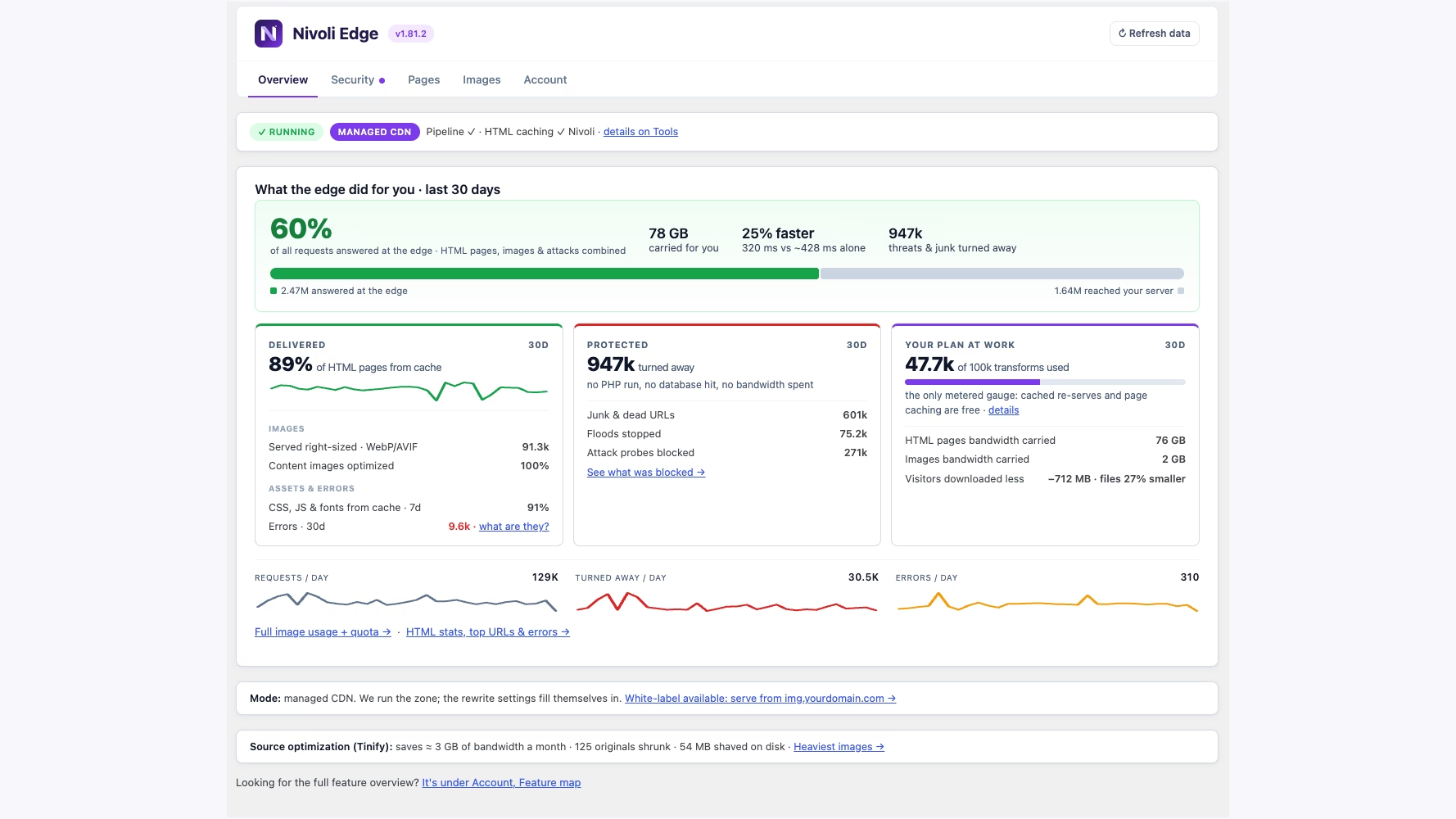
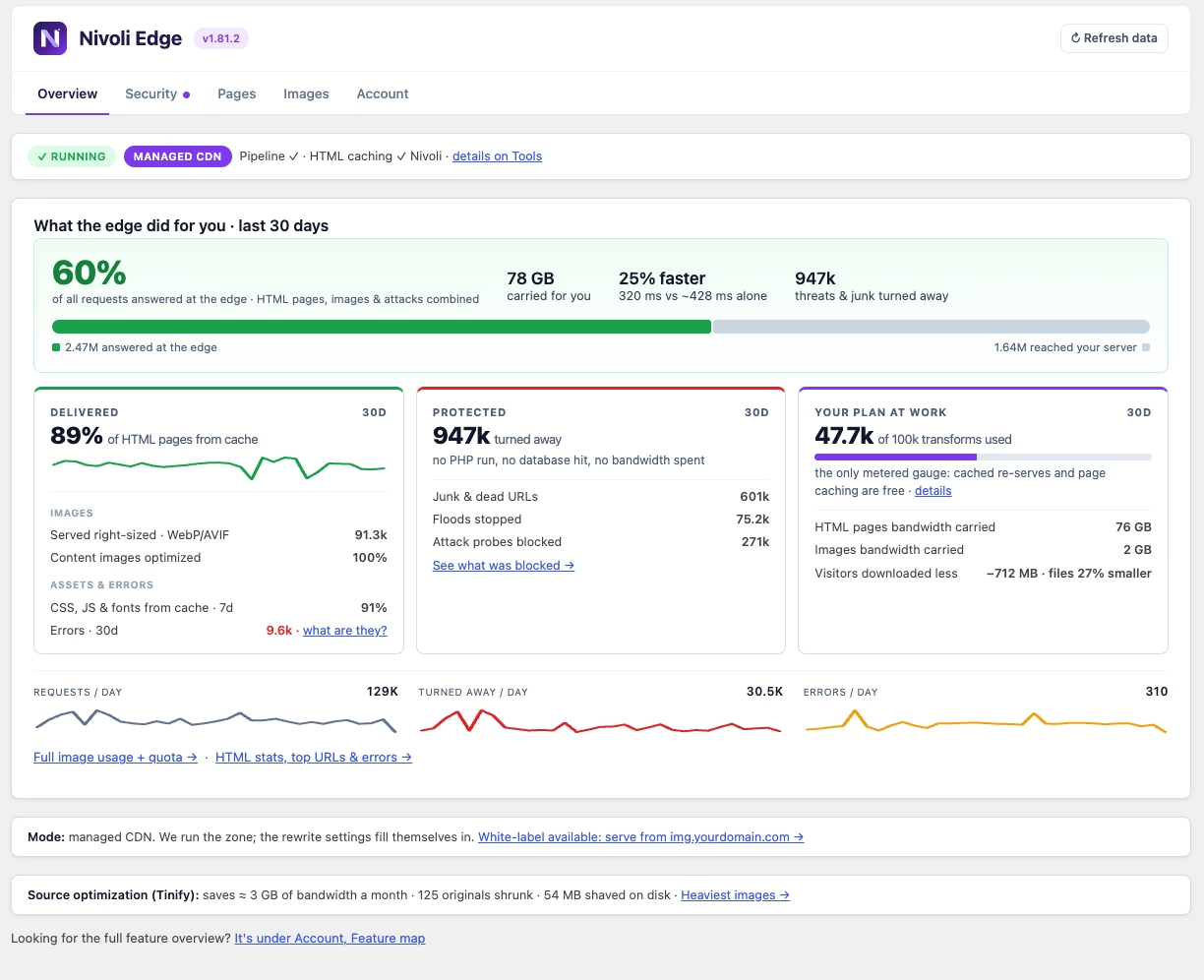
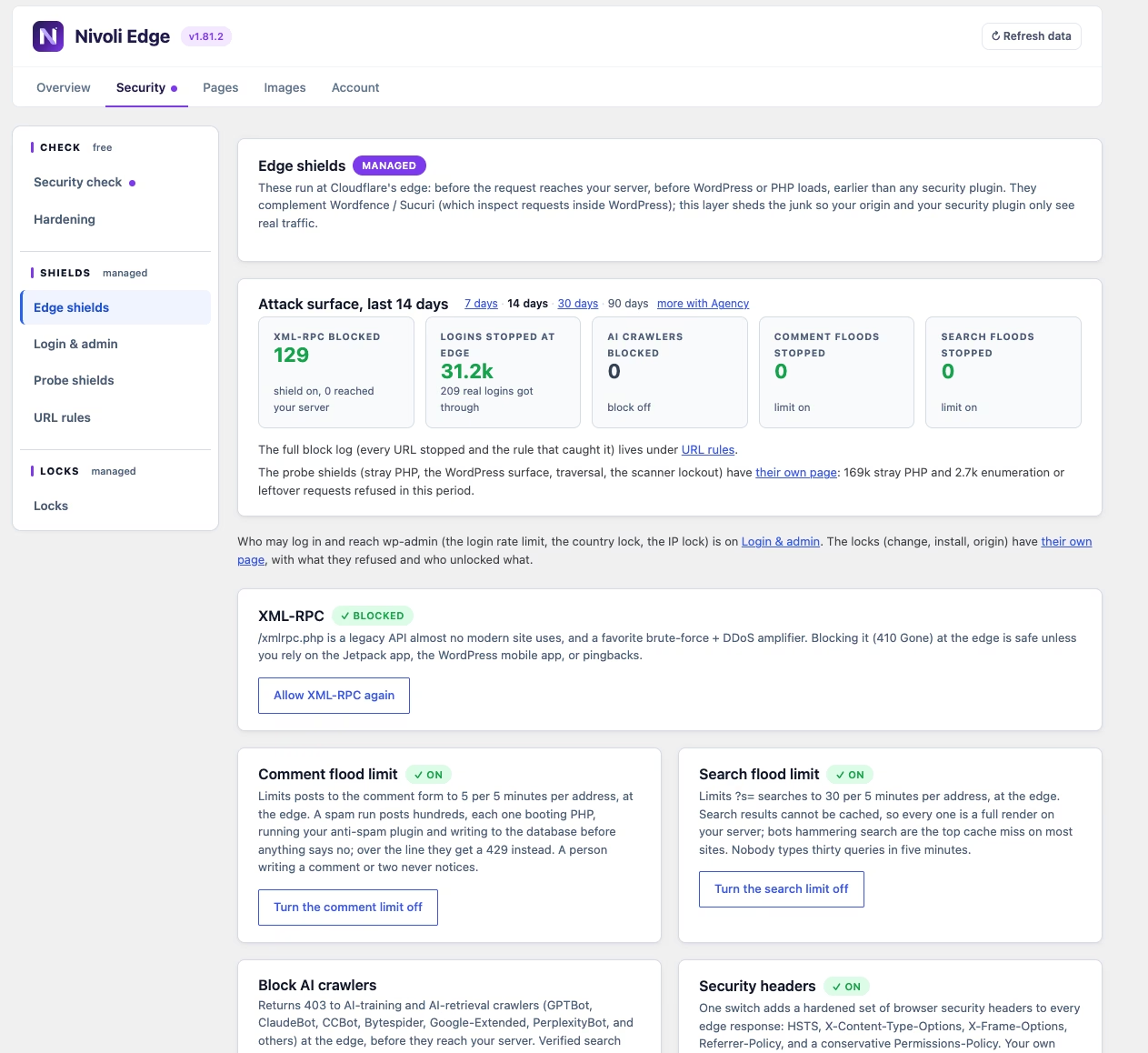
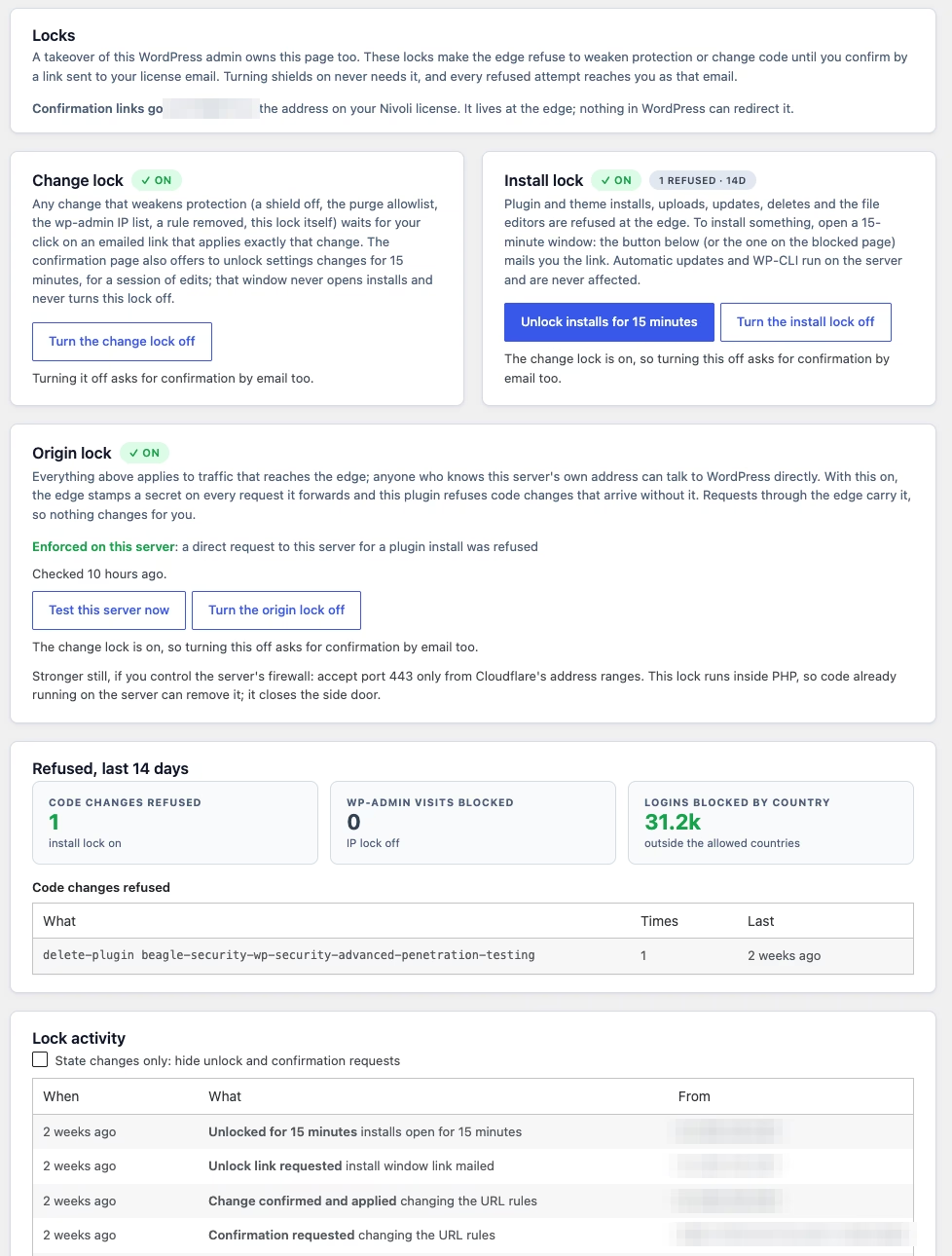
This is desk research, not a penetration test or a hosting benchmark. I read the current official product page, documentation, pricing and console pricing, July 5 terms and privacy policy, the WordPress.org listing and changelog, the Product Hunt launch and a third-party WAFPlanet page. I inspected the genuine Overview, Edge shields and Locks screenshots linked on the official product page. The displayed figures are the vendor’s examples from its own site, not measurements taken by AppsInsight. Screenshots visibly show version 1.81.2; the current WordPress.org listing is 1.81.3.
No plugin was installed, no security setting was changed, no origin firewall or DNS record was edited, no key or token was entered, and no account, trial or subscription was started. I did not send traffic, attempt a bypass, scan a site, test email delivery, measure an outage, inspect source code or verify the company’s registration independently. Compatibility, failure modes, performance and security efficacy remain untested. That distinction matters more for a security product than a polished dashboard does.
A free local plugin and a paid independent layer
The current pricing page makes the boundary clear: everything that runs on your server is free, without an account. This includes a security check, hardening switches, image URL rewriting through your own suitable Cloudflare infrastructure, page-cache tag headers and surgical purge to an existing Fastly, Cloudflare Enterprise or custom webhook backend, coverage audits, prewarming, failure alerts, fake-image repair and WP-CLI tools. Optional Tinify compression uses your own key. Free software does not make those external providers free.
The managed service adds the parts outside WordPress: twelve shields, three locks, full-page edge caching, origin shielding, URL rules and edge-measured reporting. The service runs on Cloudflare infrastructure managed by Nivoli. The managed quickstart advertises no customer Cloudflare account or DNS work: install the plugin, add the emailed license key, then enter the welcome-email dashboard URL for page caching. I did not verify provisioning on a real host. The free self-hosted route is a different setup and does need your own compatible infrastructure, permissions and configuration.
Requirements on the current official sources are WordPress 6.2 or later and PHP 7.4 or later; WordPress.org says tested up to 7.1.2. These are listing claims, not a recommendation to remain on an old unsupported PHP release. WordPress.org reports fewer than ten active installations and no reviews at inspection. That is a small public evidence base, not proof of poor quality or a complete count of customers. The GPL license covers plugin code; it does not make the hosted service self-hostable or grant rights to Nivoli branding.
The shields stop specific traffic, not every compromise
Current pricing and docs include all twelve shields on every managed plan. They cover login, comment and search floods; XML-RPC; login country restrictions; wp-admin IP restrictions; AI crawlers; stray PHP; WordPress enumeration and leftover files; traversal; scanner lockout; and security headers. Some controls have monitor modes that can reveal likely breakage before blocking. Access to a control is not the same as every control being enabled: the vendor’s screenshot, for example, shows the AI-crawler block off.
The documented login limit is ten attempts per ten minutes per IP. Comment posts are limited to five per five minutes, search requests to thirty per five minutes. XML-RPC returns a cached 410 when blocked. Scanner lockout follows five qualifying refusals in ten minutes, then refuses subsequent traffic from the address for ten minutes, with exceptions described for logged-in sessions and verified bots. The headers pack deliberately does not add Content-Security-Policy, and existing origin header values take precedence. These are defined behaviors, not a published guarantee of detection or absence of false positives.
Nivoli also says its managed Cloudflare zones enable managed WAF rulesets, including a WordPress ruleset, and use Cloudflare’s network protection. I have not verified a tenant configuration, ruleset entitlement or the scope of virtual patches. I would not translate that claim into coverage of every vulnerability. A vulnerable plugin can still receive a seemingly normal request, and a legitimate-looking authenticated action is not automatically a flood or a scanner.
Compatibility requires attention. XML-RPC blocking can affect Jetpack, mobile clients or pingbacks. Login-country and admin-IP restrictions need a reachable fallback, particularly for changing addresses and travelling administrators. admin-ajax.php remains open in the documented admin lock. Those exceptions are useful operational detail, not defects in themselves. A blanket statement that every WordPress endpoint is protected identically would be wrong.
The owner email is a security boundary
The change lock requires confirmation before weakening protected settings. The license holder receives a link for the exact pending change; the docs say it applies once within thirty minutes. Enabling stronger protection does not need that step. The confirmation address lives at the edge rather than being an editable WordPress setting, so changing an address inside the site cannot redirect approval. Console sessions are not gated by the same mechanism because signing in already verifies that address.
The install lock blocks the documented admin and REST code-change routes until the owner opens a fifteen-minute window by email. Installs, uploads, updates, deletes and file-editor actions are listed, with a refusal page and named actions in the Locks activity log. The window can be closed early. Server-side automatic updates through wp-cron and WP-CLI do not pass through the edge and are explicitly unaffected. It is therefore inaccurate to call this a freeze on every possible code change.
That design turns the license mailbox into something consequential. It needs strong authentication, a recoverable owner and an agency handoff policy. An unavailable inbox can delay maintenance; a compromised inbox or authenticated console can undermine the intended independent approval boundary. I did not verify mailbox MFA requirements, account recovery, confirmation-link replay defenses or delivery reliability. Treat those as questions for a deployment review, not assumptions filled by the words ‘owner-confirmed’.
The origin side door is the caveat to read first
Every edge control applies to traffic reaching the edge. A known origin IP, hosting-panel hostname, unregistered www or apex twin, or staging virtual host sharing the same document root may provide a different route. The docs identify an origin lock introduced in plugin 1.56.0: the edge adds a per-site secret to forwarded requests, and the plugin refuses specified code-change paths lacking it. A weekly self-test reports whether the origin actually enforces the check. The secret is not placed in a URL.
This origin lock runs inside PHP, unlike the edge shields and install lock. The vendor explicitly says server-side code execution can remove the plugin. Its documentation also discusses an origin firewall accepting Cloudflare ranges and Authenticated Origin Pulls as additional protections. Those controls need host-specific validation. I have not configured or tested any of them, and would not claim that one plugin toggle closes every direct-origin path.
The right reading is containment of some follow-on actions through WordPress tooling, not recovery from an owned server. Clean backups, patching, credential review and incident response still matter. The docs say restoring from a clean backup remains the answer to existing server compromise. The product-page phrase that an intruder is ‘stuck’ is too broad to use as an editorial guarantee. The more specific documentation is the basis of this review.
Caching is most useful where the audience is public
Nivoli attaches tags for the posts, categories, authors and other content that built a cacheable page. A content change can then purge only the affected tags instead of emptying the entire cache. That is a useful approach for a publishing site where repeated full purges make an otherwise effective cache cold. Per-path duration, query-parameter controls, versioned static assets and a Recent 404s inbox provide practical maintenance tools around it.
Origin Shield serves a last good cached public copy when the origin errors or goes down, for up to one day on Shield and seven days on Shield Plus and Agency. It cannot serve a page that was never cached, and it is not a full backup or an uptime SLA. Logged-in member pages are not cached and get no edge-cache time-to-first-byte benefit or cached outage coverage. The vendor also bypasses cart, checkout and account pages and sessions carrying WooCommerce cart or session cookies. These are appropriate safety boundaries, but they reduce the fit for heavily authenticated LMS, membership and forum workloads.
Custom carts, membership cookies and unusual dynamic plugins still deserve staging tests. A documented WooCommerce default is not proof that every custom personalization scheme is recognized. Nivoli does not claim per-user cache buckets or edge-side includes. Keeping personalized responses private is more important than maximizing the hit-rate percentage.
Its render-optimizer boundary is equally useful. Nivoli does not provide critical CSS, unused-CSS removal, script deferral, font handling or minification. WP Rocket, FlyingPress and similar tools address a different part of page delivery. Vendor statements that the tools complement one another are not a tested universal compatibility list. Cloudflare, Fastly and Tinify are documented service connections; Stripe handles the product’s billing and should not be advertised as a payment integration for customers’ own sites.
Images are a separate bill, except for the Agency allowance
Managed Images creates right-sized WebP and AVIF variants at the edge. A variant is a unique image size and format in a rolling thirty-day window, not each cached image request. Blocks stack and attach to an active managed license. The listed monthly blocks are 10,000 variants for €6, 30,000 for €15 and 100,000 for €39. Shield and Shield Plus need an add-on for managed transformation; Agency includes 100,000 pooled variants.
Without the add-on, images continue from the origin unchanged. If the allowance is exhausted, the terms say new optimized variants fall back to original files rather than disappearing; notices are sent at eighty and one hundred percent. The public evidence does not demonstrate the behavior under a real failure. Fallback also depends on a working origin. It should not be read as a guarantee that pages stay online when both the origin and necessary edge infrastructure fail.
The source-image tools are a separate consideration. Optional Tinify compression sends chosen images to that provider, while audits and image-repair tools can help find oversized uploads or failures. No image was compressed or restored in this review. I would inspect backups and recovery options before source changes on a live media library.
Pricing: current launch prices, with older legal wording left visible
On October 1 both the public pricing page and console pricing showed Shield at €9 a month, Shield Plus at €19 and Agency at €99. Annual totals are €99, €209 and €1,089 respectively, described as twelve months for the price of eleven. The displayed monthly equivalents of €8.25, €17.42 and €90.75 are not monthly billing. VAT is handled at checkout and these are launch prices that may change. No checkout total or regional tax was tested.
Shield covers one site, 500,000 monthly pageviews, one hundred URL rules, seven days of analytics and monthly reports. Shield Plus covers one site, three million pageviews, five hundred rules, thirty days of analytics and weekly reports. Agency covers ten sites, fifteen million pooled pageviews, one thousand rules, ninety days of analytics, weekly reports, a fleet console, white-label reports and priority support. Every managed tier includes the same stated shield and lock access.
The pageview allowance is a soft cap, not unlimited usage. If a site remains above one hundred fifty percent for two monthly checks, HTML caching goes to pass-through until an upgrade. Pricing says shields and locks do not pause under that pageview policy. That statement is narrower than an assurance of continued security through every termination, nonpayment or outage. The terms allow suspension for abuse or nonpayment, and managed protections should not be treated as a permanent entitlement after cancellation.
Each managed plan advertises a fourteen-day trial requiring a card. Billing begins automatically afterward; cancelling before the trial ends costs nothing. A separate Managed Images subscription can be cancelled to the end of its paid period. Payment, VAT and refund mechanics are handled by Stripe’s merchant-of-record offering, sold through Link. The terms defer payment/refund mechanics to those sale terms, including applicable EU consumer rights; they do not establish an unconditional vendor money-back promise.
There is a material documentation mismatch. The July 5 terms still say subscriptions renew monthly and contain a self-hosted Pro license section, whereas current pricing offers annual plans and says every local plugin feature is free. Older homepage and third-party descriptions also have fewer shields, older Starter/Growth prices and plan-gated protection. I use the current specific product, docs and pricing for the feature and plan fields, but would ask the vendor to reconcile billing and any legacy license entitlement before purchase. An older mirror is not the current price sheet.
Privacy: cookieless does not mean nothing is processed
The privacy policy describes customer email, license keys, site hostname and origin configuration, activation metadata, billing reference IDs and email-delivery state. Per-request metadata includes URL path, status, cache outcome, response size, image format and bot/browser classification, stored in Cloudflare Analytics Engine for up to ninety days and used in aggregate. It says no cookies, fingerprinting or visitor profiles, and transient Cloudflare IP processing for routing rather than visitor IP storage by Nivoli.
The Locks documentation and vendor UI also show requesting addresses in approval and activity records. State changes are kept up to two hundred entries, with requests retained for ninety days; this deserves clarification alongside the privacy summary’s broader IP statement. I have not resolved whether those administrative-event addresses are handled differently from visitor analytics, so I would not describe the whole product as collecting no IP addresses.
Cloudflare supplies infrastructure, Stripe handles payments, SendGrid delivers transactional emails and Tinify receives selected files if enabled. A DPA is available on request. Customer and tenant data are described as deleted within thirty days after a managed plan ends, while billing references follow statutory retention and edge copies expire under cache rules. The policy names international transfer mechanisms, but no signed DPA, regional residency option, certification or independent security audit was verified.
The documentation’s claim that no consent banner is needed is the vendor’s position, not legal advice for every jurisdiction or site’s other tools. Keep analytics, caching and transactional-email processing in the site’s own assessment. A free core that does not phone home is also distinct from enabled external services, license validation and optional file compression.
Evidence, support and the editorial score
Nivoli is a trading name of a Dutch BV according to its terms, with a registered address in Woerden and KvK number 82568650. The legal entity’s formal name, founder identity, founding year and team size were not independently established. Support is support@nivoli.com; Agency’s one-business-day first-response target is explicitly not a guarantee. No plan carries an uptime SLA.
The inspected third-party WAFPlanet page describes older prices and fewer shields and exposes ratings without enough observed methodology to treat them as a security benchmark. Product Hunt launch information is useful discovery context, not proof of protection or customer outcomes. WordPress.org’s current version, requirements, changelog and small installation count are better grounding for distribution facts. None replaces a deployment test.
I assign a provisional 3.7/5. Product quality gets 7/10 for a coherent documented split between local and edge controls; ease gets 3/5 because approval, origin and dynamic-cache boundaries require operational care; feature depth gets 4/5; innovation gets 4/5 for an independent approval boundary; value gets 3/3 given the low entry price but separate image allowance and no SLA; confidence gets 1/2 because this is desk research with very limited public usage evidence. Those inputs total 22/30. This is an editorial judgment, not a security certification or a customer-rating average.
My verdict
Nivoli Edge is most interesting when treated as one layer in a maintained WordPress stack. Public-page caching and owner-confirmed edge settings address real operational problems. The docs’ direct-origin and server-compromise caveats deserve as much attention as the refusal counters. I would shortlist it for a public content site or a small agency fleet, keep existing backups and endpoint protection, and verify the approval mailbox, host routing, cache exclusions and cancellation behavior before relying on it.
I would not select it primarily to speed authenticated member pages, to replace incident response, or to satisfy an enterprise SLA or compliance requirement. Current pricing is attractive enough to justify a careful trial, but the card requirement and older legal wording are reasons to read the sale terms first. The product earns interest for its architecture. Trust has to be earned on the deployment.
Sources and media
Official product and genuine UI screenshots; current documentation and operating boundaries; public pricing; console pricing; July 5 terms; July 5 privacy policy; WordPress.org distribution and changelog; Product Hunt discovery context; older third-party description, not current pricing or tested evidence. Logo is the official site’s inline favicon rendered as PNG. Hero uses the complete vendor Overview screenshot with a neutral border; gallery uses distinct official Overview, Edge shields and Locks views. No Product Hunt or WordPress.org media was copied.
Who it's for
Best for
- Public-facing WordPress publishers; site owners maintaining a secure license mailbox; agencies with up to ten sites needing pooled reports; teams willing to validate origin routing and cache exclusions
Not ideal for
- Mostly logged-in LMS or membership performance; malware cleanup or backup replacement; enterprise uptime guarantees; teams unable to secure approval email; non-WordPress sites
How we tested
Ashley Richmond desk research, October 1, 2026: official product, docs, public and console pricing, July 5 terms and privacy; WordPress.org requirements and changelog; Product Hunt discovery and older WAFPlanet description. Inspected genuine official Overview, Edge shields and Locks screenshots showing 1.81.2. Official favicon rendered as PNG. No install, account, trial, card, key, token, DNS, firewall or shield changes; no scan, bypass, benchmark, outage, code, network or security audit, or independent company verification. Counters are vendor examples, not our results. Current versus legacy billing and administrative-IP privacy caveats preserved.
What's new
Current WordPress.org version 1.81.3 refreshes screenshots for the five-tab admin, including Overview, Edge shields, Locks, Security check, Probe shields, Stats, Heaviest images and Static assets; adds Hardening and Broken images views. Version 1.81.2 improves activity-log pagination and state filters. Current docs describe twelve shields and three locks; older homepages and mirrors differ. Official screenshots show 1.81.2.
At a glance
| Pricing | Free+Paid |
|---|---|
| Free plan | Yes |
| Free trial | Yes (14 days) |
| Pricing page | View pricing |
| Platforms | Web app, Self-hosted / On-premise, WordPress plugin |
| API | No |
| Company | Nivoli (trading name of a Dutch BV; KvK 82568650) |
| Apps Insight Score | 42/100 |
| Implementation | Medium |
| Learning curve | Intermediate |
Why this app scored 42/100
Editorial Review 22/30
- Product quality 7/10 7/10
- Ease of use 3/5 3/5
- Feature depth 4/5 4/5
- Innovation 4/5 4/5
- Value for money 3/3 3/3
- Recommendation confidence 1/2 1/2
Trust & Verification 7/25
- AppsInsight badge installed Badge not installed 0/15
- HTTPS website HTTPS 1/1
- Business support email Provided 1/1
- Privacy policy published Provided 2/2
- Terms of service published Provided 1/1
- Security certifications None listed 0/2
- Knowledge base / help center Provided 2/2
- Social profiles linked 0 profiles linked 0/1
Community 0/20
- Verified reviews & rating 0 reviews (5 needed) 0/15
- Recent reviews No reviews yet 0/5
Product Profile 10/20
- Detailed description 2977 words 3/3
- Screenshots 3 screenshots 1/3
- Demo video No demo video 0/2
- FAQ 6 items 1/2
- Feature list 8 items 1/2
- Pricing published Plan tiers published 3/3
- Pros & cons Pros & cons listed 1/1
- Integrations 0 integrations 0/2
- API available No 0/1
- Company details 2 of 3 details filled 0/1
Freshness 3/5
- Listing recently updated Updated 0 days ago 3/3
- Recent changelog entry No changelog entries 0/2
Editorial points are assigned by AppsInsight editors and cannot be purchased or influenced.
Built for
Use case
Development & DevOps
Use case
Security & compliance
How Nivoli Edge compares
| Feature | Nivoli Edge | iFixAi |
|---|---|---|
| Rating | 3.7 / 5 | 3.8 / 5 |
| Pricing | Free+Paid | Free+Paid |
| Starting price | — | — |
| Free plan | Included | Included |
| Free trial | Yes (14 days) | No |
| Platforms | Web app, Self-hosted / On-premise, WordPress plugin | — |
| Best for | Public-facing WordPress publishers; site owners maintaining a secure license mailbox; agencies with up to ten sites needing pooled reports; teams willing to validate origin routing and cache exclusions | Teams deploying AI agents with real authority over money, data or customers, engineering leads who need audit evidence they can defend, and enterprises that want agent governance without building an eval harness. |
Key features
Twelve managed edge shields
WordPress-specific flood limits, XML-RPC, country and admin-IP controls, AI crawlers, probe, surface, traversal and scanner refusals, plus headers. All managed tiers; enabled state varies. No efficacy test.
Owner-confirmed change lock
Weakening covered settings needs a one-time emailed confirmation for an exact change within thirty minutes. Address held at edge; authenticated-console exception documented. Mailbox security and recovery untested.
Fifteen-minute install window
Admin and REST plugin, theme and code-change routes refused until the license owner opens a fifteen-minute window by email. Automatic wp-cron updates and WP-CLI unaffected. Not all server code frozen.
Origin code-change lock
Per-site forwarded secret checked inside PHP for specified code-change routes, with weekly self-test. Direct-origin security still needs host validation; existing server code execution can remove the plugin.
Tagged full-page caching
Post, category and author tags support selective purge and path, query and cache controls. Public cacheable pages only; logged-in and cart, checkout and account sessions bypass. Custom personalization untested.
Cached origin outage coverage
Previously cached public copies available up to one day on Shield, seven days on Plus and Agency. Origin incident alerts and history. Not a whole-site backup, logged-in coverage or uptime SLA.
Edge insight and fleet reporting
Audience, cache, refusal, top URL, 404 and static-asset panes; redirect and block suggestions. Plan-specific history; Agency ten sites, fleet and white-label reports. Vendor counters not independently measured.
Free local tools and optional images
Local security check, hardening, audits, prewarming, repair and WP-CLI free. Own Cloudflare, Fastly, webhook and Tinify costs and configuration separate. Managed WebP/AVIF add-on, except Agency includes 100k variants.
Key benefits
- Reduce qualifying junk requests before WordPress boots PHP.
- Keep covered weakening changes outside the authority of an ordinary compromised WordPress admin.
- Keep public cache pages warm through selective purge and some origin failures.
- See refusals and cache behavior in WordPress admin or agency reports.
Pricing
Free+Paid14-day trial
Free local GPL plugin
0 /mo
- Local security check and hardening
- Own-infrastructure image and cache tools
- No account required
- External provider costs and configuration separate
- No managed shields or hosted page cache
Shield - EUR; annual total EUR99
€9 /mo
€99 billed annually
- One site
- 500k monthly pageviews soft cap
- 100 URL rules
- One-day cached Origin Shield
- Seven-day analytics
- Monthly reports
- Twelve shields and three locks
- Managed Images separate
- 14-day card-required auto-renewing trial
- VAT at checkout
Shield Plus - EUR; annual total EUR209
€19 /mo
€209 billed annually
- One site
- 3M monthly pageviews soft cap
- 500 URL rules
- Seven-day cached Origin Shield
- Thirty-day analytics
- Weekly reports
- Same shields and locks
- Managed Images separate
- 14-day card-required trial
- VAT at checkout
Agency - EUR; annual total EUR1089
€99 /mo
€1089 billed annually
- Ten sites
- 15M pooled monthly pageviews soft cap
- 1000 URL rules
- Seven-day cached Origin Shield
- Ninety-day analytics
- Weekly reports
- Fleet console and white-label reports
- 100k pooled image variants
- Priority support target not SLA
- VAT at checkout
Managed Images add-on - EUR6 / EUR15 / EUR39 monthly
- 10k / 30k / 100k unique size-format variants per rolling thirty days
- Separate subscription tied to active managed plan
- Blocks stack
- Agency includes 100k pooled
- Without add-on originals serve unchanged
- Exhaustion falls back to originals
- VAT at checkout
Pros & Cons
Pros
- Independent owner-email boundary with explicit direct-origin caveats
- Same stated shield and lock access on all managed tiers
- Free local GPL toolbox without account and low managed entry price
- Public-page cache visibility and pooled agency reporting
Cons
- No security or outage test; fewer than ten WordPress.org installations and no reviews
- Direct-origin and server code-execution risks; strong approval-mailbox dependency
- Logged-in and personalized pages miss caching and outage benefit; no SLA
- Older Pro and monthly-only legal wording and administrative-IP privacy ambiguity need clarification
Screenshots & media
Nivoli Edge alternatives
View all alternatives
More Cybersecurity apps
User reviews
No reviews yet. Be the first to review this app.
Write a review
Already have an account? Log in to track your reviews.
Frequently asked questions
Does Nivoli Edge replace security plugins or clean malware?
No. Managed shields refuse specific traffic before PHP, and owner-email locks cover specific settings and code routes. Docs describe them as complementary to Wordfence and Sucuri. Existing server code execution can remove the local origin lock. Clean backups, patching and incident response remain necessary. No efficacy or penetration test here.
What needs to run through the edge, and can the origin bypass it?
Edge protection depends on traffic reaching the edge. Origin IP, alternate hostname and staging routes may bypass it. The local origin-secret check covers specified code-change paths and has a weekly self-test; server code execution can remove the plugin. Docs discuss a Cloudflare-only origin firewall and Authenticated Origin Pulls. Host-specific enforcement was not tested.
How do the locks affect updates and administrators?
Weakening covered protection requires exact-change confirmation by license email within thirty minutes. Install lock opens a fifteen-minute window by email for documented admin and REST code-change routes. Automatic wp-cron updates and WP-CLI are unaffected; email-authenticated console sessions are exempt from change confirmation. Secure and maintain access to the license mailbox. Delivery, replay defenses and recovery were not tested.
Does caching cover a membership site or guarantee uptime?
Public cacheable pages are covered; logged-in member pages and WooCommerce cart, checkout and account sessions bypass caching. Cached Origin Shield lasts one day on Shield, seven days on Plus and Agency, for previously cached copies only. No per-user cache, enterprise SLA or full backup. Custom dynamic cookies and host routing need staging validation.
What is free, and what does the trial cost?
Local GPL plugin is free without an account; your Cloudflare, Fastly and Tinify infrastructure costs are separate. Current monthly prices: EUR9 Shield, EUR19 Plus, EUR99 Agency. Annual totals: EUR99, EUR209, EUR1089 before checkout VAT. All managed tiers include twelve shields and three locks. Fourteen-day trial requires a card and auto-renews. Managed Images costs EUR6, EUR15 or EUR39 for 10k, 30k or 100k variants; Agency includes 100k pooled. July terms still have monthly-only and Pro wording. Clarify before buying.
What data, cancellation and support limits should I check?
Policy records account and site configuration, billing references and aggregate request metadata for up to ninety days; it says cookieless, no visitor profiles and transient Cloudflare IP handling. Locks record requesting addresses, which deserves clarification. DPA available on request; Cloudflare, Stripe, SendGrid and optional Tinify process data. Managed tenant data deletion within thirty days after the plan ends; billing references follow legal retention. Cancel to end of paid period; refunded keys revoked. No SLA; Agency first-response target one business day only. support@nivoli.com.